1. วัตถุประสงค์#
การพัฒนา backend สมัยใหม่ไม่ใช่แค่การเขียนโค้ดด้วยมืออีกต่อไป วันนี้เราสามารถ:
- ใช้ AI สร้าง RESTful endpoints ที่สมบูรณ์
- เชื่อมต่อกับ MySQL หรือ TiDB ที่ขยายได้
- Deploy ไปยัง serverless infrastructure (Vercel) ทันที
ในบทความนี้ เราจะสร้าง E-Commerce REST API ที่พร้อมใช้งานจริงโดยใช้:
- Express.js
- mysql2/promise (ไม่ใช้ ORM)
- MySQL หรือ TiDB
- Endpoints ที่สร้างด้วย AI
- Vercel deployment
2. โครงสร้างโปรเจกต์#
rest-api-deploy/
├── db.js
├── index.js
├── schema.sql
├── seed.sql
├── package.json
├── .env
└── routes/
    ├── customers.js
    ├── products.js
└── orders.js3. ใช้ AI สร้าง RESTful Endpoints#
แทนที่จะเขียน routes ทั้งหมดด้วยมือ เราจะกำหนด specification ของ API ที่ชัดเจน และให้ AI สร้าง implementation
ตัวอย่าง AI Prompt#
Generate a RESTful API using Express + mysql2/promise for MySQL/TiDB.

Project structure: db.js, index.js, routes/*.js, schema.sql, seed.sql

Resources:
1. customers (id, name, email, created_at)
2. products (id, name, price, stock, created_at)
3. orders (id, customer_id, total, status, created_at)
4. order_items (id, order_id, product_id, quantity, price)

Requirements:
- Parameterized queries only
- Use transactions for order creation
- Return JSON only
- Use proper HTTP status codes
- No ORM
- Enable CORS
- Deploy to Vercel (serverless)

Also generate:
1. Complete setup instructions (mkdir, npm init, npm install)
2. schema.sql and seed.sql with test data
3. Local testing commandsด้วย prompt นี้ AI จะสร้าง API ที่สมบูรณ์พร้อมใช้งานจริง พร้อม error handling, transactions และ deployment configuration ที่เหมาะสม
4. การตั้งค่าโปรเจกต์#
Step 1 — สร้างโปรเจกต์#
mkdir rest-api-deploy
cd rest-api-deploy
npm init -y
code .คำสั่ง code . จะเปิดโปรเจกต์ใน VS Code (ถ้าติดตั้งไว้)
Step 2 — ติดตั้ง Dependencies#
npm install express mysql2 cors dotenvStep 3 — สร้าง .env#
DB_HOST=localhost
DB_USERNAME=root
DB_PASSWORD=
DB_DATABASE=rest_api
DB_PORT=3306สำหรับ TiDB Cloud ให้ใช้ connection credentials ที่ได้รับและตั้งค่า DB_SSL=true
5. การเชื่อมต่อฐานข้อมูล (db.js)#
// db.js
const mysql = require("mysql2/promise");
require("dotenv").config();

const pool = mysql.createPool({
  host: process.env.DB_HOST,
  user: process.env.DB_USERNAME,
  password: process.env.DB_PASSWORD,
  database: process.env.DB_DATABASE,
  port: process.env.DB_PORT,
  waitForConnections: true,
  connectionLimit: 10,
  ssl: process.env.DB_SSL === "true" ? { rejectUnauthorized: true } : undefined
});

module.exports = pool;6. ตั้งค่า TiDB Serverless#
TiDB เป็น distributed database ที่เข้ากันได้กับ MySQL สามารถใช้ TiDB Serverless บน Cloud แทน MySQL ในเครื่องเราได้
สร้าง TiDB Serverless Cluster#
- ไปที่ https://tidbcloud.com ↗ และสมัครสมาชิก
- คลิก Create Cluster → TiDB Serverless
- เลือก region ที่ใกล้ที่สุด
- รอให้ cluster ถูกสร้าง (โดยปกติใช้เวลา 1-2 นาที)
สร้างฐานข้อมูล#
- ไปที่ TiDB Cloud cluster dashboard
- คลิก Chat หรือ SQL Editor ที่แผงด้านซ้าย
- รัน SQL ต่อไปนี้เพื่อสร้างฐานข้อมูล:
CREATE DATABASE rest_api;รับ Connection Details#
- คลิก Overview บน cluster
- คลิกปุ่ม Connect
- เลือก Connect with .env
- สร้าง password (บันทึกอย่างปลอดภัย)
- คัดลอก connection details:
DB_HOST=gateway01.ap-southeast-1.prod.aws.tidbcloud.com
DB_PORT=4000
DB_USERNAME=xxx.root
DB_PASSWORD=xxx
DB_DATABASE=rest_api
DB_SSL=trueอัปเดต .env สำหรับ TiDB#
แทนที่ไฟล์ .env ด้วย TiDB credentials:
DB_HOST=your-tidb-host
DB_PORT=4000
DB_USERNAME=your-tidb-user
DB_PASSWORD=your-tidb-password
DB_DATABASE=rest_api
DB_SSL=trueหมายเหตุ: TiDB ใช้ port 4000 และต้องการ SSL (DB_SSL=true)
7. Database Schema (schema.sql)#
สร้างไฟล์ชื่อ schema.sql พร้อมเนื้อหาต่อไปนี้:
-- Create Tables
USE rest_api;

CREATE TABLE customers (
  id INT AUTO_INCREMENT PRIMARY KEY,
  name VARCHAR(100) NOT NULL,
  email VARCHAR(100) UNIQUE NOT NULL,
  created_at TIMESTAMP DEFAULT CURRENT_TIMESTAMP
);

CREATE TABLE products (
  id INT AUTO_INCREMENT PRIMARY KEY,
  name VARCHAR(100) NOT NULL,
  price DECIMAL(10,2) NOT NULL,
  stock INT NOT NULL,
  created_at TIMESTAMP DEFAULT CURRENT_TIMESTAMP
);

CREATE TABLE orders (
  id INT AUTO_INCREMENT PRIMARY KEY,
  customer_id INT NOT NULL,
  total DECIMAL(10,2) NOT NULL,
  status VARCHAR(50) DEFAULT 'pending',
  created_at TIMESTAMP DEFAULT CURRENT_TIMESTAMP,
  FOREIGN KEY (customer_id) REFERENCES customers(id)
);

CREATE TABLE order_items (
  id INT AUTO_INCREMENT PRIMARY KEY,
  order_id INT NOT NULL,
  product_id INT NOT NULL,
  quantity INT NOT NULL,
  price DECIMAL(10,2) NOT NULL,
  FOREIGN KEY (order_id) REFERENCES orders(id),
  FOREIGN KEY (product_id) REFERENCES products(id)
);รัน Schema SQL#
รันสคริปต์นี้เพื่อสร้างฐานข้อมูลและตาราง:
TiDB Serverless:
- ไปที่ TiDB Cloud cluster
- คลิก Chat หรือ SQL Editor
- คัดลอกและวาง SQL script
- เลือก (highlight) SQL script ทั้งหมด
- คลิก Run เพื่อ execute
8. Seed Data (seed.sql)#
สร้างไฟล์ชื่อ seed.sql พร้อมเนื้อหาต่อไปนี้:
USE rest_api;

INSERT INTO customers (name, email) VALUES
('Karn Yong', 'karnyong@example.com'),
('Bob Smith', 'bob@example.com');

INSERT INTO products (name, price, stock) VALUES
('Laptop', 1200.00, 10),
('Phone', 800.00, 15),
('Headphones', 150.00, 25);รัน Seed Data#
รันสคริปต์นี้หลังจากสร้าง database schema เพื่อเพิ่มข้อมูลทดสอบ:
TiDB Serverless:
- ไปที่ TiDB Cloud cluster
- คลิก Chat หรือ SQL Editor
- เลือกฐานข้อมูล
rest_api - คัดลอกและวาง seed SQL script
- เลือก (highlight) SQL script ทั้งหมด
- คลิก Run เพื่อ execute
ทดสอบผลลัพธ์#
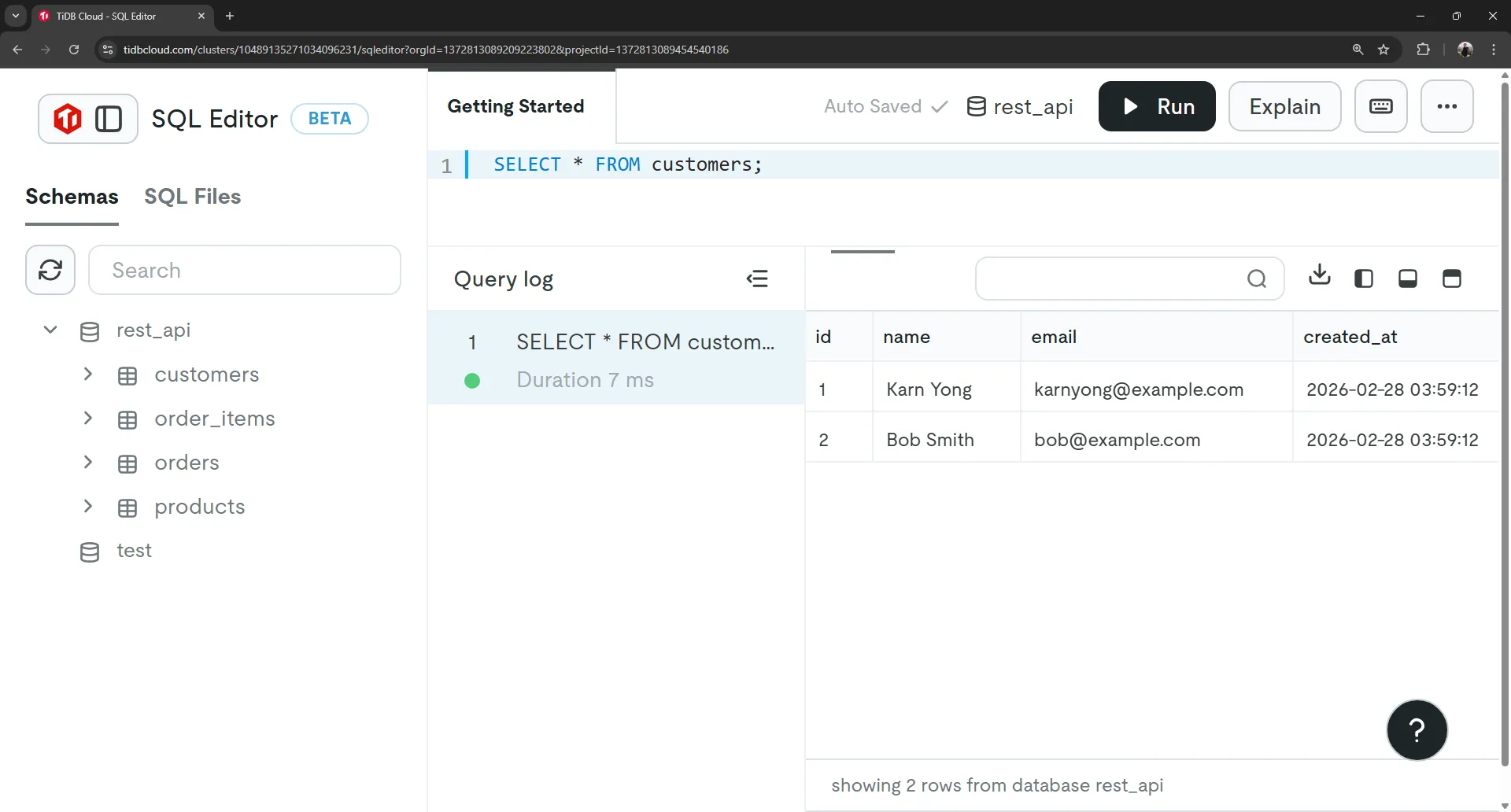
ตรวจสอบว่าข้อมูลถูก insert อย่างถูกต้องโดยรันคำสั่ง SELECT เหล่านี้ใน SQL Editor:
-- Check customers
SELECT * FROM customers;

-- Check products
SELECT * FROM products;ควรจะเห็น:
- 2 ลูกค้า: Karn Yong และ Bob Smith
- 3 สินค้า: Laptop, Phone, และ Headphones
9. Main Entry Point (index.js)#
// index.js
const express = require("express");
const cors = require("cors");

const customersRoutes = require("./routes/customers");
const productsRoutes = require("./routes/products");
const ordersRoutes = require("./routes/orders");

const app = express();

// Middleware
app.use(cors());
app.use(express.json());

// Routes
app.use("/api/customers", customersRoutes);
app.use("/api/products", productsRoutes);
app.use("/api/orders", ordersRoutes);

// 404 handler
app.use((req, res) => {
  res.status(404).json({ error: "Not Found" });
});

// Export for Vercel
module.exports = app;

// Start server only in development
if (process.env.NODE_ENV !== "production") {
  const PORT = process.env.PORT || 3333;
  app.listen(PORT, () => {
    console.log(`Server running on port ${PORT}`);
  });
}10. Customers API (routes/customers.js)#
// routes/customers.js
const express = require("express");
const router = express.Router();
const db = require("../db");

/* GET all customers */
router.get("/", async (req, res) => {
  try {
    const [rows] = await db.execute(
      "SELECT * FROM customers ORDER BY id DESC"
    );
    res.json(rows);
  } catch (err) {
    res.status(500).json({ error: err.message });
  }
});

/* GET single customer */
router.get("/:id", async (req, res) => {
  try {
    const [rows] = await db.execute(
      "SELECT * FROM customers WHERE id = ?",
      [req.params.id]
    );

    if (rows.length === 0)
      return res.status(404).json({ error: "Customer not found" });

    res.json(rows[0]);
  } catch (err) {
    res.status(500).json({ error: err.message });
  }
});

/* CREATE customer */
router.post("/", async (req, res) => {
  const { name, email } = req.body;

  if (!name || !email)
    return res.status(400).json({ error: "Name and email required" });

  try {
    const [result] = await db.execute(
      "INSERT INTO customers (name, email) VALUES (?, ?)",
      [name, email]
    );

    res.status(201).json({ id: result.insertId, name, email });
  } catch (err) {
    res.status(500).json({ error: err.message });
  }
});

/* DELETE customer */
router.delete("/:id", async (req, res) => {
  try {
    const [result] = await db.execute(
      "DELETE FROM customers WHERE id = ?",
      [req.params.id]
    );

    if (result.affectedRows === 0)
      return res.status(404).json({ error: "Customer not found" });

    res.status(204).json({});
  } catch (err) {
    res.status(500).json({ error: err.message });
  }
});

module.exports = router;11. Products API (routes/products.js)#
// routes/products.js
const express = require("express");
const router = express.Router();
const db = require("../db");

/* GET all products */
router.get("/", async (req, res) => {
  try {
    const [rows] = await db.execute(
      "SELECT * FROM products ORDER BY id DESC"
    );
    res.json(rows);
  } catch (err) {
    res.status(500).json({ error: err.message });
  }
});

/* GET single product */
router.get("/:id", async (req, res) => {
  try {
    const [rows] = await db.execute(
      "SELECT * FROM products WHERE id = ?",
      [req.params.id]
    );

    if (rows.length === 0)
      return res.status(404).json({ error: "Product not found" });

    res.json(rows[0]);
  } catch (err) {
    res.status(500).json({ error: err.message });
  }
});

/* CREATE product */
router.post("/", async (req, res) => {
  const { name, price, stock } = req.body;

  if (!name || price == null || stock == null)
    return res.status(400).json({ error: "Missing fields" });

  try {
    const [result] = await db.execute(
      "INSERT INTO products (name, price, stock) VALUES (?, ?, ?)",
      [name, price, stock]
    );

    res.status(201).json({ id: result.insertId, name, price, stock });
  } catch (err) {
    res.status(500).json({ error: err.message });
  }
});

/* DELETE product */
router.delete("/:id", async (req, res) => {
  try {
    const [result] = await db.execute(
      "DELETE FROM products WHERE id = ?",
      [req.params.id]
    );

    if (result.affectedRows === 0)
      return res.status(404).json({ error: "Product not found" });

    res.status(204).json({});
  } catch (err) {
    res.status(500).json({ error: err.message });
  }
});

module.exports = router;12. Orders API พร้อม Transactions (routes/orders.js)#
นี่คือจุดที่ AI มีประโยชน์มาก — สร้าง transaction logic ที่ถูกต้องพร้อมการตรวจสอบ stock
// routes/orders.js
const express = require("express");
const router = express.Router();
const db = require("../db");

/*
Create Order with Transaction
Request body:
{
  "customer_id": 1,
  "items": [
    { "product_id": 1, "quantity": 2 },
    { "product_id": 2, "quantity": 1 }
  ]
}
*/

router.post("/", async (req, res) => {
  const { customer_id, items } = req.body;

  if (!customer_id || !items || !items.length)
    return res.status(400).json({ error: "Invalid payload" });

  const connection = await db.getConnection();

  try {
    await connection.beginTransaction();

    let total = 0;

    // Validate products and check stock
    for (const item of items) {
      const [products] = await connection.execute(
        "SELECT price, stock FROM products WHERE id = ? FOR UPDATE",
        [item.product_id]
      );

      if (products.length === 0)
        throw new Error("Product not found");

      const product = products[0];

      if (product.stock < item.quantity)
        throw new Error("Insufficient stock");

      total += product.price * item.quantity;

      // Update stock
      await connection.execute(
        "UPDATE products SET stock = stock - ? WHERE id = ?",
        [item.quantity, item.product_id]
      );
    }

    // Create order
    const [orderResult] = await connection.execute(
      "INSERT INTO orders (customer_id, total, status) VALUES (?, ?, ?)",
      [customer_id, total, "pending"]
    );

    const orderId = orderResult.insertId;

    // Add order items
    for (const item of items) {
      const [product] = await connection.execute(
        "SELECT price FROM products WHERE id = ?",
        [item.product_id]
      );

      await connection.execute(
        `INSERT INTO order_items (order_id, product_id, quantity, price)
         VALUES (?, ?, ?, ?)`,
        [orderId, item.product_id, item.quantity, product[0].price]
      );
    }

    await connection.commit();

    res.status(201).json({ order_id: orderId, total });

  } catch (err) {
    await connection.rollback();
    res.status(400).json({ error: err.message });
  } finally {
    connection.release();
  }
});

// GET all orders with customer + products
router.get('/', async (req, res) => {
  try {
    const [rows] = await db.execute(`
      SELECT
        o.id AS order_id,
        o.total,
        o.status,
        o.created_at AS order_created_at,

        c.id AS customer_id,
        c.name AS customer_name,
        c.email AS customer_email,

        oi.id AS order_item_id,
        oi.quantity,
        oi.price,

        p.id AS product_id,
        p.name AS product_name,
        p.price AS product_price

      FROM orders o
      JOIN customers c ON o.customer_id = c.id
      JOIN order_items oi ON o.id = oi.order_id
      JOIN products p ON oi.product_id = p.id
      ORDER BY o.id DESC
    `);

    if (!rows.length) {
      return res.status(200).json([]);
    }

    // Transform flat rows into nested JSON
    const ordersMap = {};

    for (const row of rows) {
      if (!ordersMap[row.order_id]) {
        ordersMap[row.order_id] = {
          id: row.order_id,
          total: row.total,
          status: row.status,
          created_at: row.order_created_at,
          customer: {
            id: row.customer_id,
            name: row.customer_name,
            email: row.customer_email
          },
          items: []
        };
      }

      ordersMap[row.order_id].items.push({
        id: row.order_item_id,
        quantity: row.quantity,
        price: row.price,
        product: {
          id: row.product_id,
          name: row.product_name,
          price: row.product_price
        }
      });
    }

    res.status(200).json(Object.values(ordersMap));

  } catch (err) {
    res.status(500).json({ error: err.message });
  }
});

module.exports = router;ฟีเจอร์สำคัญ:
FOR UPDATEล็อกแถวระหว่าง transaction- ตรวจสอบ stock ก่อนสร้างออเดอร์
- Rollback อัตโนมัติเมื่อเกิด error
- release connection อย่างเหมาะสมใน
finally
13. ทดสอบในเครื่องก่อน Deploy#
เริ่ม Server#
node --watch index.jsควรจะเห็น:
Server running on http://localhost:3333ทดสอบด้วย curl#
แสดงข้อมูลลูกค้าทั้งหมด:
curl http://localhost:3333/api/customersPostman: GET http://localhost:3333/api/customers
สร้างลูกค้า:
curl -X POST http://localhost:3333/api/customers \
  -H "Content-Type: application/json" \
-d '{"name":"John Doe","email":"john@example.com"}'Postman: POST http://localhost:3333/api/customers
{
  "name": "John Doe",
  "email": "john@example.com"
}แสดงข้อมูลสินค้าทั้งหมด:
curl http://localhost:3333/api/productsPostman: GET http://localhost:3333/api/products
สร้างสินค้า:
curl -X POST http://localhost:3333/api/products \
  -H "Content-Type: application/json" \
-d '{"name":"Tablet","price":500,"stock":20}'Postman: POST http://localhost:3333/api/products
{
  "name": "Tablet",
  "price": 500,
  "stock": 20
}สร้างออเดอร์ (พร้อม transaction):
curl -X POST http://localhost:3333/api/orders \
  -H "Content-Type: application/json" \
  -d '{
    "customer_id":1,
    "items":[
      {"product_id":1,"quantity":1},
      {"product_id":2,"quantity":2}
    ]
}'Postman: POST http://localhost:3333/api/orders
{
  "customer_id": 1,
  "items": [
    {"product_id": 1, "quantity": 1},
    {"product_id": 2, "quantity": 2}
  ]
}แสดงออเดอร์ทั้งหมด:
curl http://localhost:3333/api/ordersPostman: GET http://localhost:3333/api/orders
14. Deploy ไปยัง Vercel#
Deploy ไปยัง Vercel#
Step 1: Push ไปยัง GitHub
สร้างไฟล์ .gitignore เพื่อ exclude ไฟล์ที่ละเอียดอ่อน:
node_modules/
.envInitialize git และ push ไปยัง GitHub โดยใช้ VS Code:
- เปิดโปรเจกต์ใน VS Code
- คลิกไอคอน Source Control (หรือกด
Ctrl+Shift+G) - คลิก Initialize Repository
- คลิกไอคอน + ถัดจาก “Changes” เพื่อ stage การเปลี่ยนแปลงทั้งหมด
- ใส่ข้อความ commit:
Initial commit - RESTful API - คลิก Commit
- คลิกปุ่ม Publish Branch
- ทำตามคำแนะนำเพื่อสร้าง GitHub repository ใหม่ (ทำเป็น Public)
โค้ดตอนนี้อยู่บน GitHub ที่: https://github.com/YOUR_USERNAME/rest-api-deploy
Step 2: Import ไปยัง Vercel
- ไปที่ https://vercel.com ↗ และสมัครสมาชิก/เข้าสู่ระบบ
- คลิก Add New → Project
- คลิก Import Git Repository
- เลือก repository
rest-api-deployจาก GitHub - คลิก Import
- ไปที่ส่วน Environment Variables
- คลิก Upload .env File และเลือกไฟล์
.envเพื่อ import ตัวแปรทั้งหมดพร้อมกัน
Step 3: ตรวจสอบ Environment Variables
ตรวจสอบว่า environment variables ถูก import อย่างถูกต้อง:
| Name | Value |
|---|---|
DB_HOST | Database host |
DB_USERNAME | Database user |
DB_PASSWORD | Database password |
DB_DATABASE | Database name |
DB_PORT | 4000 (TiDB) หรือ 3306 (MySQL) |
DB_SSL | true (สำหรับ TiDB) |
Step 4: Deploy
- คลิก Deploy
- รอให้ deployment เสร็จสิ้น (โดยปกติใช้เวลา 1-2 นาที)
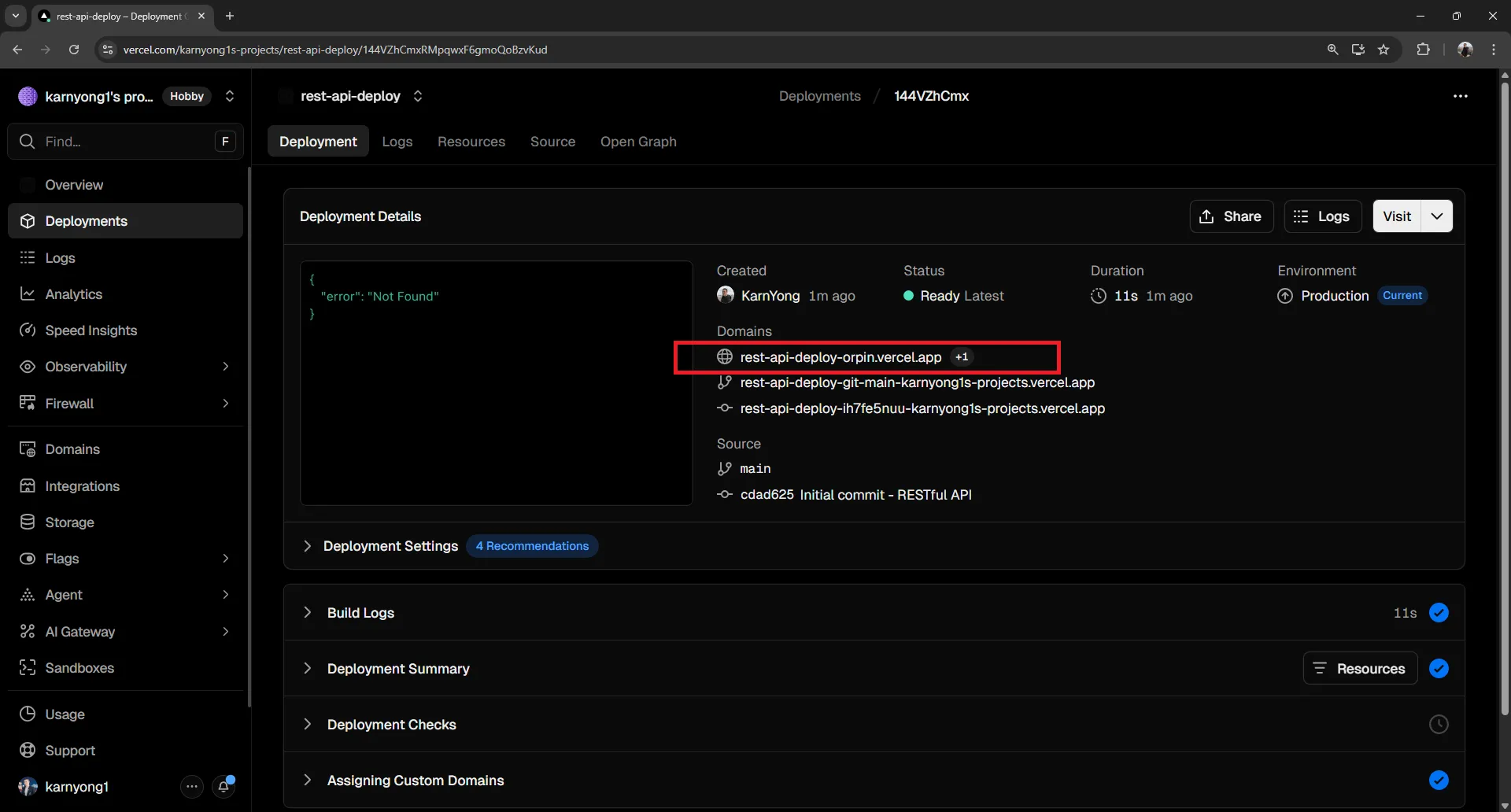
- รับ URL ของ API:
https://your-project.vercel.app
ตัวอย่าง Live#
Deployed API: https://rest-api-deploy-orpin.vercel.app ↗
- https://rest-api-deploy-orpin.vercel.app/api/customers ↗
- https://rest-api-deploy-orpin.vercel.app/api/products ↗
15. API Reference แบบสมบูรณ์#
Base URL: https://rest-api-deploy-orpin.vercel.app

=== CUSTOMERS ===

GET /api/customers
Description: รับลูกค้าทั้งหมด
Response: Array ของ customer objects

Example Response:
[
  {
    "id": 1,
    "name": "Karn Yong",
    "email": "karnyong@example.com",
    "created_at": "2027-01-15T10:30:00.000Z"
  }
]

GET /api/customers/:id
Description: รับลูกค้าตาม ID
Response: Customer object เดียว หรือ 404

Example Response:
{
  "id": 1,
  "name": "Karn Yong",
  "email": "karnyong@example.com",
  "created_at": "2027-01-15T10:30:00.000Z"
}

POST /api/customers
Description: สร้างลูกค้าใหม่
Request Body:
{
  "name": "John Doe",
  "email": "john@example.com"
}
Response: Created customer object พร้อม ID

DELETE /api/customers/:id
Description: ลบลูกค้าตาม ID
Response: 204 No Content เมื่อสำเร็จ

=== PRODUCTS ===

GET /api/products
Description: รับสินค้าทั้งหมด
Response: Array ของ product objects

Example Response:
[
  {
    "id": 1,
    "name": "Laptop",
    "price": 1200.00,
    "stock": 10,
    "created_at": "2027-01-15T10:30:00.000Z"
  }
]

GET /api/products/:id
Description: รับสินค้าตาม ID
Response: Product object เดียว หรือ 404

Example Response:
{
  "id": 1,
  "name": "Laptop",
  "price": 1200.00,
  "stock": 10,
  "created_at": "2027-01-15T10:30:00.000Z"
}

POST /api/products
Description: สร้างสินค้าใหม่
Request Body:
{
  "name": "Tablet",
  "price": 500,
  "stock": 20
}
Response: Created product object พร้อม ID

DELETE /api/products/:id
Description: ลบสินค้าตาม ID
Response: 204 No Content เมื่อสำเร็จ

=== ORDERS ===

GET /api/orders
Description: รับออเดอร์ทั้งหมด
Response: Array ของ order objects

Example Response:
[
  {
    "id": 1,
    "total": "2800.00",
    "status": "pending",
    "created_at": "2026-02-28T00:20:45.000Z",
    "customer": {
      "id": 1,
      "name": "Alice Johnson",
      "email": "alice@example.com"
    },
    "items": [
      {
        "id": 1,
        "quantity": 1,
        "price": "1200.00",
        "product": {
          "id": 1,
          "name": "Laptop",
          "price": "1200.00"
        }
      },
      {
        "id": 2,
        "quantity": 2,
        "price": "800.00",
        "product": {
          "id": 2,
          "name": "Phone",
          "price": "800.00"
        }
      }
    ]
  }
]

POST /api/orders
Description: สร้างออเดอร์ใหม่พร้อม transaction (ตรวจสอบ stock)
Request Body:
{
  "customer_id": 1,
  "items": [
    { "product_id": 1, "quantity": 2 },
    { "product_id": 2, "quantity": 1 }
  ]
}
Response: Created order พร้อม order_id และ total

Example Response:
{
  "order_id": 1,
  "total": 2000.00
}

Errors: ส่ง 400 พร้อมข้อความ error ถ้า:
- ไม่พบสินค้า
- stock ไม่เพียงพอใช้ API Reference นี้สำหรับการพัฒนา Frontend#
สามารถคัดลอก API reference ทั้งหมดด้านบนและใช้เป็น prompt เพื่อสร้าง frontend application AI สามารถสร้าง:
- React / Vue / Angular components สำหรับแต่ละ resource
- API service layer พร้อม fetch/axios calls
- TypeScript interfaces based on response models
- State management (Redux, Zustand, Context)
- Forms สำหรับสร้าง/แก้ไขข้อมูล
- Tables สำหรับแสดงข้อมูล
- Loading states และ error handling
เพียงวาง API reference ลงในเครื่องมือ AI พร้อมกับ frontend framework ที่ต้องการ!