

This article is a starting point for anyone who wants to understand NoSQL Database — from the core concepts, the JSON data format, and the types of NoSQL, through to working with MongoDB, a popular NoSQL that stores data as documents, with command examples covering create, insert, find, update, and delete, all the way to Aggregation. Each section ends with exercises.
1. What is NoSQL?#
NoSQL (short for “Not Only SQL”) is a family of database management systems designed to handle workloads that traditional Relational Database (RDBMS) struggle with — such as massive data volumes, frequently changing data structures, and distributed scaling (horizontal scaling).
The key strength of NoSQL is a flexible schema — you don’t have to define a rigid table structure up front. Each record can have different fields, so you can add new fields without running ALTER TABLE and naturally store nested or unbounded groups of data.
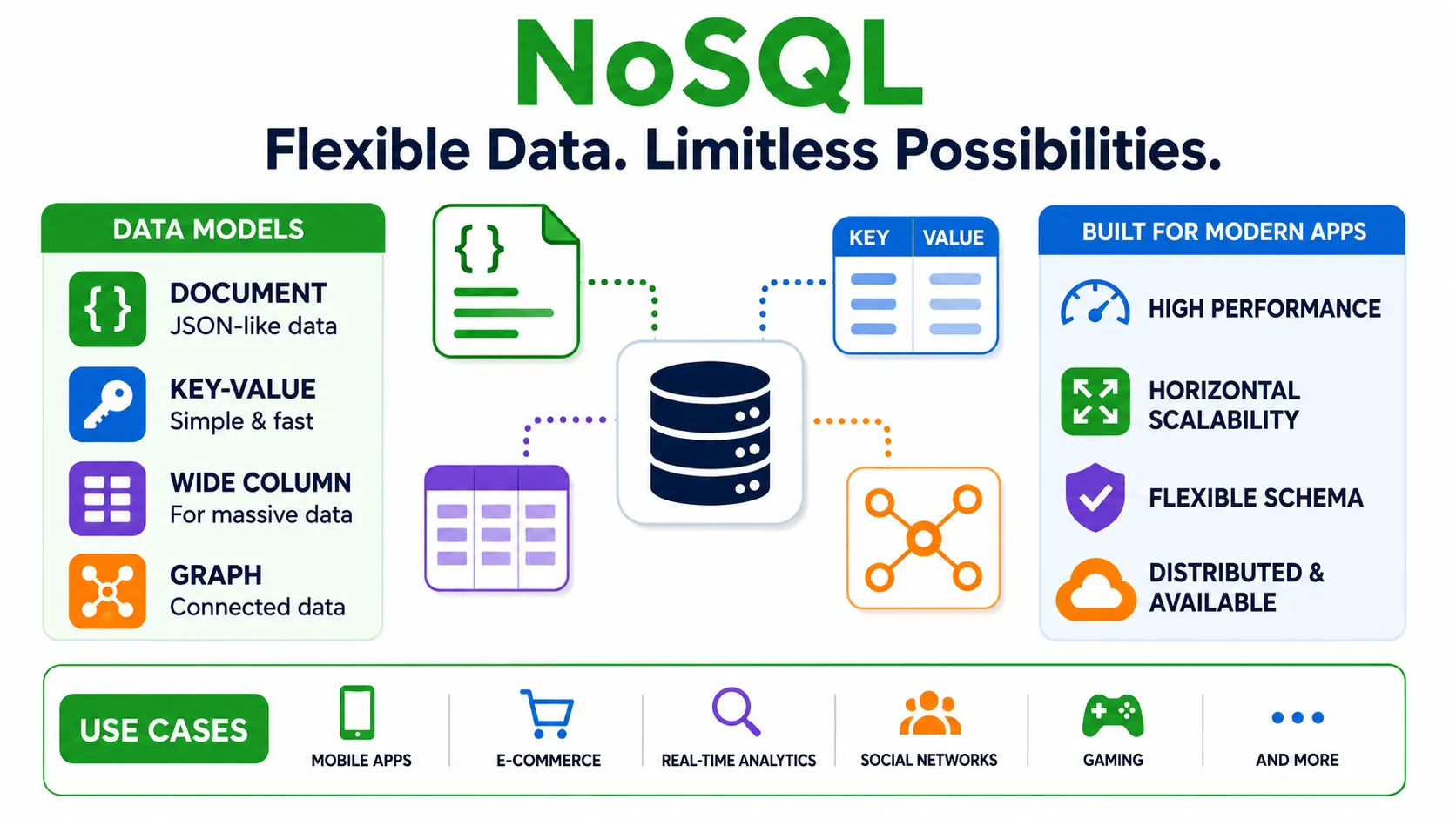
NoSQL emerged to address four main areas:
Massive Data Volumes (Big Data)#
NoSQL is designed to distribute data across many servers (sharding). As data grows, you keep adding servers instead of buying a single increasingly expensive and powerful machine as with traditional RDBMS.
Frequently Changing Structure (Flexible Schema)#
In modern applications, the data structure often changes as development progresses. NoSQL lets you add or change fields without migrating an entire table — ideal for rapid prototyping and diverse data.
High Speed (Performance)#
Many types of NoSQL sacrifice some RDBMS capabilities (such as complex JOINs and strong transactions) in exchange for very high read/write speed — for example Redis, which stores data in memory.
Diverse Data Formats (Variety)#
NoSQL supports data in many formats, divided into 4 main types. Each stores data differently and suits different workloads:
- Document — stores data as JSON-like documents that can be nested, and each document can have different fields. Suited for document/catalog data (e.g. MongoDB)
- Key-Value — stores simple key-value pairs; very fast read/write. Suited for cache, session (e.g. Redis)
- Wide Column — stores tables where each row can have different columns; supports massive data volumes. Suited for time-series, log (e.g. Cassandra)
- Graph — stores nodes (node) and relationships (edge), focusing on relationships between data. Suited for social networks, recommendation systems (e.g. Neo4j)
Choosing the type that matches the nature of your data is key — a full comparison is covered in the NoSQL types section.
Summary: NoSQL doesn’t replace RDBMS, it complements it — choose based on the workload. For document/hierarchical data choose a Document DB; for fast cache choose Key-Value.
📝 Exercises
- Explain in your own words why RDBMS may be unsuitable for data whose structure changes frequently.
- Give an example of one application where you think NoSQL is a better fit than RDBMS, with reasoning.
2. What is JSON?#
Before understanding a Document Database like MongoDB, you need to understand JSON, because MongoDB stores data in a format very similar to JSON.
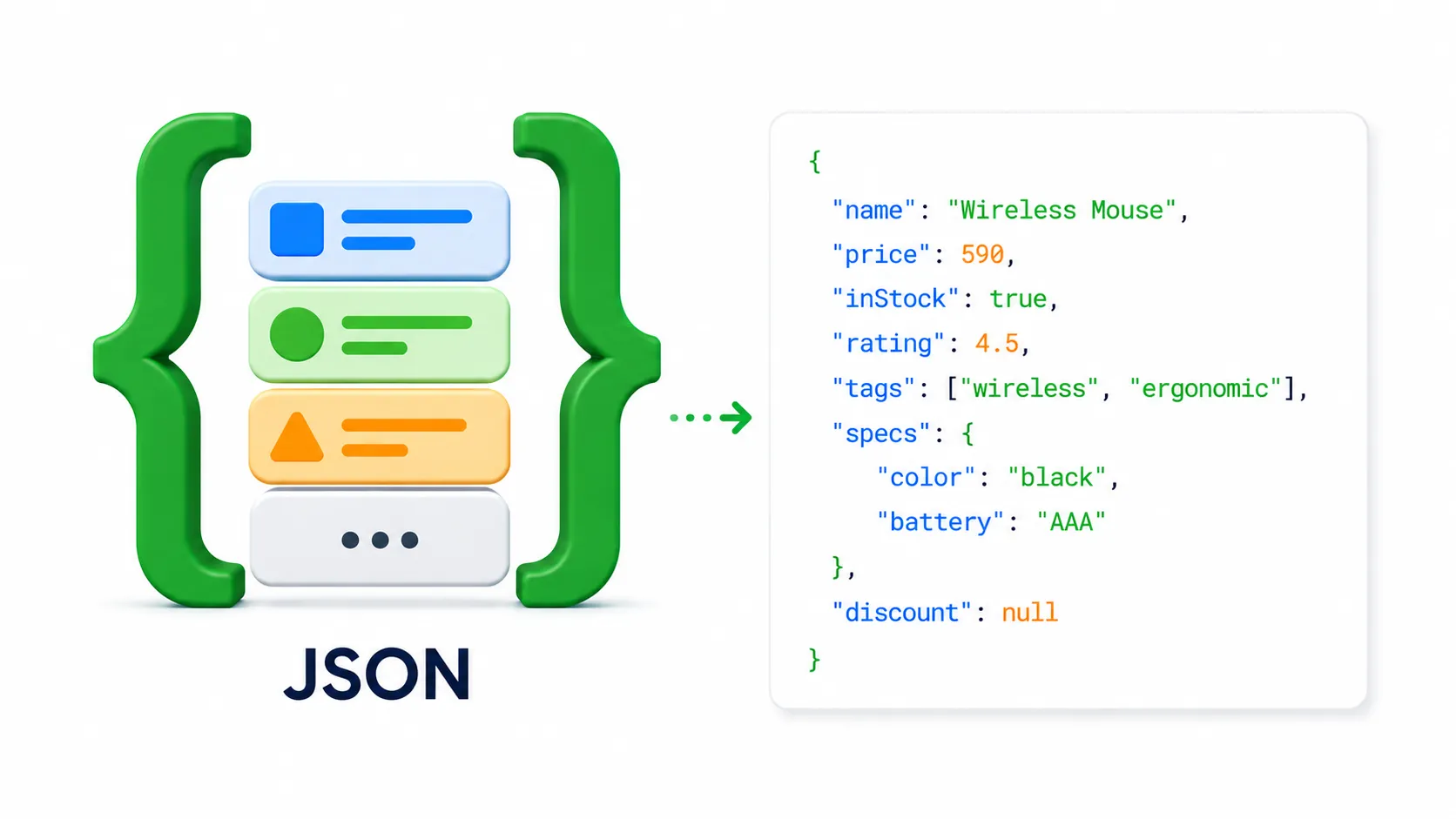
JSON (JavaScript Object Notation) is a text format for storing and exchanging data that is both easy for humans to read and convenient for machines to process. Even though the name contains “JavaScript”, JSON is language-independent — almost every language (Python, Java, PHP, Go, etc.) can read and write JSON.
Basic Structure of JSON#
JSON consists of key-value pairs written inside curly braces { }. Keys must be text wrapped in double quotes " ", while values can be of several types.
{
  "name": "Wireless Mouse",
  "price": 590,
  "inStock": true,
  "rating": 4.5,
  "tags": ["wireless", "ergonomic"],
  "specs": {
    "color": "black",
    "battery": "AAA"
  },
  "discount": null
}💡 Tip: We recommend writing JSON in VS Code, because it checks syntax instantly — e.g. a missing comma
,, the wrong quote style (such as single quotes instead of double quotes), or an unclosed brace. VS Code flags these with a red underline, making it much easier and faster to write correct JSON (if you don’t have it yet, download it free at code.visualstudio.com ↗).
JSON Data Types#
| Type | Example | Description |
|---|---|---|
| String | "Wireless Mouse" | Text, always in double quotes |
| Number | 590, 4.5 | Numbers (both integers and decimals) |
| Boolean | true, false | True/false values (no quotes) |
| Null | null | Empty value (no quotes) |
| Array | ["wireless", "ergonomic"] | A sequence of values, in [ ] |
| Object | { "color": "black" } | Key-value pairs, in { } (can be nested) |
What makes JSON powerful is that objects and arrays can be nested to unlimited depth — for example, specs is an object nested inside the larger object, and tags is an array of strings. This property lets JSON store complex (hierarchical) structures naturally.
Why JSON Matters#
- Data exchange between systems — REST APIs send and receive data as JSON almost universally
- Configuration files (config) — e.g.
package.json,tsconfig.json - The foundation of Document Databases — MongoDB stores each record as a JSON-format document (actually BSON, a binary form of JSON, explained in the next section)
Tip — common pitfall: JSON keys must always be in double quotes (
"name", notname), and the last pair must not have a trailing comma, otherwise it won’t parse.
Summary: JSON is a human- and machine-readable key-value text format that supports 6 data types and nested objects/arrays — the foundation of document databases and modern data exchange.
📝 Exercises
- Write the JSON for a product “Notebook”, price 35, category Stationery, with tags
["school", "office"]andinStockset to true. - The following JSON has 2 mistakes — fix them:
{ name: 'Pen', price: 20, } - What data types are the values
20andtruein JSON? (Answer without quotes.)
3. SQL vs NoSQL — Which to Choose#
Neither is absolutely better; each suits different workloads.
| Aspect | Relational (SQL) | NoSQL |
|---|---|---|
| Structure | Tables (table) of rows/columns with a rigid schema | Document/key-value/column/graph, flexible schema |
| Language | SQL | Depends on the system (MongoDB uses JavaScript-style commands) |
| Relationships | JOINs across tables, foreign keys | Usually embeds related data together (embed) |
| Scaling | Usually scales one machine to be more powerful (vertical) | Distributes well across many machines (horizontal) |
| Transactions | Strong (ACID) | Some support, but usually prioritizes speed/volume |
| Examples | MySQL, PostgreSQL, Oracle | MongoDB, Redis, Cassandra |
| Suited for | Clearly structured data, complex relationships (banking, ERP) | Diverse/nested data, high volume, frequently changing (content, IoT, real-time) |
Summary: Choose SQL when data has a rigid structure and you need strong relationships/transactions. Choose NoSQL when you need flexibility, speed, and support for massive data volumes.
📝 Exercises
- Should a banking/deposit-account system use SQL or NoSQL? Why?
- An app that stores user click logs, millions of records per day — which should it use? Why?
4. Types of NoSQL Database#
NoSQL is divided into 4 main types, based on how data is stored.
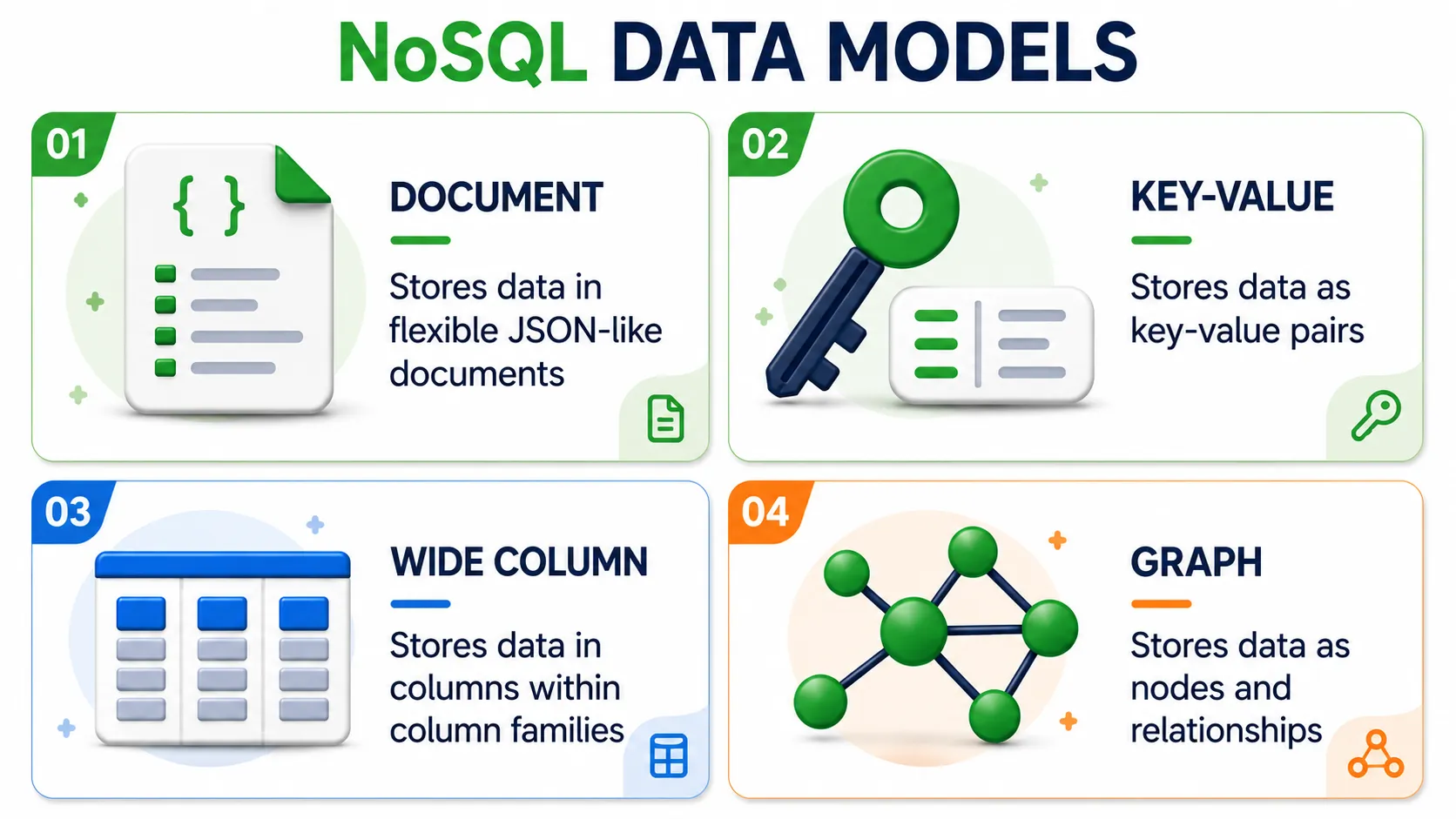
| Type | Data Format | Examples | Suited for |
|---|---|---|---|
| Document | JSON-like documents | MongoDB, CouchDB | Document/hierarchical data, content, catalog |
| Key-Value | Simple key-value pairs | Redis, DynamoDB | High-speed cache, session, counters |
| Wide Column | Tables where each row can have different columns | Cassandra, HBase | Time-series data, logs, large volumes |
| Graph | Nodes and relationships (node & edge) | Neo4j, ArangoDB | Social networks, recommendations, fraud detection |
In this article we focus on Document Databases using MongoDB, because it is the most popular and approachable NoSQL, and it stores data in the JSON format that developers already know.
Summary: Choose the type by data nature — documents → Document, fast cache → Key-Value, high-volume time-based → Wide Column, complex relationships → Graph.
📝 Exercises
Match each workload to the most appropriate NoSQL type (Document / Key-Value / Wide Column / Graph).
- A friend-recommendation system on a social network.
- Temporarily storing user sessions that must be read very fast.
- Storing blog articles with comments nested inside.
- Storing temperature sensor data every minute, millions of points per day.
5. What is MongoDB?#
MongoDB is a popular Document Database that stores data as documents in a JSON-like format. Under the hood, MongoDB actually stores BSON (Binary JSON) — a binary form of JSON that makes searching and processing faster and supports additional data types such as Date and ObjectId.
Vocabulary — Comparison with RDBMS#
| RDBMS | MongoDB | Description |
|---|---|---|
| Database | Database | The overall container (same) |
| Table | Collection | Holds a group of documents |
| Row | Document | A single data record (JSON-like) |
| Column | Field | A single key-value pair in a document |
| Primary Key | _id | Uniquely identifies a document (auto-generated) |
SELECT * FROM table | db.collection.find() | Retrieve data |
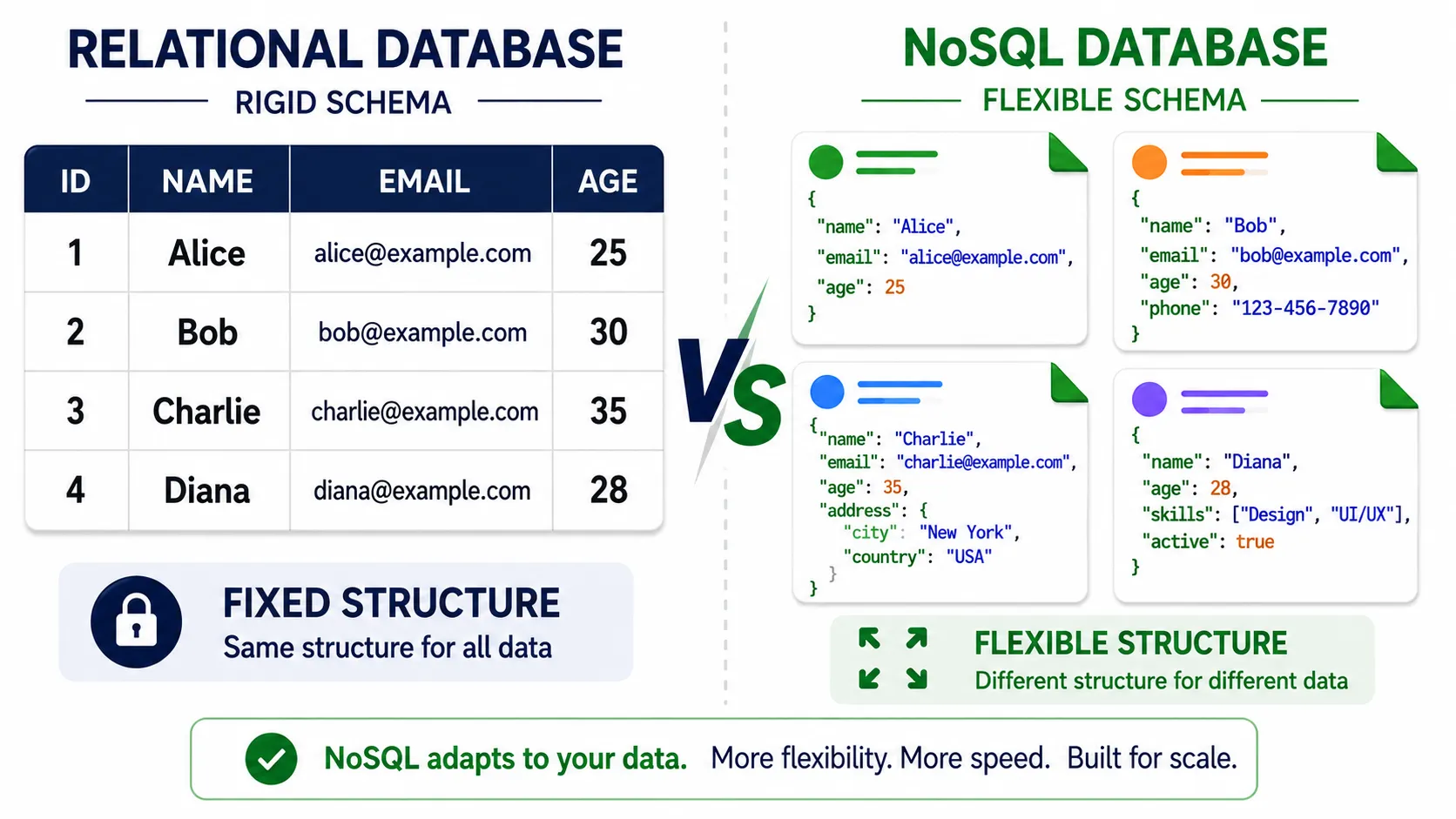
Key difference: in an RDBMS every row in a table must have the same columns, but in MongoDB each document in the same collection can have different fields — letting you store diverse data without changing the structure.
Summary: MongoDB stores data as BSON documents in a collection, comparable to a row in an RDBMS table, but more flexible because each document can have different fields.
📝 Exercises
- What are the MongoDB equivalents of table, row, column in RDBMS?
- In RDBMS we write
SELECT * FROM products. Write the equivalent command in MongoDB. - Why is the statement “each document in the same collection can have different fields” considered a strength of MongoDB?
6. Tools — MongoDB Community Server and Compass#
In the RDBMS article we used MongoDB Community Server (the free, fully-featured version) and then MongoDB Compass as the GUI for managing the database, similar to phpMyAdmin.
Download and Install MongoDB Community Server#
- Open the download page: https://www.mongodb.com/try/download/community ↗
- Choose the latest version, your operating system (Windows / macOS / Linux), and the package format (e.g.
.msifor Windows,.tgz/.zipfor macOS/Linux). - Download and run the installer — during installation on Windows, we recommend selecting “Install MongoDB as a Service” (runs automatically as a service on every startup) and you can install MongoDB Compass at the same time.
Once installed, MongoDB runs as a background service, listening for connections on port 27017 (the default).

MongoDB Compass — GUI for Managing the Database#
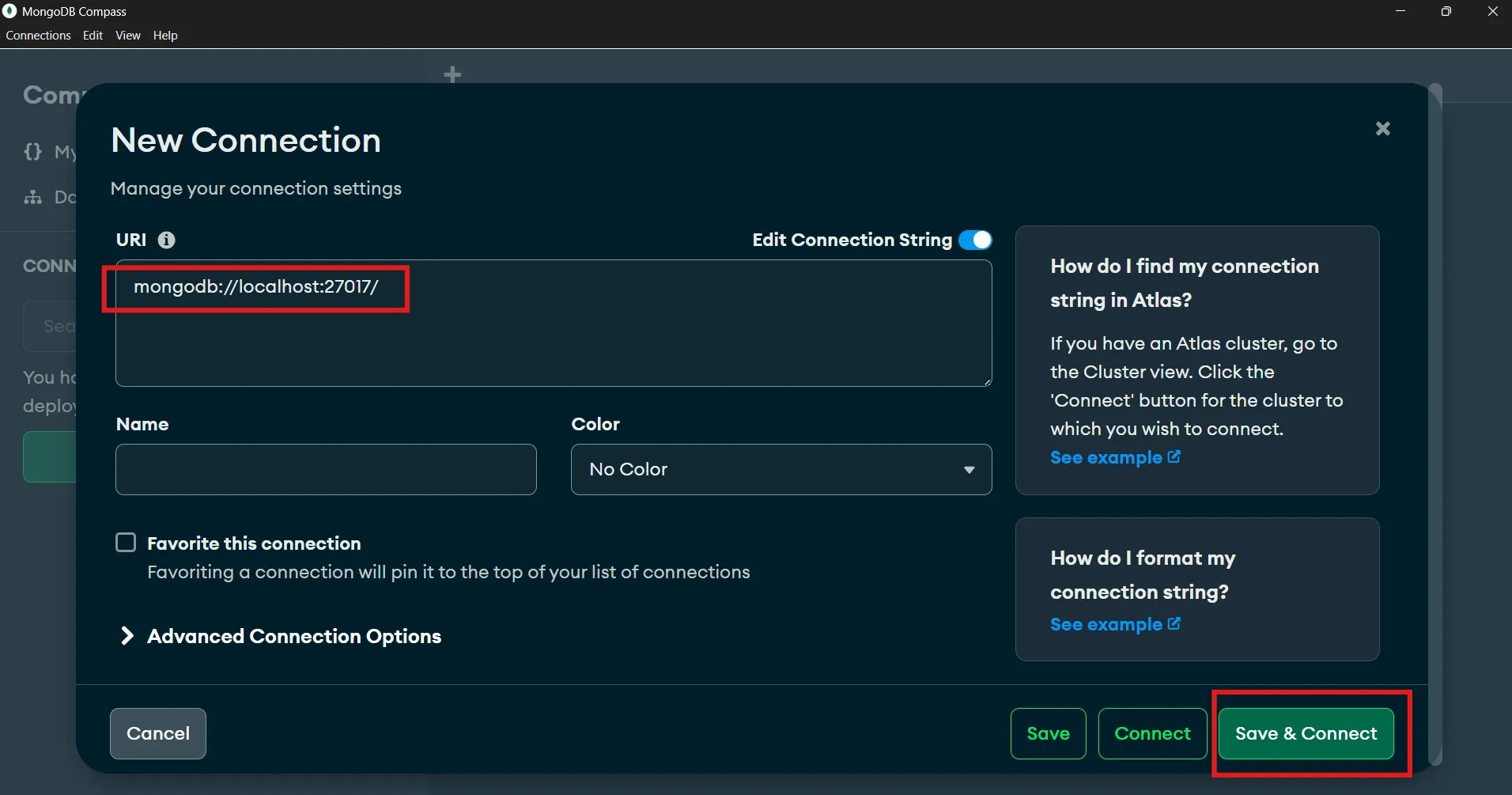
MongoDB Compass is a GUI for managing the database, similar to phpMyAdmin (it can be installed alongside Community Server, or downloaded separately from the MongoDB website). Open Compass and paste this connection string to connect to your local server:
mongodb://localhost:27017You’ll then see databases, collections, and documents in a graphical form. You can insert, edit, delete, and run queries through the GUI without using the command line.
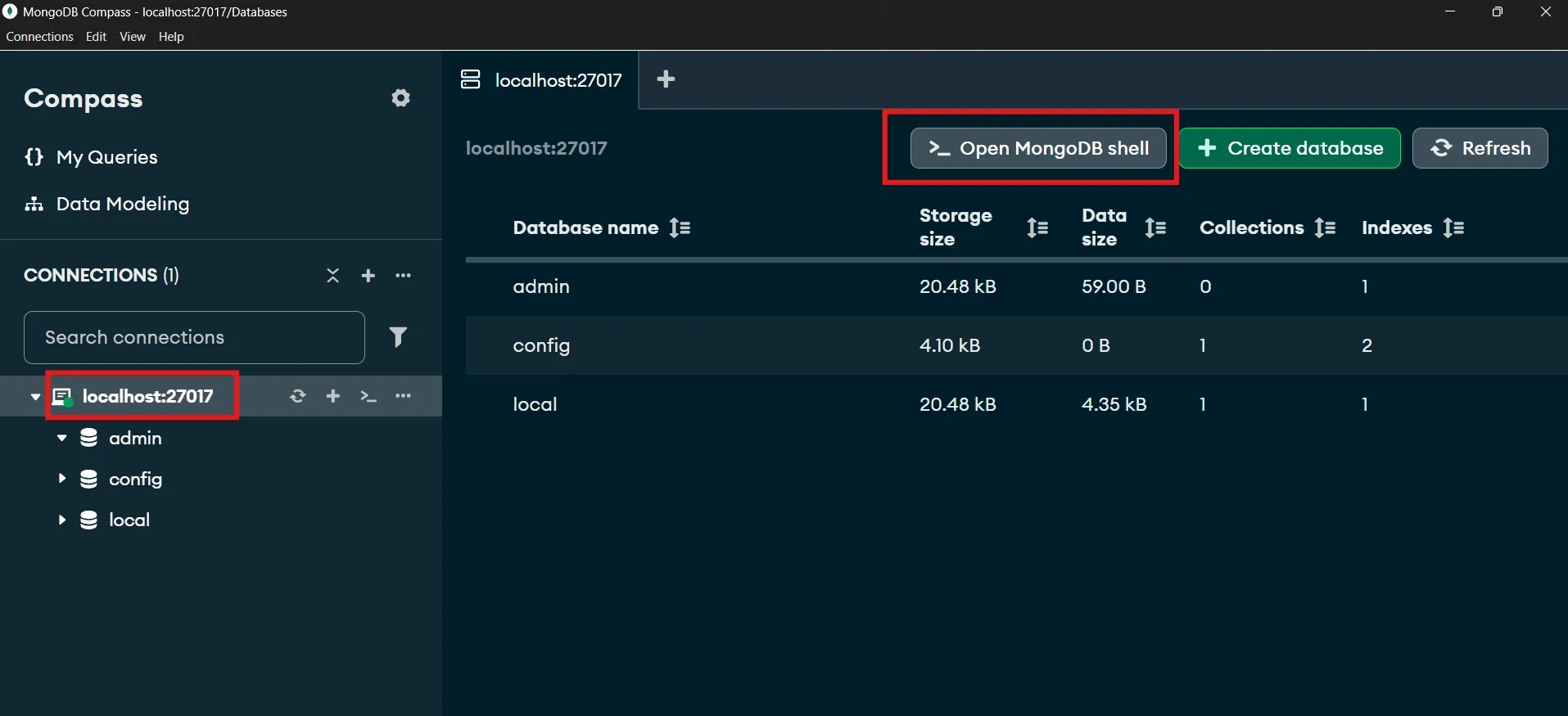
The commands in the following sections are written in mongosh (MongoDB Shell) format, which is JavaScript — you can run them in either Compass or a terminal.
7. Database, Collection, Document — Create and Insert Data#
We’ll use a shop database named shop and a collection named products, pretending to store products with nested details (specs, tags) — a strength of document databases.
Create a Database and Insert a Single Document (insertOne)#
In mongosh, use the use command to switch to a database (it’s created automatically when you first add data), then use insertOne to add a document.
use shop

db.products.insertOne({
  name: "Wireless Mouse",
  price: 590,
  category: "Accessories",
  stock: 25,
  rating: 4.5,
  tags: ["wireless", "ergonomic"],
  specs: { color: "black", battery: "AAA" }
})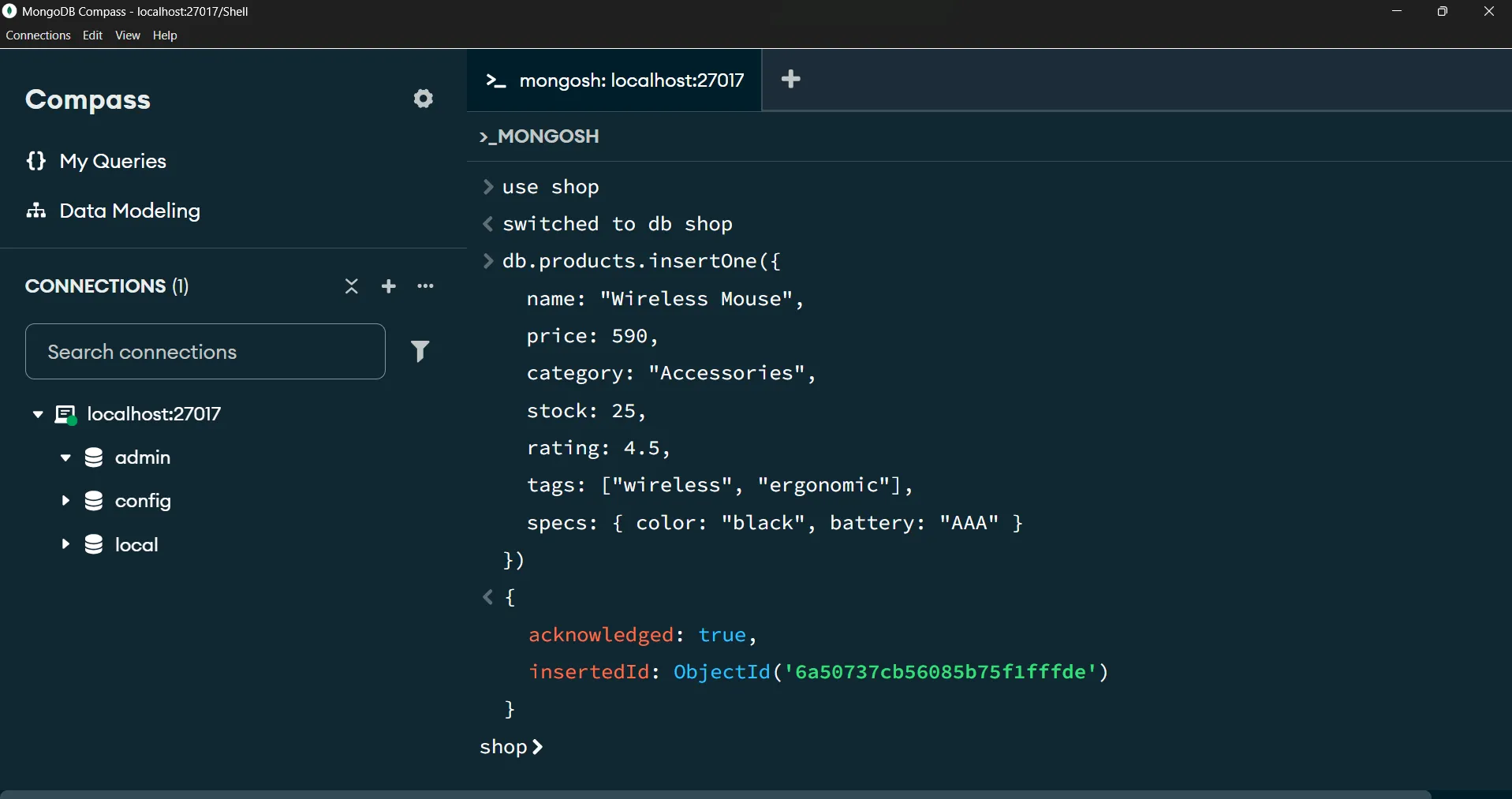
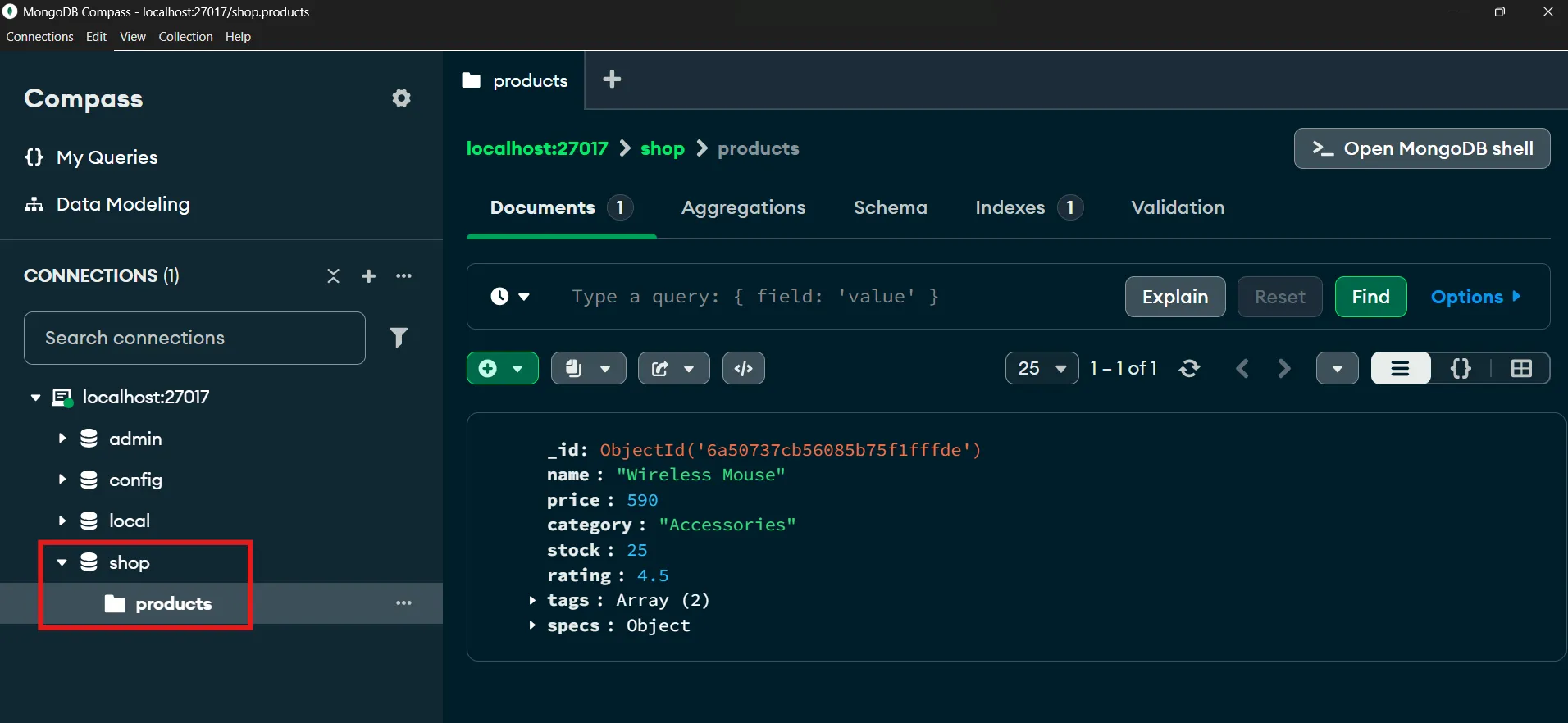
Notice that we didn’t have to create a table or define a schema up front — you just insert a document. MongoDB auto-generates an _id (primary key) if you don’t specify one. You can check the result as shown.
Insert Multiple Documents (insertMany)#
db.products.insertMany([
  { name: "Mechanical Keyboard", price: 1890, category: "Accessories", stock: 12, rating: 4.8 },
  { name: "USB-C Hub", price: 750, category: "Accessories", stock: 0, rating: 4.2 },
  { name: "4K Monitor", price: 8500, category: "Displays", stock: 8, rating: 4.7 },
  { name: "Laptop Stand", price: 690, category: "Accessories", stock: 30, rating: 4.0 },
  { name: "Webcam HD", price: 1200, category: "Electronics", stock: 15, rating: 4.3 },
  { name: "Bluetooth Speaker", price: 1450, category: "Electronics", stock: 18, rating: 4.6 },
  { name: "Desk Lamp", price: 560, category: "Accessories", stock: 0, rating: 3.9 }
])This sample data will be used for the query examples in the following sections — notice that some products (e.g. the first Wireless Mouse) have tags and specs, while others don’t. This is the schema flexibility that RDBMS struggles with.
Summary:
use <db>selects a database;db.<collection>.insertOne()/insertMany()add documents. MongoDB auto-generates_idand accepts documents with different fields in the same collection.
📝 Exercises
- Write an
insertOnecommand to add a product “USB Cable”, price 199, category Accessories, stock 50, rating 4.1. - If you want to add 3 products in a single command, should you use
insertOneorinsertMany? Why? - If you don’t specify the
_idfield yourself, what does MongoDB do?
8. find() — Retrieve Data#
MongoDB’s find() is the equivalent of SQL’s SELECT — it retrieves documents from a collection.
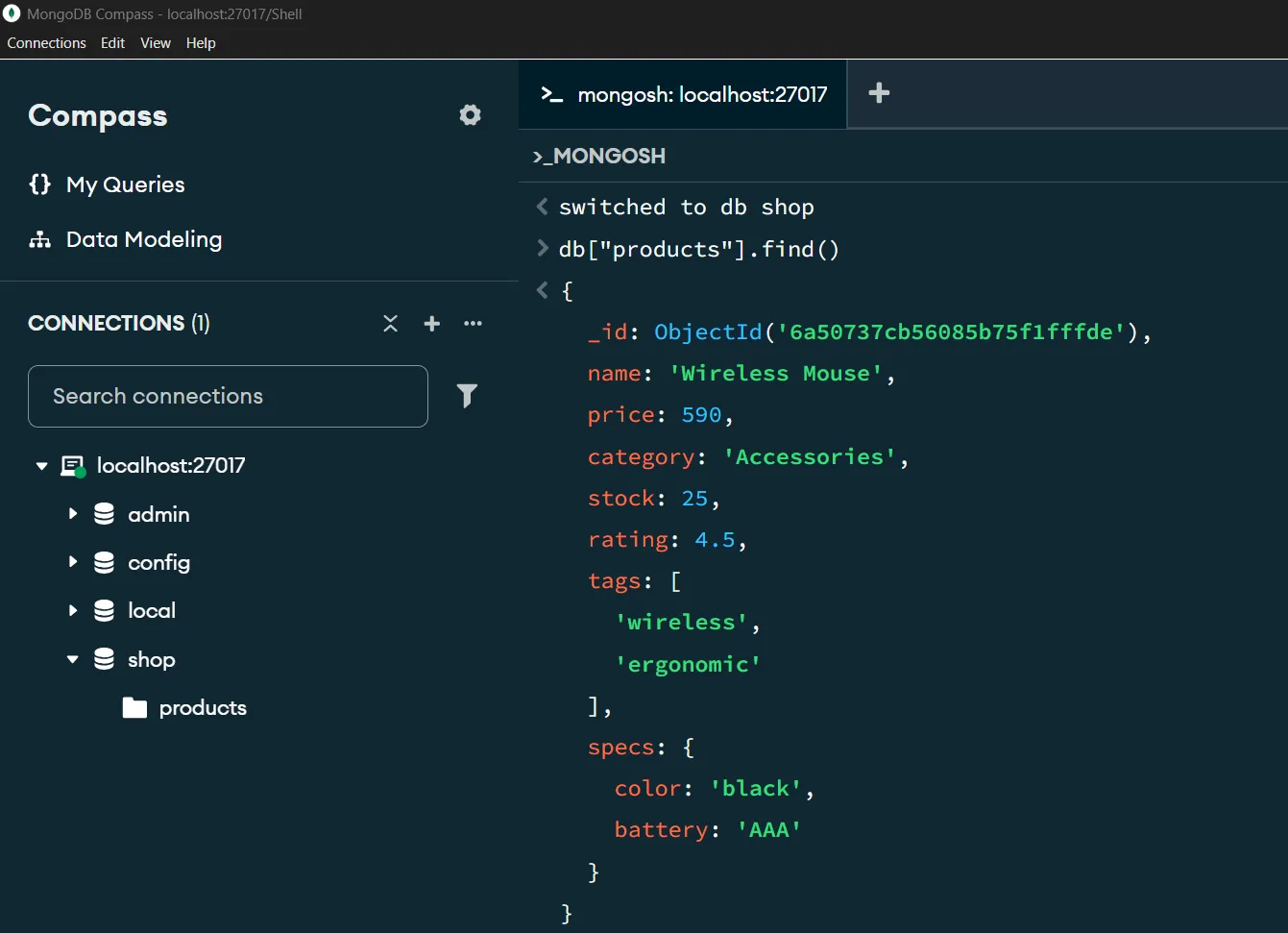
Retrieve All Documents#
db.products.find()Equivalent to SELECT * FROM products in SQL. Add .pretty() if you’re in an older shell to make the output easier to read (modern mongosh formats it automatically).
Retrieve Only the Fields You Want (Projection)#
Like selecting columns in SQL: set 1 for fields you want to show and 0 for fields you want to hide.
// Show only name and price (hide _id)
db.products.find({}, { name: 1, price: 1, _id: 0 })Result:
| name | price |
|---|---|
| Wireless Mouse | 590 |
| Mechanical Keyboard | 1890 |
| USB-C Hub | 750 |
| 4K Monitor | 8500 |
| Laptop Stand | 690 |
| Webcam HD | 1200 |
| Bluetooth Speaker | 1450 |
| Desk Lamp | 560 |
Tip:
_idis always returned; if you don’t want it, explicitly set_id: 0.
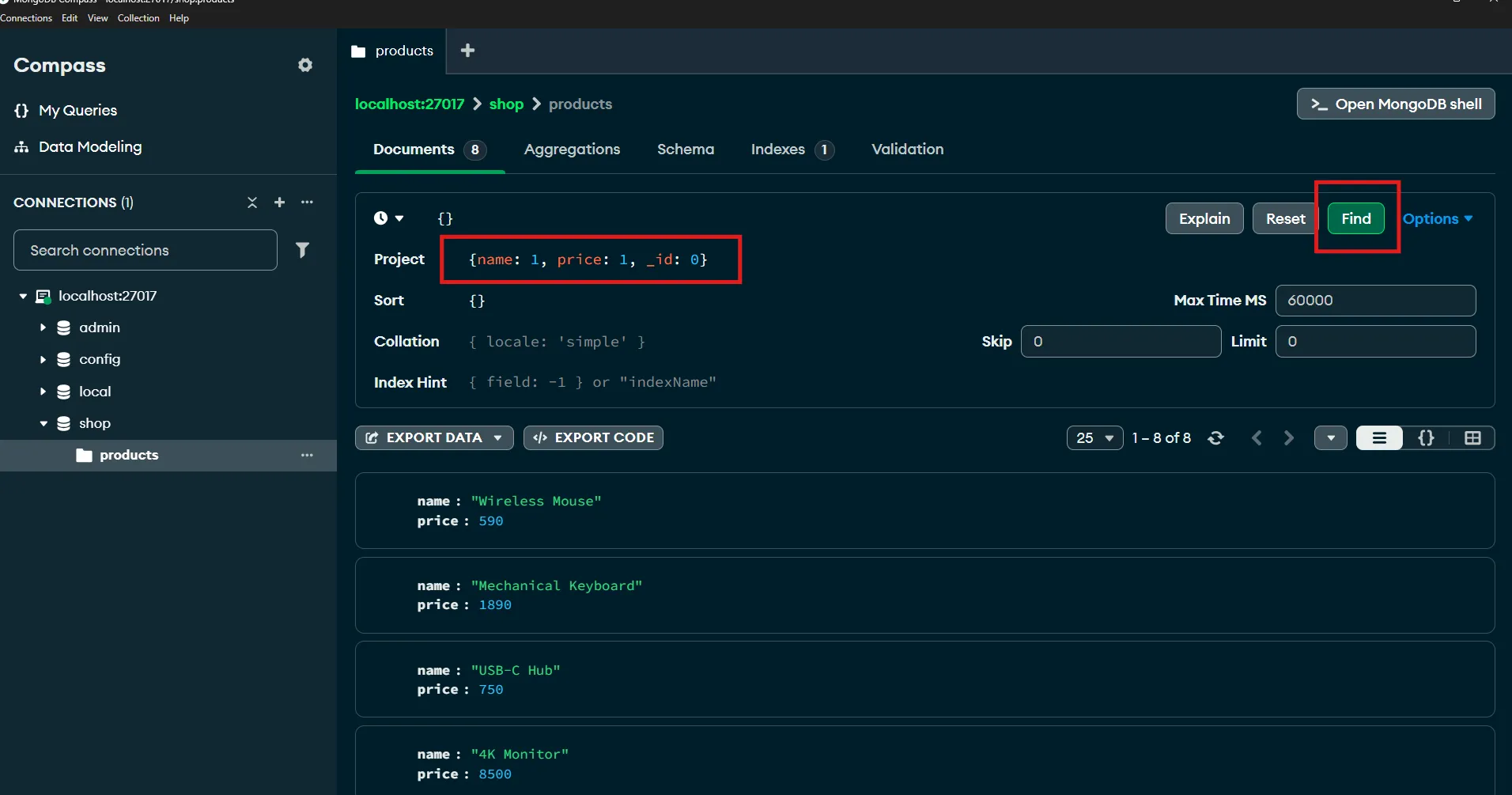
💡 You can also do this via the UI: Besides typing commands in mongosh (MongoDB Shell), you can also run
findthrough MongoDB Compass, the GUI. In Compass there are two input fields that correspond to the two arguments offind():
- Filter — enter the filter condition (the first argument); here
{}means no filter, all documents.- Project — enter the projection to select fields (the second argument); here
{ name: 1, price: 1, _id: 0 }.Once filled in, click the Find button. The result appears in an easy-to-read table. Below is running
db.products.find({}, { name: 1, price: 1, _id: 0 })via Compass — note that we put{ name: 1, price: 1, _id: 0 }in the Project field so that only the name and price fields are shown and_idis hidden.
📝 Exercises
- Write a
findthat retrieves only the name and rating fields of every product (hide_id). - What SQL statement returns the same result as
db.products.find({})? - To hide the
_idfield from the result, what value do you set in the projection?
9. Query Operators — Filter with Conditions#
Filtering in MongoDB is done by putting conditions inside find() and using query operators that start with $.
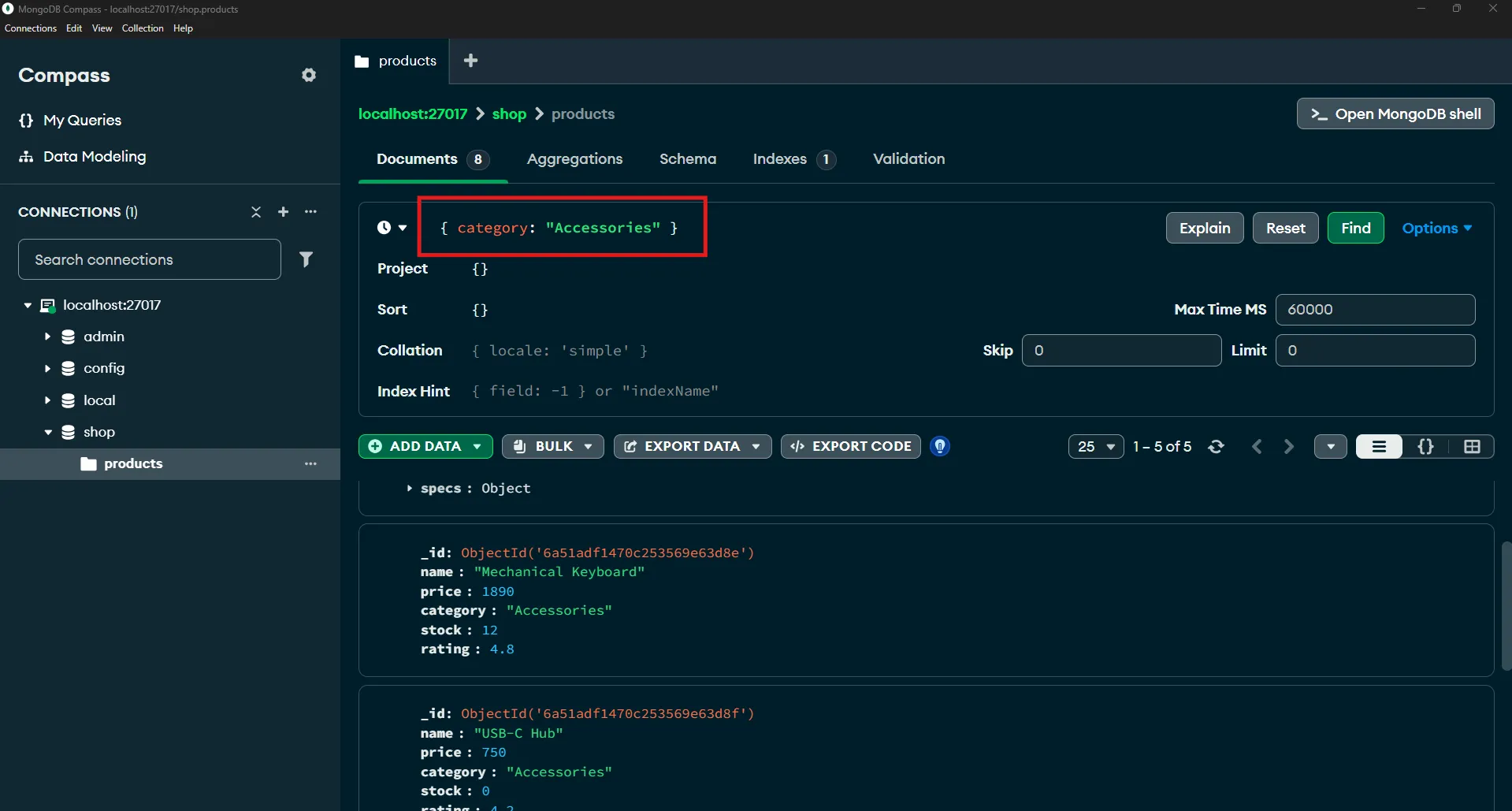
Exact Match (equivalent to WHERE column = value)#
db.products.find({ category: "Accessories" })Returns only products in the Accessories category (5 items).
Compare Numbers with lt, lte#
| Operator | Meaning | SQL equivalent |
|---|---|---|
$gt | greater than | > |
$gte | greater than or equal | >= |
$lt | less than | < |
$lte | less than or equal | <= |
$ne | not equal | != |
$in | in a given set | IN (...) |
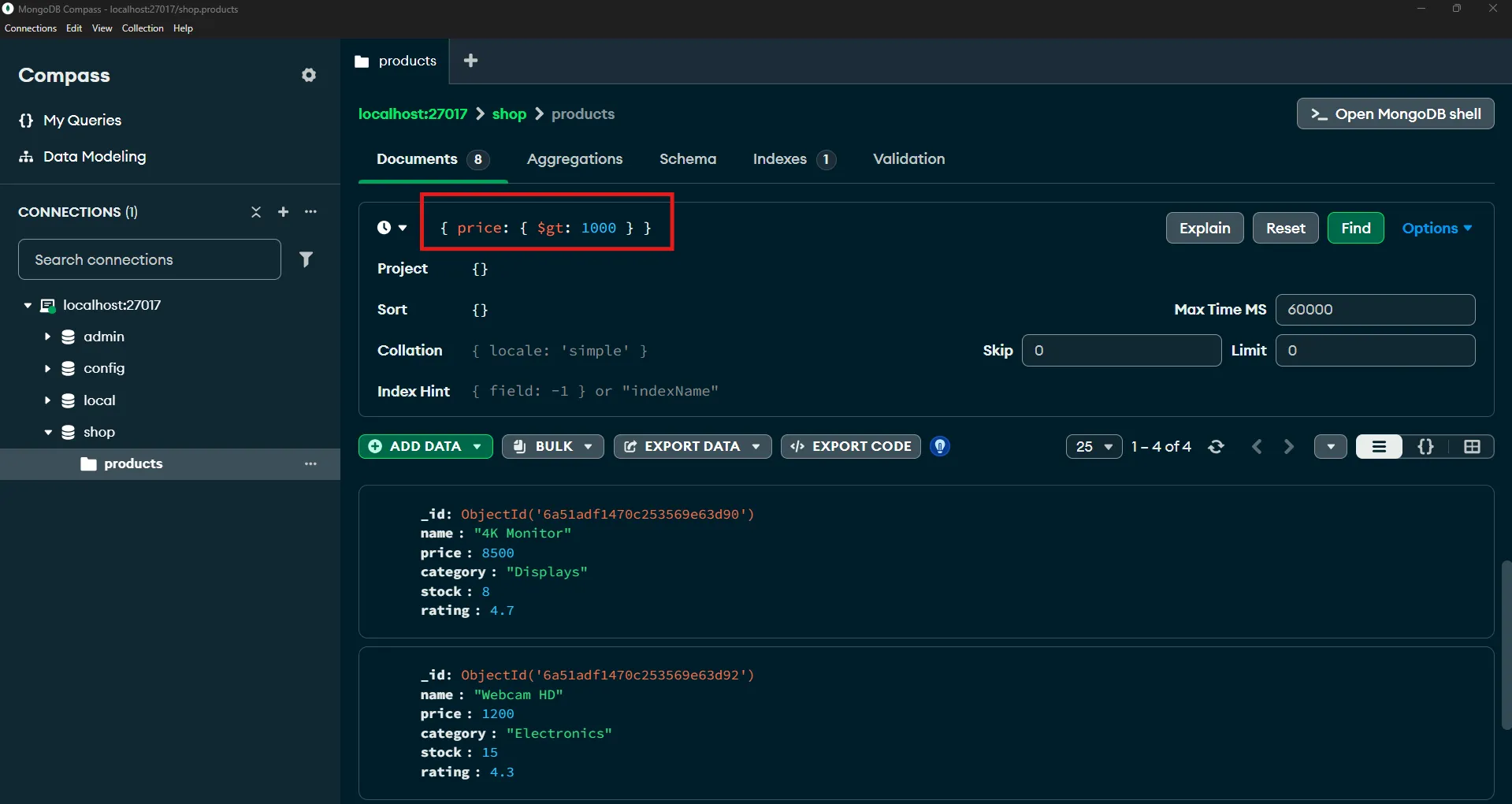
// Price greater than 1000
db.products.find({ price: { $gt: 1000 } })Result:
| name | price |
|---|---|
| Mechanical Keyboard | 1890 |
| 4K Monitor | 8500 |
| Webcam HD | 1200 |
| Bluetooth Speaker | 1450 |
Multiple Conditions — Default Is AND#
When you put multiple fields in one condition, MongoDB treats them as all having to be true (AND) automatically.
// Category Accessories and stock > 10
db.products.find({ category: "Accessories", stock: { $gt: 10 } })Result:
| name | category | stock |
|---|---|---|
| Wireless Mouse | Accessories | 25 |
| Mechanical Keyboard | Accessories | 12 |
| Laptop Stand | Accessories | 30 |
(USB-C Hub and Desk Lamp are excluded because their stock is 0)
Use $or for “or”#
db.products.find({
  $or: [
    { category: "Displays" },
    { rating: { $gte: 4.6 } }
  ]
})Returns products that are in the Displays category or have rating ≥ 4.6 — yielding 4K Monitor (Displays), Mechanical Keyboard (4.8), Bluetooth Speaker (4.6).
Use $in for a Set of Values#
// Category is Displays or Electronics
db.products.find({ category: { $in: ["Displays", "Electronics"] } })Summary: MongoDB filters with conditions in
find(); multiple fields are implicitly AND,$orfor or,$gt/$lt/...for comparisons, and$infor a set of values.
📝 Exercises
- Write a query to find products with rating ≥ 4.5 and stock > 0 (multiple fields in one condition).
- Write a query to find products in category Displays or Electronics using
$in. - Write a query to find products with price < 700 or rating > 4.7 using
$or. - Which operator would you use to query “products whose stock is not equal to 0”?
10. sort, limit, and count#
Sorting — sort()#
Use 1 for ascending (ASC) and -1 for descending (DESC), like ORDER BY in SQL.
// Sort by price descending
db.products.find().sort({ price: -1 })Result (top portion):
| name | price |
|---|---|
| 4K Monitor | 8500 |
| Mechanical Keyboard | 1890 |
| Bluetooth Speaker | 1450 |
| Webcam HD | 1200 |
Limit the Count — limit()#
Use it with sort() to fetch the “top N”, like LIMIT in SQL.
// The 3 most expensive products
db.products.find().sort({ price: -1 }).limit(3)Result: 4K Monitor, Mechanical Keyboard, Bluetooth Speaker
Count — countDocuments()#
// Count products in Accessories with stock > 10
db.products.countDocuments({ category: "Accessories", stock: { $gt: 10 } })Result: 3
Summary:
sort()orders results (1/-1),limit()restricts the count, andcountDocuments()counts documents matching a condition.
📝 Exercises
- Write a query to find the 3 highest-rated products (using
sort+limit). - Write a command to count products with stock = 0 (what is the expected result?).
- To sort products by price ascending, do you use
1or-1insort?
11. Aggregation — Group and Summarize Data#
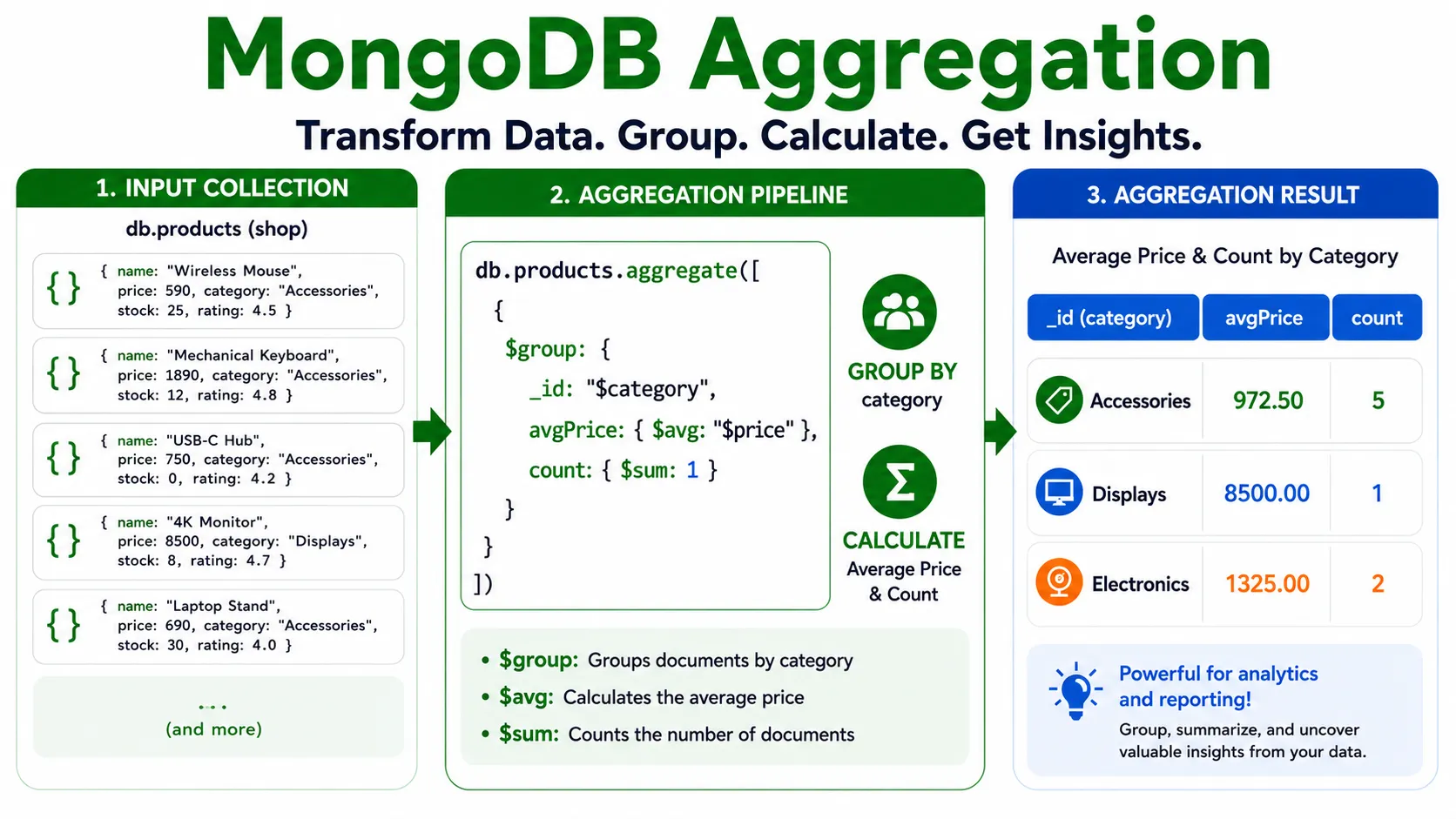
MongoDB’s Aggregation Pipeline is the equivalent of SQL’s GROUP BY, including SUM, AVG, and COUNT calculations, by chaining multiple stages together.
Average Price by Category — $group#
db.products.aggregate([
  {
    $group: {
      _id: "$category",
      avgPrice: { $avg: "$price" },
      count: { $sum: 1 }
    }
  }
])Explanation of each part:
$group— groups documents by a specified field_id: "$category"— the field to group by (prefix the field name with$)avgPrice: { $avg: "$price" }— computes the averagepriceof each group, stored under the nameavgPricecount: { $sum: 1 }— counts the documents in each group (adding 1 per row)
Result:
| _id (category) | avgPrice | count |
|---|---|---|
| Accessories | 896 | 5 |
| Displays | 8500 | 1 |
| Electronics | 1325 | 2 |
Common Aggregation Operators#
| Operator | Meaning | SQL equivalent |
|---|---|---|
$sum | sum / count ($sum: 1) | SUM() / COUNT() |
$avg | average | AVG() |
$min / $max | lowest/highest value | MIN() / MAX() |
// Find the highest and lowest price in each category
db.products.aggregate([
  {
    $group: {
      _id: "$category",
      maxPrice: { $max: "$price" },
      minPrice: { $min: "$price" }
    }
  }
])Summary: The Aggregation Pipeline groups and summarizes data across multiple stages, starting with
$groupand computing with$avg,$sum,$min,$max— the equivalent of SQL’sGROUP BYand aggregate functions.
📝 Exercises
- Write an aggregation to find the total (sum) price of products by category, naming the result
totalPrice. - Write an aggregation to find the average rating of all products without grouping by category (hint: use
_id: null). - In
$group, why must field names be prefixed with$, e.g."$price"?
12. update — Modify Data#
updateOne() modifies the first document matching a condition; updateMany() modifies every matching document. Use update operators prefixed with $.
Modify a Field with $set#
// Change the price of Wireless Mouse
db.products.updateOne(
  { name: "Wireless Mouse" },
  { $set: { price: 690 } }
)- First argument
{ name: "Wireless Mouse" }— the condition to find the document (likeWHERE) - Second argument
{ $set: { price: 690 } }— what to change ($setsets a new value)
Increment a Number with $inc#
// Increase stock of all Accessories products by 5
db.products.updateMany(
  { category: "Accessories" },
  { $inc: { stock: 5 } }
)$inc (increment) increases a numeric value by the given amount; use a negative value to decrease.
Add an Element to an Array with $push#
// Add the "sale" tag to Wireless Mouse
db.products.updateOne(
  { name: "Wireless Mouse" },
  { $push: { tags: "sale" } }
)| Operator | Action |
|---|---|
$set | Sets a field (creates it if it doesn’t exist) |
$inc | Increments/decrements a numeric value |
$push | Appends an element to an array |
$unset | Removes a field from a document |
⚠️ Warning: Don’t forget the update operator (
$set,$inc, etc.). If you write{ price: 690 }directly, MongoDB will try to replace the entire document with{ price: 690 }, which is usually not what you intend.
Summary:
updateOne/updateManymodify documents — the first argument is the condition, the second uses an operator such as$set,$inc,$push.
📝 Exercises
- Write an
updateOneto change the rating of “Desk Lamp” to 4.2 (using$set). - Write an
updateManyto decrease the stock of Electronics products by 3 (using$incwith a negative value). - Write a command to add the tag “new” to “Webcam HD” (using
$push). - If you write
db.products.updateOne({ name: "Desk Lamp" }, { price: 700 })without$set, what happens?
13. delete — Remove Data#
deleteOne() removes the first document matching a condition; deleteMany() removes every matching document — like DELETE in SQL.
Delete with a Condition#
// Delete products whose stock is 0 (out of stock)
db.products.deleteMany({ stock: 0 })This command removes USB-C Hub and Desk Lamp (both have stock: 0).
Delete a Single Document#
db.products.deleteOne({ name: "4K Monitor" })⚠️ Important warning: If you pass an empty condition
{}, it deletes all documents in the collection!javascriptdb.products.deleteMany({}) // deletes every document in productsAlways double-check the condition before running
deleteMany.
Summary:
deleteOne/deleteManyremove documents by condition. Beware the empty condition{}which deletes everything.
📝 Exercises
- Write a
deleteManyto remove products with stock = 0 — how many will be deleted? - Write a command to delete “4K Monitor”, a single document.
- What does
db.products.deleteMany({})do? What should you watch out for?
14. Schema Design — Embed vs Reference#
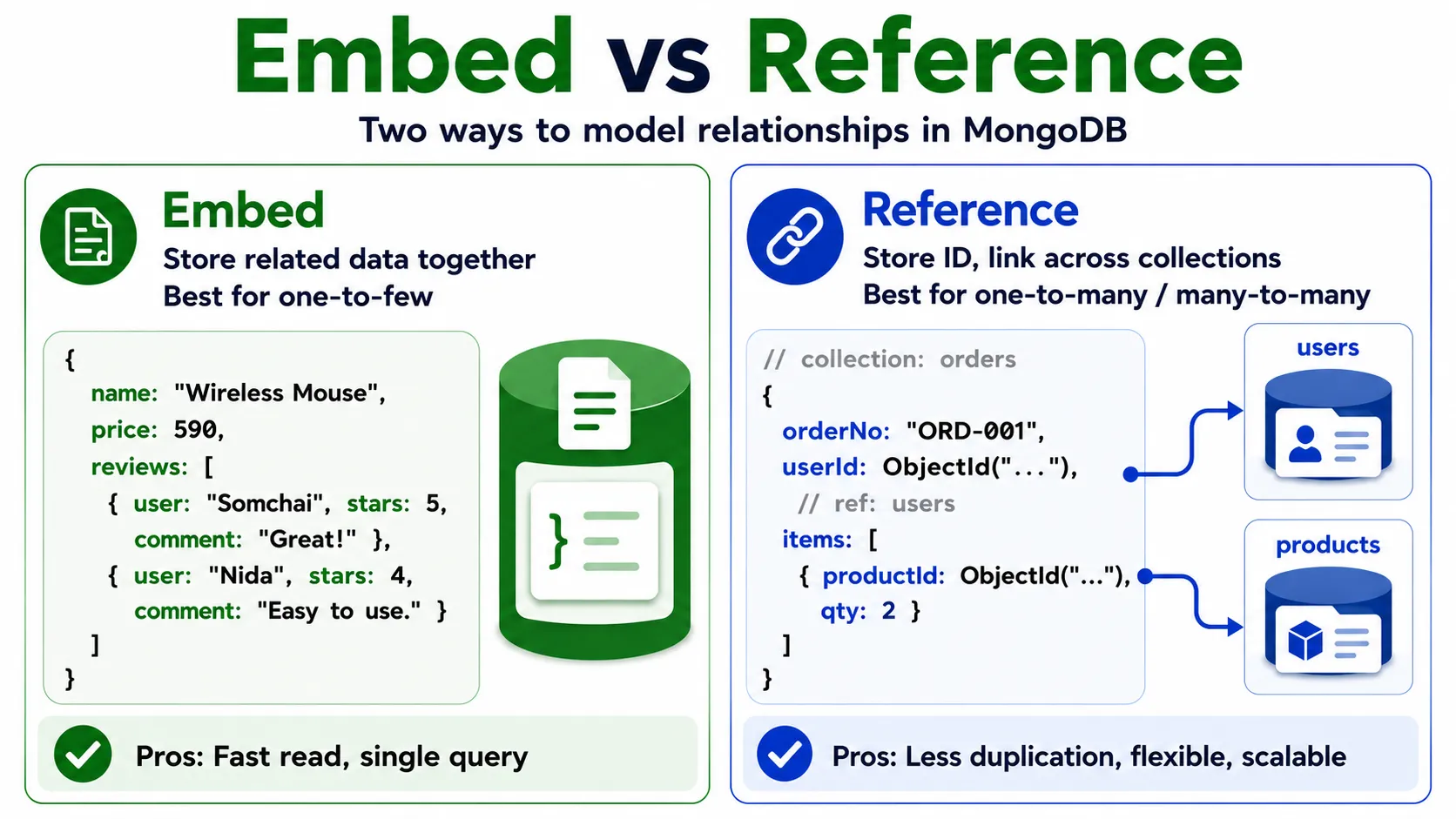
In RDBMS we split data into many tables and connect them with foreign keys + JOINs. In MongoDB there are two main design approaches: Embed and Reference.
Embed — Store Related Data Together#
Best when data is always read together and is limited in quantity (one-to-few) — e.g. product reviews embedded inside the product document.
{
  name: "Wireless Mouse",
  price: 590,
  reviews: [
    { user: "Somchai", stars: 5, comment: "Very good" },
    { user: "Nida", stars: 4, comment: "Easy to use" }
  ]
}Pros: fetch all the data in a single query, no JOIN needed, fast reads.
Reference — Store an ID That Points Across Collections#
Best when data is large, reused, or changes often (one-to-many, many-to-many) — e.g. an order that references users and products in separate collections.
// collection: orders
{
  orderNo: "ORD-001",
  userId: ObjectId("..."),       // references users
  items: [
    { productId: ObjectId("..."), qty: 2 }  // references products
  ]
}
Which to Choose?#
| Criterion | Recommendation |
|---|---|
| Little data, always read together, rarely changes | Embed |
| Lots of data, reused across documents, changes often | Reference |
| One-to-few relationship | Embed |
| Many-to-many relationship | Reference |
Summary: MongoDB lets you choose to embed or reference based on the data. Embed when read together and few in number; reference when large or reused. Good design is the heart of using NoSQL efficiently.
📝 Exercises
- Should a user’s “shipping address” (house number, street, subdistrict, district, province) be embedded in the user document or reference a separate collection? Why?
- Should “comments” on a forum where each post has thousands of comments be embedded or referenced? Why?
- Give one example of a one-to-few relationship suited to embedding.
15. Example Prompts for Generating Queries with Generative AI#
You can use ChatGPT or Claude to help build MongoDB queries by giving clear context.
Prompt 1 — Search and Filter:
collection
productshas fields name, price, category, stock, rating Write a MongoDB query to find Electronics products priced below 1500 with stock greater than 10, sorted by price ascending.
Prompt 2 — Aggregation:
From collection
productswith fields category and price Write a MongoDB aggregation to find the average price and number of products by category, sorted by average price descending.
Prompt 3 — Generate Sample Data:
Generate MongoDB
insertManystatements for aproductscollection with fields name, price, category, stock, and rating, using 10 realistic sample products across categories Electronics, Accessories, and Displays.
Tip: The more clearly you specify the collection name, fields, and what you want, the more accurate the resulting query.
16. Summary#
This article covers NoSQL Database and MongoDB fundamentals, from concepts to practice:
- NoSQL — databases with a flexible schema that support massive data volumes and diverse formats
- JSON — a key-value text format that is the foundation of document databases
- NoSQL types — Document, Key-Value, Wide Column, Graph, each suited to different workloads
- MongoDB — a document database that stores data as BSON, mapping table/row to collection/document
- Community Server & Compass — install the database locally and manage it through a GUI
- CRUD —
insertOne/insertMany,find,updateOne/updateMany,deleteOne/deleteMany - Query operators —
$gt,$lt,$or,$infor filtering - Aggregation —
$groupwith$avg,$sum,$max,$minfor summarizing - Schema design — Embed vs Reference, chosen by the nature of the relationships
Each section has 📝 Exercises for practice. Once you understand these fundamentals, you’ll be able to design and manage NoSQL databases for applications that demand flexibility and speed, and build toward API development, real-time applications, and systems that handle massive data volumes.