Build & Deploy an AI-Generated REST API (TiDB + Vercel)
Learn how to use AI to generate complete RESTful endpoints with Express.js, connect to scalable MySQL/TiDB, and deploy instantly to Vercel
1. Objectives#
Modern backend development is no longer just about writing code manually. Today we can:
- Use AI to generate complete RESTful endpoints
- Connect to scalable MySQL or TiDB
- Deploy instantly to serverless infrastructure (Vercel)
In this tutorial, we will build a production-ready E-Commerce REST API using:
- Express.js
- mysql2/promise (no ORM)
- MySQL or TiDB
- AI-generated endpoints
- Vercel deployment
2. Project Structure#
rest-api-deploy/
├── db.js
├── index.js
├── schema.sql
├── seed.sql
├── package.json
├── .env
└── routes/
    ├── customers.js
    ├── products.js
└── orders.js3. Use AI to Generate RESTful Endpoints#
Instead of manually writing all routes, we define a clear API specification and let AI generate the implementation.
Example AI Prompt#
Generate a RESTful API using Express + mysql2/promise for MySQL/TiDB.

Project structure: db.js, index.js, routes/*.js, schema.sql, seed.sql

Resources:
1. customers (id, name, email, created_at)
2. products (id, name, price, stock, created_at)
3. orders (id, customer_id, total, status, created_at)
4. order_items (id, order_id, product_id, quantity, price)

Requirements:
- Parameterized queries only
- Use transactions for order creation
- Return JSON only
- Use proper HTTP status codes
- No ORM
- Enable CORS
- Deploy to Vercel (serverless)

Also generate:
1. Complete setup instructions (mkdir, npm init, npm install)
2. schema.sql and seed.sql with test data
3. Local testing commandsWith this prompt, AI will generate a complete production-ready API with proper error handling, transactions, and deployment configuration.
4. Complete Setup Instructions#
Step 1 — Create Project#
mkdir rest-api-deploy
cd rest-api-deploy
npm init -y
code .The code . command opens the project in VS Code (if installed).
Step 2 — Install Dependencies#
npm install express mysql2 cors dotenvStep 3 — Create .env#
DB_HOST=localhost
DB_USERNAME=root
DB_PASSWORD=
DB_DATABASE=rest_api
DB_PORT=3306For TiDB Cloud, use the provided connection credentials and set DB_SSL=true.
5. Database Connection (db.js)#
// db.js
const mysql = require("mysql2/promise");
require("dotenv").config();

const pool = mysql.createPool({
  host: process.env.DB_HOST,
  user: process.env.DB_USERNAME,
  password: process.env.DB_PASSWORD,
  database: process.env.DB_DATABASE,
  port: process.env.DB_PORT,
  waitForConnections: true,
  connectionLimit: 10,
  ssl: process.env.DB_SSL === "true" ? { rejectUnauthorized: true } : undefined
});

module.exports = pool;6. Setup TiDB Serverless#
TiDB is a MySQL-compatible distributed database. You can use TiDB Serverless instead of local MySQL for a cloud-native experience.
Create TiDB Serverless Cluster#
- Go to https://tidbcloud.com ↗ and sign up
- Click Create Cluster → TiDB Serverless
- Choose a region closest to you
- Wait for cluster creation (usually takes 1-2 minutes)
Create Database#
- Go to your TiDB Cloud cluster dashboard
- Click Chat or SQL Editor on the left panel
- Run the following SQL to create your database:
CREATE DATABASE rest_api;Get Connection Details#
- Click Overview on your cluster
- Click Connect button
- Select Connect with .env
- Generate a password (save it securely)
- Copy your connection details:
DB_HOST=gateway01.ap-southeast-1.prod.aws.tidbcloud.com
DB_PORT=4000
DB_USERNAME=xxx.root
DB_PASSWORD=xxx
DB_DATABASE=rest_api
DB_SSL=trueUpdate .env for TiDB#
Replace your .env file with TiDB credentials:
DB_HOST=your-tidb-host
DB_PORT=4000
DB_USERNAME=your-tidb-user
DB_PASSWORD=your-tidb-password
DB_DATABASE=rest_api
DB_SSL=trueNote: TiDB uses port 4000 and requires SSL (DB_SSL=true).
7. Database Schema (schema.sql)#
Create a file named schema.sql with the following content:
-- Create Tables
USE rest_api;

CREATE TABLE customers (
  id INT AUTO_INCREMENT PRIMARY KEY,
  name VARCHAR(100) NOT NULL,
  email VARCHAR(100) UNIQUE NOT NULL,
  created_at TIMESTAMP DEFAULT CURRENT_TIMESTAMP
);

CREATE TABLE products (
  id INT AUTO_INCREMENT PRIMARY KEY,
  name VARCHAR(100) NOT NULL,
  price DECIMAL(10,2) NOT NULL,
  stock INT NOT NULL,
  created_at TIMESTAMP DEFAULT CURRENT_TIMESTAMP
);

CREATE TABLE orders (
  id INT AUTO_INCREMENT PRIMARY KEY,
  customer_id INT NOT NULL,
  total DECIMAL(10,2) NOT NULL,
  status VARCHAR(50) DEFAULT 'pending',
  created_at TIMESTAMP DEFAULT CURRENT_TIMESTAMP,
  FOREIGN KEY (customer_id) REFERENCES customers(id)
);

CREATE TABLE order_items (
  id INT AUTO_INCREMENT PRIMARY KEY,
  order_id INT NOT NULL,
  product_id INT NOT NULL,
  quantity INT NOT NULL,
  price DECIMAL(10,2) NOT NULL,
  FOREIGN KEY (order_id) REFERENCES orders(id),
  FOREIGN KEY (product_id) REFERENCES products(id)
);Running Schema SQL#
Run this script to create the database and tables:
TiDB Serverless:
- Go to your TiDB Cloud cluster
- Click Chat or SQL Editor
- Copy and paste the SQL script
- Select (highlight) the entire SQL script.
- Click Run to execute
8. Seed Data (seed.sql)#
Create a file named seed.sql with the following content:
USE rest_api;

INSERT INTO customers (name, email) VALUES
('Karn Yong', 'karnyong@example.com'),
('Bob Smith', 'bob@example.com');

INSERT INTO products (name, price, stock) VALUES
('Laptop', 1200.00, 10),
('Phone', 800.00, 15),
('Headphones', 150.00, 25);Running Seed Data#
Run this script after creating the database schema to populate test data:
TiDB Serverless:
- Go to your TiDB Cloud cluster
- Click Chat or SQL Editor
- Select the
rest_apidatabase - Copy and paste the seed SQL script
- Select (highlight) the entire SQL script.
- Click Run to execute
Test the Results#
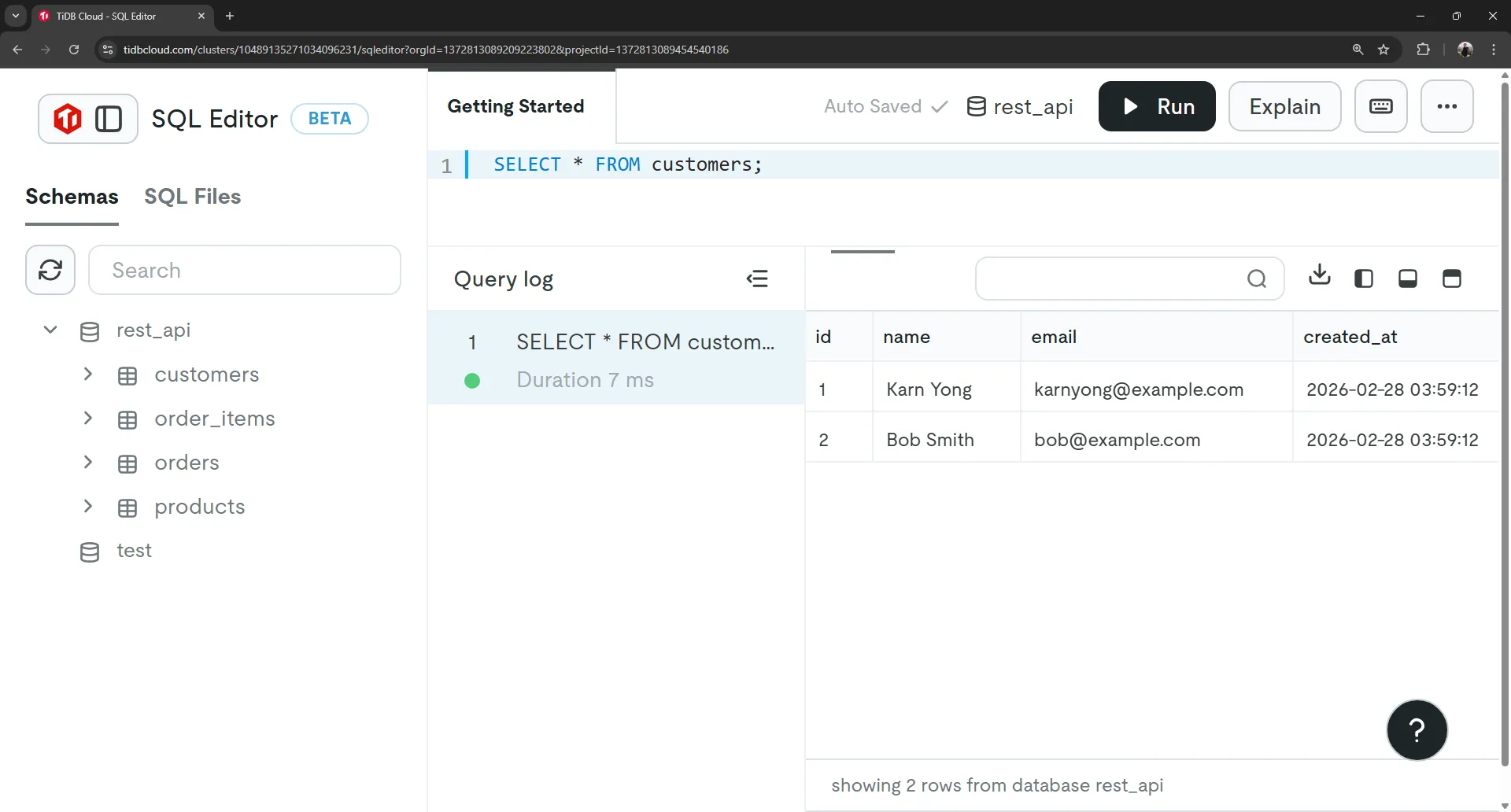
Verify your data was inserted correctly by running these SELECT commands in the SQL Editor:
-- Check customers
SELECT * FROM customers;

-- Check products
SELECT * FROM products;You should see:
- 2 customers: Karn Yong and Bob Smith
- 3 products: Laptop, Phone, and Headphones
9. Main Entry Point (index.js)#
// index.js
const express = require("express");
const cors = require("cors");

const customersRoutes = require("./routes/customers");
const productsRoutes = require("./routes/products");
const ordersRoutes = require("./routes/orders");

const app = express();

// Middleware
app.use(cors());
app.use(express.json());

// Routes
app.use("/api/customers", customersRoutes);
app.use("/api/products", productsRoutes);
app.use("/api/orders", ordersRoutes);

// 404 handler
app.use((req, res) => {
  res.status(404).json({ error: "Not Found" });
});

// Export for Vercel
module.exports = app;

// Start server only in development
if (process.env.NODE_ENV !== "production") {
  const PORT = process.env.PORT || 3333;
  app.listen(PORT, () => {
    console.log(`Server running on port ${PORT}`);
  });
}10. Customers API (routes/customers.js)#
// routes/customers.js
const express = require("express");
const router = express.Router();
const db = require("../db");

/* GET all customers */
router.get("/", async (req, res) => {
  try {
    const [rows] = await db.execute(
      "SELECT * FROM customers ORDER BY id DESC"
    );
    res.json(rows);
  } catch (err) {
    res.status(500).json({ error: err.message });
  }
});

/* GET single customer */
router.get("/:id", async (req, res) => {
  try {
    const [rows] = await db.execute(
      "SELECT * FROM customers WHERE id = ?",
      [req.params.id]
    );

    if (rows.length === 0)
      return res.status(404).json({ error: "Customer not found" });

    res.json(rows[0]);
  } catch (err) {
    res.status(500).json({ error: err.message });
  }
});

/* CREATE customer */
router.post("/", async (req, res) => {
  const { name, email } = req.body;

  if (!name || !email)
    return res.status(400).json({ error: "Name and email required" });

  try {
    const [result] = await db.execute(
      "INSERT INTO customers (name, email) VALUES (?, ?)",
      [name, email]
    );

    res.status(201).json({ id: result.insertId, name, email });
  } catch (err) {
    res.status(500).json({ error: err.message });
  }
});

/* DELETE customer */
router.delete("/:id", async (req, res) => {
  try {
    const [result] = await db.execute(
      "DELETE FROM customers WHERE id = ?",
      [req.params.id]
    );

    if (result.affectedRows === 0)
      return res.status(404).json({ error: "Customer not found" });

    res.status(204).json({});
  } catch (err) {
    res.status(500).json({ error: err.message });
  }
});

module.exports = router;11. Products API (routes/products.js)#
// routes/products.js
const express = require("express");
const router = express.Router();
const db = require("../db");

/* GET all products */
router.get("/", async (req, res) => {
  try {
    const [rows] = await db.execute(
      "SELECT * FROM products ORDER BY id DESC"
    );
    res.json(rows);
  } catch (err) {
    res.status(500).json({ error: err.message });
  }
});

/* GET single product */
router.get("/:id", async (req, res) => {
  try {
    const [rows] = await db.execute(
      "SELECT * FROM products WHERE id = ?",
      [req.params.id]
    );

    if (rows.length === 0)
      return res.status(404).json({ error: "Product not found" });

    res.json(rows[0]);
  } catch (err) {
    res.status(500).json({ error: err.message });
  }
});

/* CREATE product */
router.post("/", async (req, res) => {
  const { name, price, stock } = req.body;

  if (!name || price == null || stock == null)
    return res.status(400).json({ error: "Missing fields" });

  try {
    const [result] = await db.execute(
      "INSERT INTO products (name, price, stock) VALUES (?, ?, ?)",
      [name, price, stock]
    );

    res.status(201).json({ id: result.insertId, name, price, stock });
  } catch (err) {
    res.status(500).json({ error: err.message });
  }
});

/* DELETE product */
router.delete("/:id", async (req, res) => {
  try {
    const [result] = await db.execute(
      "DELETE FROM products WHERE id = ?",
      [req.params.id]
    );

    if (result.affectedRows === 0)
      return res.status(404).json({ error: "Product not found" });

    res.status(204).json({});
  } catch (err) {
    res.status(500).json({ error: err.message });
  }
});

module.exports = router;12. Orders API with Transactions (routes/orders.js)#
This is where AI is extremely useful — generating correct transaction logic with stock validation.
// routes/orders.js
const express = require("express");
const router = express.Router();
const db = require("../db");

/*
Create Order with Transaction
Request body:
{
  "customer_id": 1,
  "items": [
    { "product_id": 1, "quantity": 2 },
    { "product_id": 2, "quantity": 1 }
  ]
}
*/

router.post("/", async (req, res) => {
  const { customer_id, items } = req.body;

  if (!customer_id || !items || !items.length)
    return res.status(400).json({ error: "Invalid payload" });

  const connection = await db.getConnection();

  try {
    await connection.beginTransaction();

    let total = 0;

    // Validate products and check stock
    for (const item of items) {
      const [products] = await connection.execute(
        "SELECT price, stock FROM products WHERE id = ? FOR UPDATE",
        [item.product_id]
      );

      if (products.length === 0)
        throw new Error("Product not found");

      const product = products[0];

      if (product.stock < item.quantity)
        throw new Error("Insufficient stock");

      total += product.price * item.quantity;

      // Update stock
      await connection.execute(
        "UPDATE products SET stock = stock - ? WHERE id = ?",
        [item.quantity, item.product_id]
      );
    }

    // Create order
    const [orderResult] = await connection.execute(
      "INSERT INTO orders (customer_id, total, status) VALUES (?, ?, ?)",
      [customer_id, total, "pending"]
    );

    const orderId = orderResult.insertId;

    // Add order items
    for (const item of items) {
      const [product] = await connection.execute(
        "SELECT price FROM products WHERE id = ?",
        [item.product_id]
      );

      await connection.execute(
        `INSERT INTO order_items (order_id, product_id, quantity, price)
         VALUES (?, ?, ?, ?)`,
        [orderId, item.product_id, item.quantity, product[0].price]
      );
    }

    await connection.commit();

    res.status(201).json({ order_id: orderId, total });

  } catch (err) {
    await connection.rollback();
    res.status(400).json({ error: err.message });
  } finally {
    connection.release();
  }
});

// GET all orders with customer + products
router.get('/', async (req, res) => {
  try {
    const [rows] = await db.execute(`
      SELECT
        o.id AS order_id,
        o.total,
        o.status,
        o.created_at AS order_created_at,

        c.id AS customer_id,
        c.name AS customer_name,
        c.email AS customer_email,

        oi.id AS order_item_id,
        oi.quantity,
        oi.price,

        p.id AS product_id,
        p.name AS product_name,
        p.price AS product_price

      FROM orders o
      JOIN customers c ON o.customer_id = c.id
      JOIN order_items oi ON o.id = oi.order_id
      JOIN products p ON oi.product_id = p.id
      ORDER BY o.id DESC
    `);

    if (!rows.length) {
      return res.status(200).json([]);
    }

    // Transform flat rows into nested JSON
    const ordersMap = {};

    for (const row of rows) {
      if (!ordersMap[row.order_id]) {
        ordersMap[row.order_id] = {
          id: row.order_id,
          total: row.total,
          status: row.status,
          created_at: row.order_created_at,
          customer: {
            id: row.customer_id,
            name: row.customer_name,
            email: row.customer_email
          },
          items: []
        };
      }

      ordersMap[row.order_id].items.push({
        id: row.order_item_id,
        quantity: row.quantity,
        price: row.price,
        product: {
          id: row.product_id,
          name: row.product_name,
          price: row.product_price
        }
      });
    }

    res.status(200).json(Object.values(ordersMap));

  } catch (err) {
    res.status(500).json({ error: err.message });
  }
});

module.exports = router;Key Features:
FOR UPDATElocks rows during transaction- Stock validation before creating order
- Automatic rollback on any error
- Proper connection cleanup in
finally
13. Test Locally Before Deploy#
Start the Server#
node --watch index.jsYou should see:
Server running on http://localhost:3333Test with curl#
Get all customers:
curl http://localhost:3333/api/customersPostman: GET http://localhost:3333/api/customers
Create a customer:
curl -X POST http://localhost:3333/api/customers \
  -H "Content-Type: application/json" \
-d '{"name":"John Doe","email":"john@example.com"}'Postman: POST http://localhost:3333/api/customers
{
  "name": "John Doe",
  "email": "john@example.com"
}Get all products:
curl http://localhost:3333/api/productsPostman: GET http://localhost:3333/api/products
Create a product:
curl -X POST http://localhost:3333/api/products \
  -H "Content-Type: application/json" \
-d '{"name":"Tablet","price":500,"stock":20}'Postman: POST http://localhost:3333/api/products
{
  "name": "Tablet",
  "price": 500,
  "stock": 20
}Create an order (with transaction):
curl -X POST http://localhost:3333/api/orders \
  -H "Content-Type: application/json" \
  -d '{
    "customer_id":1,
    "items":[
      {"product_id":1,"quantity":1},
      {"product_id":2,"quantity":2}
    ]
}'Postman: POST http://localhost:3333/api/orders
{
  "customer_id": 1,
  "items": [
    {"product_id": 1, "quantity": 1},
    {"product_id": 2, "quantity": 2}
  ]
}Get all orders:
curl http://localhost:3333/api/ordersPostman: GET http://localhost:3333/api/orders
14. Deploy to Vercel#
Deploy to Vercel#
Step 1: Push to GitHub
Create a .gitignore file to exclude sensitive files:
node_modules/
.envInitialize git and push to GitHub using VS Code:
- Open your project in VS Code
- Click the Source Control icon (or press
Ctrl+Shift+G) - Click Initialize Repository
- Click the + icon next to “Changes” to stage all changes
- Enter a commit message:
Initial commit - RESTful API - Click Commit
- Click the Publish Branch button
- Follow the prompts to create a new GitHub repository (make it Public)
Your code is now on GitHub at: https://github.com/YOUR_USERNAME/rest-api-deploy
Step 2: Import to Vercel
- Go to https://vercel.com ↗ and sign up/login
- Click Add New → Project
- Click Import Git Repository
- Select your
rest-api-deployrepository from GitHub - Click Import
- Go to Environment Variables section
- Click Upload .env File and select your
.envfile to import all variables at once
Step 3: Review Environment Variables
Verify your environment variables were imported correctly:
| Name | Value |
|---|---|
DB_HOST | Your database host |
DB_USERNAME | Your database user |
DB_PASSWORD | Your database password |
DB_DATABASE | Your database name |
DB_PORT | 4000 (TiDB) or 3306 (MySQL) |
DB_SSL | true (for TiDB) |
Step 4: Deploy
- Click Deploy
- Wait for deployment to complete (usually takes 1-2 minutes)
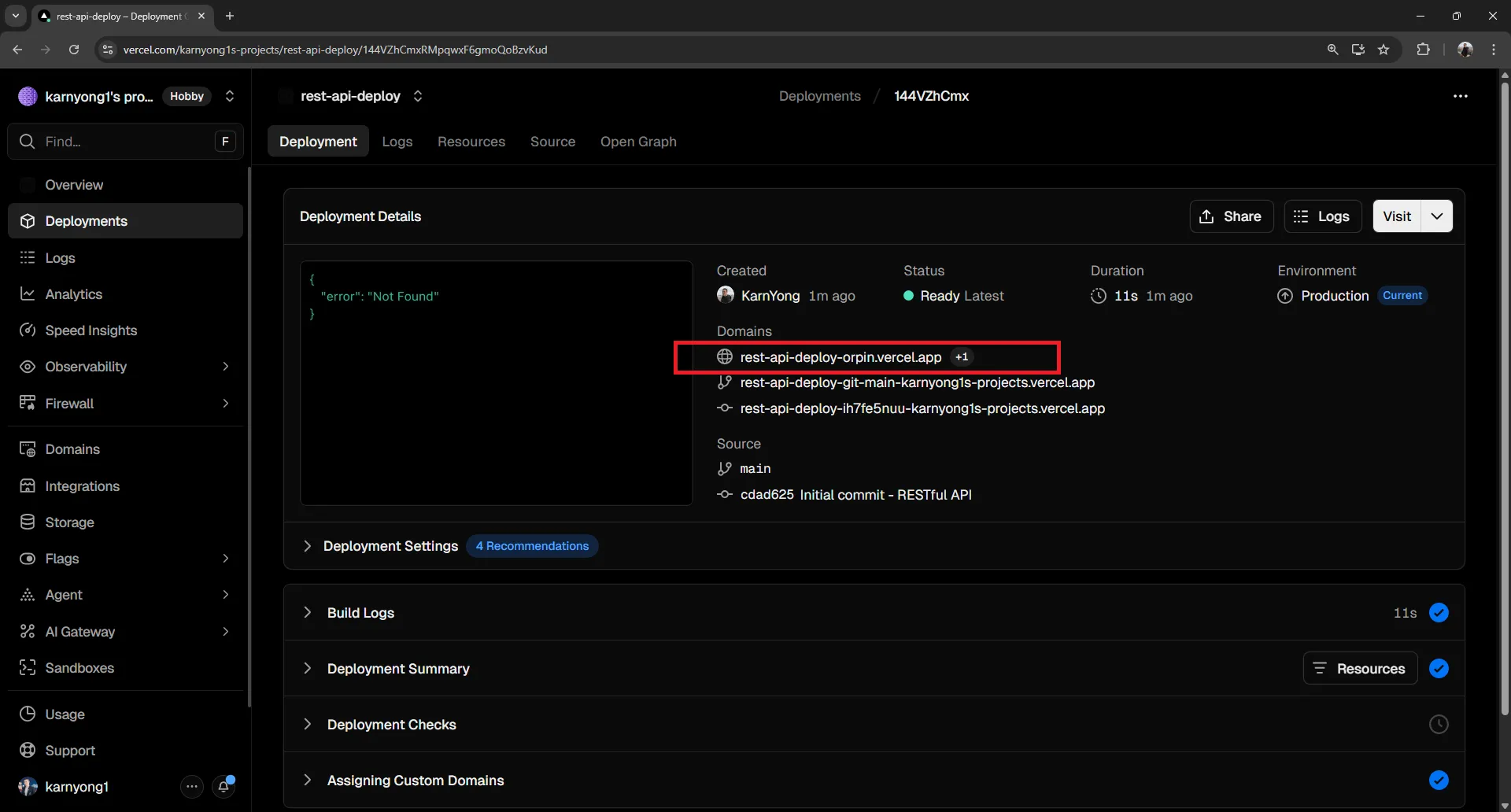
- Get your API URL:
https://your-project.vercel.app
Live Example#
Deployed API: https://rest-api-deploy-orpin.vercel.app ↗
- https://rest-api-deploy-orpin.vercel.app/api/customers ↗
- https://rest-api-deploy-orpin.vercel.app/api/products ↗
15. Complete API Reference#
Base URL: https://rest-api-deploy-orpin.vercel.app

=== CUSTOMERS ===

GET /api/customers
Description: Get all customers
Response: Array of customer objects

Example Response:
[
  {
    "id": 1,
    "name": "Karn Yong",
    "email": "karnyong@example.com",
    "created_at": "2027-01-15T10:30:00.000Z"
  }
]

GET /api/customers/:id
Description: Get customer by ID
Response: Single customer object or 404

Example Response:
{
  "id": 1,
  "name": "Karn Yong",
  "email": "karnyong@example.com",
  "created_at": "2027-01-15T10:30:00.000Z"
}

POST /api/customers
Description: Create new customer
Request Body:
{
  "name": "John Doe",
  "email": "john@example.com"
}
Response: Created customer object with ID

DELETE /api/customers/:id
Description: Delete customer by ID
Response: 204 No Content on success

=== PRODUCTS ===

GET /api/products
Description: Get all products
Response: Array of product objects

Example Response:
[
  {
    "id": 1,
    "name": "Laptop",
    "price": 1200.00,
    "stock": 10,
    "created_at": "2027-01-15T10:30:00.000Z"
  }
]

GET /api/products/:id
Description: Get product by ID
Response: Single product object or 404

Example Response:
{
  "id": 1,
  "name": "Laptop",
  "price": 1200.00,
  "stock": 10,
  "created_at": "2027-01-15T10:30:00.000Z"
}

POST /api/products
Description: Create new product
Request Body:
{
  "name": "Tablet",
  "price": 500,
  "stock": 20
}
Response: Created product object with ID

DELETE /api/products/:id
Description: Delete product by ID
Response: 204 No Content on success

=== ORDERS ===

GET /api/orders
Description: Get all orders
Response: Array of order objects

Example Response:
[
  {
    "id": 1,
    "total": "2800.00",
    "status": "pending",
    "created_at": "2026-02-28T00:20:45.000Z",
    "customer": {
      "id": 1,
      "name": "Alice Johnson",
      "email": "alice@example.com"
    },
    "items": [
      {
        "id": 1,
        "quantity": 1,
        "price": "1200.00",
        "product": {
          "id": 1,
          "name": "Laptop",
          "price": "1200.00"
        }
      },
      {
        "id": 2,
        "quantity": 2,
        "price": "800.00",
        "product": {
          "id": 2,
          "name": "Phone",
          "price": "800.00"
        }
      }
    ]
  }
]

POST /api/orders
Description: Create new order with transaction (validates stock)
Request Body:
{
  "customer_id": 1,
  "items": [
    { "product_id": 1, "quantity": 2 },
    { "product_id": 2, "quantity": 1 }
  ]
}
Response: Created order with order_id and total

Example Response:
{
  "order_id": 1,
  "total": 2000.00
}

Errors: Returns 400 with error message if:
- Product not found
- Insufficient stockUse This API Reference for Frontend Development#
You can copy the entire API reference above and use it as a prompt to generate a frontend application. AI can create:
- React / Vue / Angular components for each resource
- API service layer with fetch/axios calls
- TypeScript interfaces based on response models
- State management (Redux, Zustand, Context)
- Forms for creating/editing data
- Tables for displaying data
- Loading states and error handling
Simply paste the API reference into your AI tool along with your frontend framework preference!