
บทความนี้จะแนะนำการเขียนและรันการทดสอบ (Unit Test) สำหรับ RESTful API ที่ใช้ Node.js, Express, และ MySQL โดยตรงด้วย mysql2 โดยใช้เครื่องมือทดสอบ Jest และ Supertest
1. วัตถุประสงค์#
- เรียนรู้การติดตั้งและตั้งค่า Jest และ Supertest
- เข้าใจหลักการเขียน Unit Test สำหรับ API
- ทดสอบการทำงานของ CRUD Operations
- ตรวจสอบ HTTP Status Code และ Response Data
- รันการทดสอบแบบอัตโนมัติ
2. เครื่องมือที่ใช้ในการทดสอบ#
2.1 Jest#
Jest เป็น JavaScript Testing Framework ที่พัฒนาโดย Facebook
ข้อดี:
- ใช้งานง่าย ไม่ต้องตั้งค่าซับซ้อน
- มี Assertion Library ในตัว
- รองรับ Async/Await
- แสดงผลการทดสอบที่อ่านง่าย
- มี Code Coverage Report
2.2 Supertest#
Supertest เป็น Library สำหรับทดสอบ HTTP Server
ข้อดี:
- ทำงานร่วมกับ Express ได้ดี
- รองรับการส่ง HTTP Request ทุกประเภท
- ตรวจสอบ Response ได้ครบถ้วน
- เขียน Test Case ได้อย่างเป็นระบบ
3. การตั้งค่าฐานข้อมูล MySQL ด้วย CAMPP#
3.1. ติดตั้งและเริ่มต้น CAMPP#
CAMPP เป็น Local Web Development Stack ที่รวม Caddy, PHP, MySQL และ phpMyAdmin ไว้ด้วยกัน สามารถดาวน์โหลดได้จาก https://campp.melivecode.com/ ↗
ขั้นตอนการติดตั้ง:
- ดาวน์โหลด CAMPP จากเว็บไซต์
- ติดตั้งตามประเภทระบบปฏิบัติการที่ใช้อยู่
- เปิด CAMPP และกด Start Caddy, PHP, และ MySQL
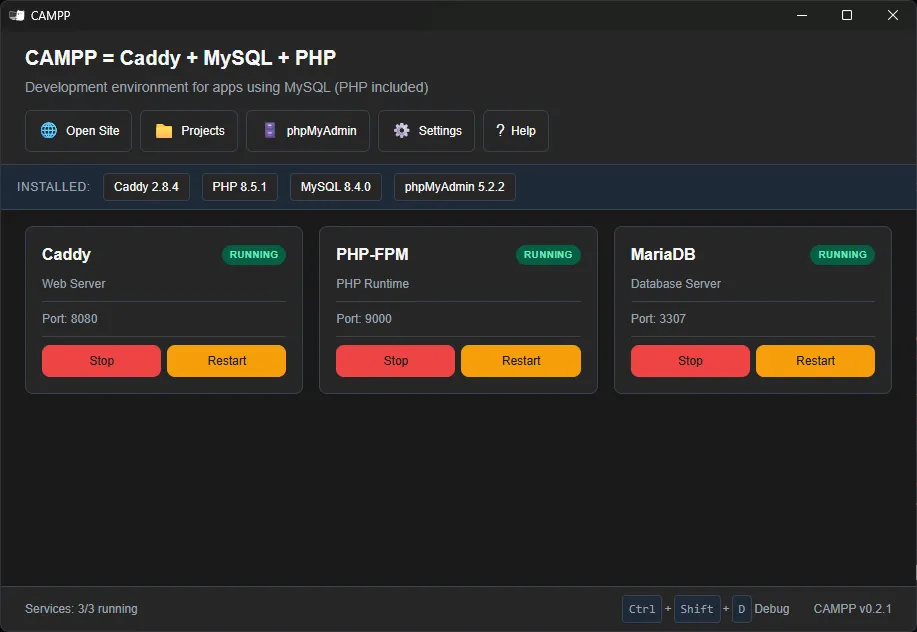
ข้อมูลการเชื่อมต่อ MySQL เริ่มต้นของ CAMPP:
| การตั้งค่า | ค่า |
|---|---|
| Host | localhost |
| Port | 3307 (ไม่ใช่ 3306 เพื่อหลีกเลี่ยงความขัดแย้ง) |
| Username | root |
| Password | (ตามที่ระบุใน CAMPP) |
หมายเหตุ: CAMPP ใช้พอร์ต 3307 สำหรับ MySQL เพื่อหลีกเลี่ยงความขัดแย้งกับบริการ MySQL อื่นที่อาจทำงานอยู่บนเครื่อง
3.2. สร้างฐานข้อมูล#
เข้าถึง phpMyAdmin ผ่าน CAMPP:
- กดปุ่ม phpMyAdmin ที่ Dashboard ของ CAMPP
- จะเปิด http://localhost:8080/phpmyadmin ↗ ขึ้นมา
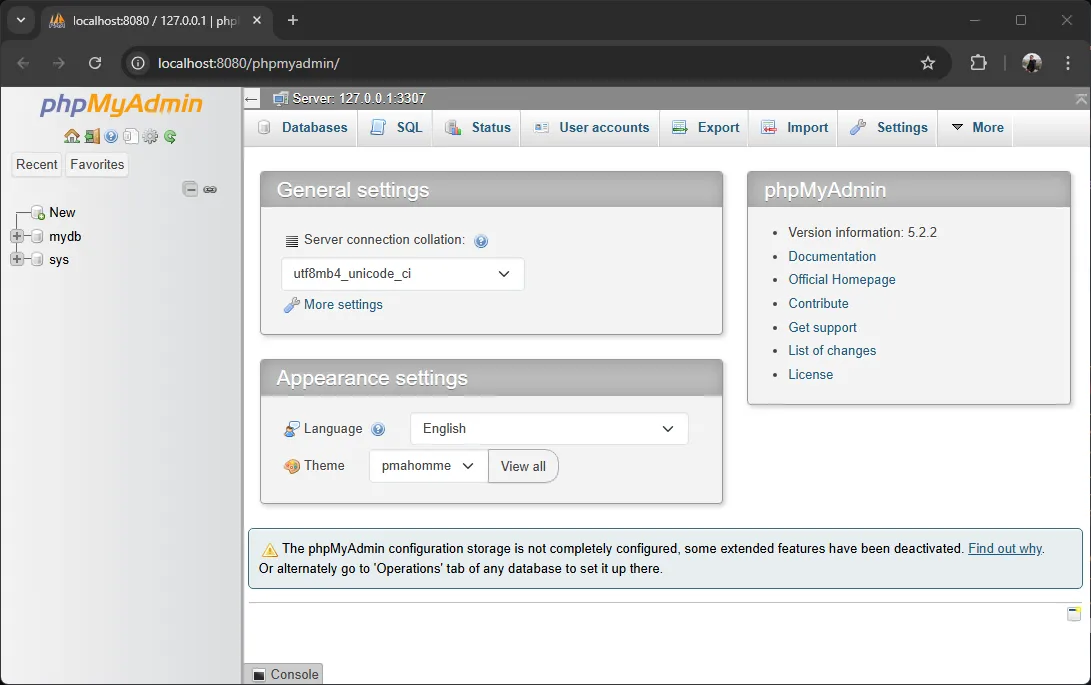
สร้างฐานข้อมูลใหม่:
- คลิกที่ New ใน phpMyAdmin
- ตั้งชื่อฐานข้อมูล:
test_db - คลิก Create
3.3. สร้างตารางด้วย SQL#
ใน phpMyAdmin เลือกฐานข้อมูล test_db แล้วคลิกที่ SQL วางคำสั่ง SQL ต่อไปนี้:
-- สร้างตาราง Users
CREATE TABLE users (
  id INT AUTO_INCREMENT PRIMARY KEY,
  fname VARCHAR(255) NOT NULL,
  lname VARCHAR(255) NOT NULL,
  username VARCHAR(255) NOT NULL UNIQUE,
  email VARCHAR(255) NOT NULL UNIQUE,
  avatar VARCHAR(500),
  created_at TIMESTAMP DEFAULT CURRENT_TIMESTAMP
);คลิก Go เพื่อสร้างตาราง
4. โครงสร้างโปรเจค#
สร้างโปรเจคใหม่และติดตั้ง Dependencies
mkdir api-testing-demo
cd api-testing-demo
npm init -y4.1 ติดตั้ง Dependencies#
# ติดตั้ง Production Dependencies
npm install express body-parser cors mysql2 dotenv

# ติดตั้ง Development Dependencies
npm install -D jest supertestคำอธิบาย Package ที่ติดตั้ง:
| Package | วัตถุประสงค์ |
|---|---|
express | เฟรมเวิร์ก API |
body-parser | แยกวิเคราะห์ JSON request bodies |
cors | เปิดใช้งาน cross-origin requests |
mysql2 | MySQL driver พร้อม Promise support |
dotenv | โหลด environment variables จากไฟล์ .env |
jest | Testing Framework |
supertest | HTTP testing library |
4.2 โครงสร้างไฟล์#
api-testing-demo/
├── src/
│   └── db.js
├── tests/
│   └── api.test.js
├── index.js
├── jest.setup.js
├── package.json
└── .env4.3 สร้างไฟล์ .env#
DB_HOST=localhost
DB_PORT=3307
DB_USER=root
DB_PASSWORD=your-password
DB_NAME=test_dbสำคัญ: CAMPP ใช้พอร์ต 3307 ไม่ใช่ 3306
4.4 ตั้งค่า Jest Setup#
สร้างไฟล์ jest.setup.js:
// Load environment variables for testing
require('dotenv').config();

// Close database connections after all tests complete
afterAll(async () => {
  const pool = require('./src/db');
  await pool.end();
});คำอธิบาย:
require('dotenv').config()- โหลด environment variables จากไฟล์ .env ก่อนรัน testsafterAll()- รันหลังจาก tests ทั้งหมดเสร็จสิ้นpool.end()- ปิด database connections ทั้งหมดอย่างสมบูรณ์
5. สร้าง Database Connection#
สร้างไฟล์ src/db.js:
const mysql = require('mysql2/promise');

// สร้าง MySQL connection pool
// การใช้ pool ช่วยให้จัดการ connection ได้อย่างมีประสิทธิภาพ
const pool = mysql.createPool({
  host: process.env.DB_HOST || 'localhost',
  port: process.env.DB_PORT || 3307,
  user: process.env.DB_USER || 'root',
  password: process.env.DB_PASSWORD || '',
  database: process.env.DB_NAME || 'test_db',
  waitForConnections: true,
  connectionLimit: 10,
  queueLimit: 0
});

module.exports = pool;จุดสำคัญ:
- Connection Pool: ใช้ pool เพื่อจัดการ database connections อย่างมีประสิทธิภาพ
- CAMPP Port: ใช้พอร์ต 3307 สำหรับ MySQL (ไม่ใช่ 3306)
- Promise Support: ใช้
mysql2/promiseเพื่อรองรับ async/await
6. สร้าง API Server#
สร้างไฟล์ index.js:
// Load environment variables
require('dotenv').config();

const express = require('express');
const bodyParser = require('body-parser');
const cors = require('cors');
const pool = require('./src/db');

const app = express();
const port = 5000;

// Middleware
app.use(cors());
app.use(bodyParser.json());

// Routes
app.get('/', (req, res) => {
  res.send('Hello! RESTful API is ready to use with MySQL')
});

// Get all users
app.get('/users', async (req, res) => {
  try {
    const [rows] = await pool.execute('SELECT * FROM users');
    res.json(rows);
  } catch (error) {
    res.status(500).json({ message: error.message });
  }
});

// Get user by ID
app.get('/users/:id', async (req, res) => {
  try {
    const id = parseInt(req.params.id);
    const [rows] = await pool.execute('SELECT * FROM users WHERE id = ?', [id]);
    if (rows.length === 0) {
      return res.status(404).json({ message: 'User not found' });
    }
    res.json(rows[0]);
  } catch (error) {
    res.status(500).json({ message: error.message });
  }
});

// Create new user
app.post('/users', async (req, res) => {
  try {
    const { fname, lname, username, email, avatar } = req.body;
    const [result] = await pool.execute(
      'INSERT INTO users (fname, lname, username, email, avatar) VALUES (?, ?, ?, ?, ?)',
      [fname, lname, username, email, avatar]
    );
    const [rows] = await pool.execute('SELECT * FROM users WHERE id = ?', [result.insertId]);
    res.status(201).json(rows[0]);
  } catch (error) {
    res.status(500).json({ message: error.message });
  }
});

// Update user
app.put('/users/:id', async (req, res) => {
  try {
    const id = parseInt(req.params.id);
    const { fname, lname, username, email, avatar } = req.body;
    const [result] = await pool.execute(
      'UPDATE users SET fname = ?, lname = ?, username = ?, email = ?, avatar = ? WHERE id = ?',
      [fname, lname, username, email, avatar, id]
    );
    const [rows] = await pool.execute('SELECT * FROM users WHERE id = ?', [id]);
    if (rows.length === 0) {
      return res.status(404).json({ message: 'User not found' });
    }
    res.json(rows[0]);
  } catch (error) {
    res.status(500).json({ message: error.message });
  }
});

// Delete user
app.delete('/users/:id', async (req, res) => {
  try {
    const id = parseInt(req.params.id);
    const [rows] = await pool.execute('SELECT * FROM users WHERE id = ?', [id]);
    if (rows.length === 0) {
      return res.status(404).json({ message: 'User not found' });
    }
    await pool.execute('DELETE FROM users WHERE id = ?', [id]);
    res.json({ message: `User with ID ${id} deleted` });
  } catch (error) {
    res.status(500).json({ message: error.message });
  }
});

// Start server only when run directly (not in tests)
if (require.main === module) {
  app.listen(port, () => {
    console.log(`Server running at http://localhost:${port}`);
    console.log(`MySQL connected via CAMPP at localhost:${process.env.DB_PORT || 3307}`);
  });
}

// Export for testing
module.exports = app;คำอธิบายโค้ดสำคัญ:
require('./src/db')- นำเข้า MySQL connection poolpool.execute()- ดำเนินการ SQL พร้อม prepared statements?placeholders - ป้องกัน SQL Injection[rows]- ดึงผลลัพธ์จาก queryresult.insertId- ดึง ID ที่เพิ่งถูกสร้างif (require.main === module)- เริ่มเซิร์ฟเวอร์เฉพาะเมื่อรันไฟล์โดยตรงmodule.exports = app- Export แอปพลิเคชันสำหรับการทดสอบ
7. เขียน Test Cases#
สร้างไฟล์ tests/api.test.js:
const request = require('supertest');
const app = require('../index');

describe('MySQL API Tests', () => {
  let createdUserId;

  // Test 1: Test Root Endpoint
  it('GET / should return API ready message', async () => {
    const res = await request(app).get('/');
    expect(res.statusCode).toBe(200);
    expect(res.text).toContain('RESTful API is ready');
  });

  // Test 2: Test creating a user
  it('POST /users should create a user', async () => {
    const res = await request(app)
      .post('/users')
      .send({
        fname: 'John',
        lname: 'Smith',
        username: `john_smith_${Date.now()}`, // unique username
        email: `john${Date.now()}@example.com`, // unique email
        avatar: 'https://example.com/avatar.jpg'
      });
    expect(res.statusCode).toBe(201);
    expect(res.body).toHaveProperty('id');
    createdUserId = res.body.id; // Save ID for later tests
  });

  // Test 3: Test retrieving the created user
  it('GET /users/:id should return the created user', async () => {
    const res = await request(app).get(`/users/${createdUserId}`);
    expect(res.statusCode).toBe(200);
    expect(res.body).toHaveProperty('fname', 'John');
    expect(res.body).toHaveProperty('lname', 'Smith');
  });

  // Test 4: Test updating the user
  it('PUT /users/:id should update the user', async () => {
    const res = await request(app)
      .put(`/users/${createdUserId}`)
      .send({
        fname: 'Jackson',
        lname: 'Mars',
        username: `jackson_mars_${Date.now()}`,
        email: `jackson${Date.now()}@example.com`,
        avatar: 'https://example.com/new-avatar.jpg'
      });
    expect(res.statusCode).toBe(200);
    expect(res.body).toHaveProperty('fname', 'Jackson');
    expect(res.body).toHaveProperty('lname', 'Mars');
  });

  // Test 5: Test deleting the user
  it('DELETE /users/:id should delete the user', async () => {
    const res = await request(app).delete(`/users/${createdUserId}`);
    expect(res.statusCode).toBe(200);
    expect(res.body.message).toContain(`User with ID ${createdUserId} deleted`);
  });

  // Test 6: Test retrieving a deleted user
  it('GET /users/:id should return 404 for deleted user', async () => {
    const res = await request(app).get(`/users/${createdUserId}`);
    expect(res.statusCode).toBe(404);
    expect(res.body).toHaveProperty('message', 'User not found');
  });
});8. คำอธิบาย Test Cases แต่ละส่วน#
8.1 การนำเข้า Dependencies#
const request = require('supertest');
const app = require('../index');supertest- สำหรับส่ง HTTP Request ไปยัง Express App../index- นำเข้า Express Application ที่จะทดสอบ
8.2 Test Suite Structure#
describe('MySQL API Tests', () => {
  let createdUserId; // Variable to store the ID of the created user

  // Test cases will be here
});describe()- จัดกลุ่ม Test Cases ที่เกี่ยวข้องกันcreatedUserId- เก็บ ID ของข้อมูลที่สร้างขึ้นเพื่อใช้ในการทดสอบต่อ
8.3 การทดสอบแต่ละ Endpoint#
Test 1: Root Endpoint
it('GET / should return API ready message', async () => {
  const res = await request(app).get('/');
  expect(res.statusCode).toBe(200);
  expect(res.text).toContain('RESTful API is ready');
});it()- กำหนด Test Case เดี่ยวrequest(app).get('/')- ส่ง GET Request ไปยัง Root Pathexpect(res.statusCode).toBe(200)- ตรวจสอบ Status Codeexpect(res.text).toContain()- ตรวจสอบเนื้อหาใน Response
Test 2: การสร้างผู้ใช้
it('POST /users should create a user', async () => {
  const res = await request(app)
    .post('/users')
    .send({
      fname: 'John',
      lname: 'Smith',
      username: `john_smith_${Date.now()}`,
      email: `john${Date.now()}@example.com`,
      avatar: 'https://example.com/avatar.jpg'
    });
  expect(res.statusCode).toBe(201);
  expect(res.body).toHaveProperty('id');
  createdUserId = res.body.id;
});.send()- ส่งข้อมูลใน Request BodyDate.now()- สร้าง Unique Value เพื่อหลีกเลี่ยงข้อมูลซ้ำtoHaveProperty('id')- ตรวจสอบว่า Response มี Property นั้น- เก็บ
idไว้ใช้ในการทดสอบต่อไป
8.4 Jest Matchers ที่ใช้บ่อย#
| Matcher | ความหมาย | ตัวอย่าง |
|---|---|---|
.toBe() | เท่ากับ (===) | expect(status).toBe(200) |
.toEqual() | เท่ากับ (deep equality) | expect(obj).toEqual({id: 1}) |
.toContain() | มีข้อความ/ค่านั้น | expect(text).toContain('success') |
.toHaveProperty() | มี Property นั้น | expect(obj).toHaveProperty('name') |
.toBeNull() | เป็น null | expect(value).toBeNull() |
.toBeTruthy() | เป็น truthy | expect(result).toBeTruthy() |
9. ตั้งค่า NPM Scripts#
เพิ่มใน package.json:
{
  "scripts": {
    "test": "jest",
    "test:watch": "jest --watch",
    "test:coverage": "jest --coverage",
    "start": "node index.js"
  },
  "jest": {
    "setupFilesAfterEnv": [
      "./jest.setup.js"
    ],
    "testEnvironment": "node"
  }
}คำอธิบาย Scripts:
npm test- รันการทดสอบทั้งหมดnpm run test:watch- รันการทดสอบและติดตามการเปลี่ยนแปลงไฟล์npm run test:coverage- รันการทดสอบพร้อม Code Coverage Report
คำอธิบาย Jest Config:
setupFilesAfterEnv- รันไฟล์ setup หลังจาก Jest environment พร้อม (โหลด .env และปิด connections หลังจบ)testEnvironment: "node"- ใช้ Node.js environment สำหรับการทดสอบ
คำอธิบาย Scripts:
npm test- รันการทดสอบทั้งหมดnpm run test:watch- รันการทดสอบและติดตามการเปลี่ยนแปลงไฟล์npm run test:coverage- รันการทดสอบพร้อม Code Coverage Report
10. รันการทดสอบ#
10.1 รันการทดสอบ#
# รันการทดสอบครั้งเดียว
npm test10.2 ผลลัพธ์การทดสอบที่คาดหวัง#
 PASS  tests/api.test.js
  MySQL API Tests
    √ GET / should return API ready message (29 ms)
    √ POST /users should create a user (50 ms)
    √ GET /users/:id should return the created user (5 ms)
    √ PUT /users/:id should update the user (8 ms)
    √ DELETE /users/:id should delete the user (7 ms)
    √ GET /users/:id should return 404 for deleted user (4 ms)

Test Suites: 1 passed, 1 total
Tests:       6 passed, 6 total
Snapshots:   0 total
Time:        1.867 s
Ran all test suites.11. การทดสอบ Error Cases เพิ่มเติม#
เพิ่ม Test Cases สำหรับกรณีข้อผิดพลาด:
describe('Error Handling Tests', () => {

  // Test creating a user with incomplete data
  it('POST /users should return 500 for invalid data', async () => {
    const res = await request(app)
      .post('/users')
      .send({
        fname: 'John'
        // Missing lname, username, email
      });
    expect(res.statusCode).toBe(500);
    expect(res.body).toHaveProperty('message');
  });

  // Test retrieving a user that does not exist
  it('GET /users/999999 should return 404', async () => {
    const res = await request(app).get('/users/999999');
    expect(res.statusCode).toBe(404);
    expect(res.body).toHaveProperty('message', 'User not found');
  });

  // Test creating a user with a duplicate email
  it('POST /users should return 500 for duplicate email', async () => {
    const userData = {
      fname: 'Jane',
      lname: 'Doe',
      username: 'jane_doe_test',
      email: 'duplicate@test.com',
      avatar: 'https://example.com/avatar.jpg'
    };

    // Create user the first time
    await request(app).post('/users').send(userData);

    // Attempt to create another user with the same email
    const res = await request(app).post('/users').send({
      ...userData,
      username: 'jane_doe_test2' // Change username but keep the same email
    });

    expect(res.statusCode).toBe(500);
    expect(res.body.message).toContain('email');
  });
});ผลลัพธ์การทดสอบที่คาดหวัง
 PASS  tests/api.test.js
  MySQL API Tests
    √ GET / should return API ready message (29 ms)
    √ POST /users should create a user (50 ms)
    √ GET /users/:id should return the created user (5 ms)
    √ PUT /users/:id should update the user (8 ms)
    √ DELETE /users/:id should delete the user (7 ms)
    √ GET /users/:id should return 404 for deleted user (4 ms)
  Error Handling Tests
    √ POST /users should return 500 for invalid data (3 ms)
    √ GET /users/999999 should return 404 (5 ms)
    √ POST /users should return 500 for duplicate email (10 ms)

Test Suites: 1 passed, 1 total
Tests:       9 passed, 9 total
Snapshots:   0 total
Time:        1.867 s
Ran all test suites.12. Code Coverage#
การตรวจสอบ Code Coverage เพื่อดูว่าโค้ดถูกทดสอบครอบคลุมเท่าไหร่:
npm run test:coverageผลลัพธ์ที่แสดง:
 PASS  tests/api.test.js
  MySQL API Tests
    √ GET / should return API ready message (29 ms)
    √ POST /users should create a user (50 ms)
    √ GET /users/:id should return the created user (5 ms)
    √ PUT /users/:id should update the user (8 ms)
    √ DELETE /users/:id should delete the user (7 ms)
    √ GET /users/:id should return 404 for deleted user (4 ms)
  Error Handling Tests
    √ POST /users should return 500 for invalid data (3 ms)
    √ GET /users/999999 should return 404 (5 ms)
    √ POST /users should return 500 for duplicate email (10 ms)

----------------------|---------|----------|---------|---------|----------------------------
File                  | % Stmts | % Branch | % Funcs | % Lines | Uncovered Line #s
----------------------|---------|----------|---------|---------|----------------------------
All files             |   78.94 |       55 |   71.42 |   78.94 |
  index.js            |   77.77 |       50 |   71.42 |   77.77 | 20-24,38,68,72,82,87,93-95
 api-testing-demo/src |     100 |       60 |     100 |     100 |
  db.js               |     100 |       60 |     100 |     100 | 6-8,10
----------------------|---------|----------|---------|---------|----------------------------
Test Suites: 1 passed, 1 total
Tests:       9 passed, 9 total
Snapshots:   0 total
Time:        1.867 s
Ran all test suites.คำอธิบาย:
- % Stmts - เปอร์เซ็นต์ของ Statements ที่ถูกทดสอบ
- % Branch - เปอร์เซ็นต์ของ Conditional Branches ที่ถูกทดสอบ
- % Funcs - เปอร์เซ็นต์ของ Functions ที่ถูกทดสอบ
- % Lines - เปอร์เซ็นต์ของบรรทัดโค้ดที่ถูกทดสอบ
13. Best Practices สำหรับการทดสอบ API#
✅ สิ่งที่ควรทำ:
- ใช้ข้อมูลที่ unique ในแต่ละ test (เช่น timestamp)
- ทดสอบทั้ง Success และ Error Cases
- ทำความสะอาดข้อมูลหลังการทดสอบ
- เขียน Test Case ที่อ่านเข้าใจง่าย
- ใช้
describe()จัดกลุ่ม Test Cases - ตรวจสอบทั้ง Status Code และ Response Data
- ใช้ Prepared Statements (
?placeholders) เพื่อป้องกัน SQL Injection
❌ สิ่งที่ควรหลีกเลี่ยง:
- ใช้ข้อมูลแบบ Hard-coded ที่อาจซ้ำกัน
- เขียน Test Cases ที่ depend กันมากเกินไป
- ไม่ทดสอบ Error Cases
- ใช้ชื่อ Test Case ที่ไม่ชัดเจน
- ไม่ตรวจสอบ Response ที่สมบูรณ์
- ใช้ raw SQL โดยไม่มี prepared statements
14. สรุป#
บทความนี้ครอบคลุม:
- ✅ การตั้งค่า Jest และ Supertest สำหรับการทดสอบ RESTful API
- ✅ การใช้ mysql2 เชื่อมต่อ MySQL โดยตรงพร้อม Prepared Statements
- ✅ CAMPP Local Web Development Stack สำหรับ MySQL และ phpMyAdmin
- ✅ การเขียน Test Cases สำหรับ CRUD operations
- ✅ การทดสอบ Error Cases การจัดการข้อผิดพลาด
- ✅ Code Coverage การตรวจสอบความครอบคลุมของการทดสอบ
ประโยชน์ของการใช้ mysql2 โดยตรง#
- ประสิทธิภาพ: เชื่อมต่อฐานข้อมูลโดยตรง ไม่มี ORM layer เพิ่ม
- ความยืดหยุ่น: เขียน SQL queries ตามต้องการ
- ความปลอดภัย: ใช้ Prepared Statements ป้องกัน SQL Injection
- Connection Pool: จัดการ connections อย่างมีประสิทธิภาพ
การทดสอบ API เป็นส่วนสำคัญของการพัฒนาซอฟต์แวร์สมัยใหม่ เครื่องมือเหล่านี้จะช่วยให้การพัฒนาเป็นไปอย่างมีคุณภาพและเชื่อถือได้
แหล่งการเรียนรู้#
- Jest Documentation ↗: เอกสารอย่างเป็นทางการของ Jest
- Supertest npm ↗: เอกสาร Supertest
- mysql2 npm ↗: เอกสาร mysql2 อย่างเป็นทางการ
- CAMPP ↗: ดาวน์โหลด Local Web Development Stack