
1. Objectives#
This article will guide you through designing and developing a RESTful API for managing Users, Products, Orders resources, and Nested Resources to display all orders of users and all products in orders, using Node.js and Express to connect directly to a MySQL database with mysql2, and testing with Postman.
2. Install Programs and Setup Database#
-
Install Node.js LTS Version Download Node.js LTS (Long Term Support) version from https://nodejs.org ↗ and select the recommended LTS version for development.
Setup:
- Download the installer file appropriate for your operating system (Windows, macOS, or Linux)
- Install by double-clicking the installer file and follow the installation steps
- After installation is complete, open Command Prompt or Terminal and check the installation with these commands:
bashnode --version npm --version - If installed successfully, it will display the versions of Node.js and npm
-
Install CAMPP (MySQL + phpMyAdmin) Download and install CAMPP from https://campp.melivecode.com ↗ and select the version appropriate for your operating system.
Setup:
- When installation is complete, open CAMPP and click Start Caddy, PHP, and MySQL
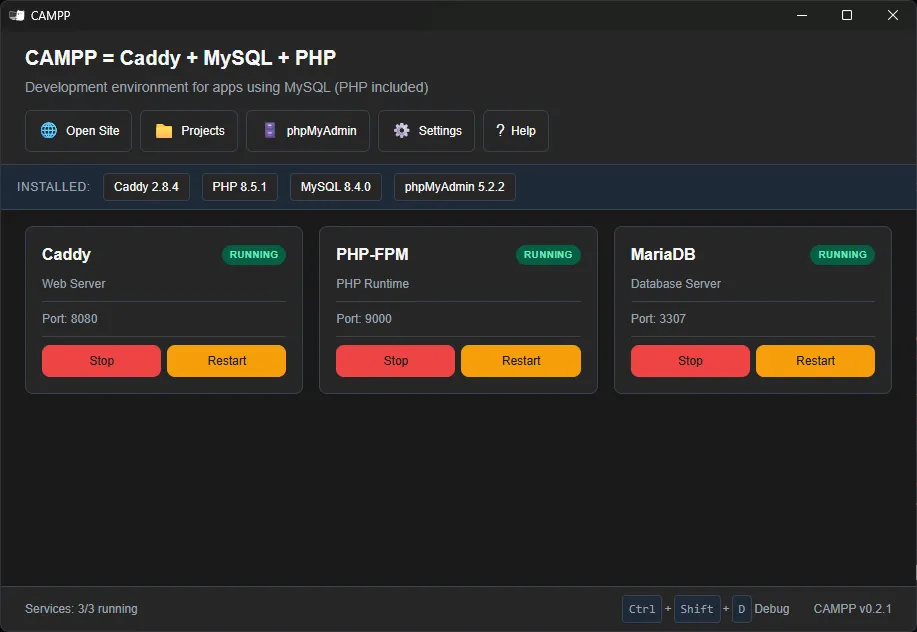
- Click the phpMyAdmin button on the CAMPP Dashboard to open http://localhost:8080/phpmyadmin ↗
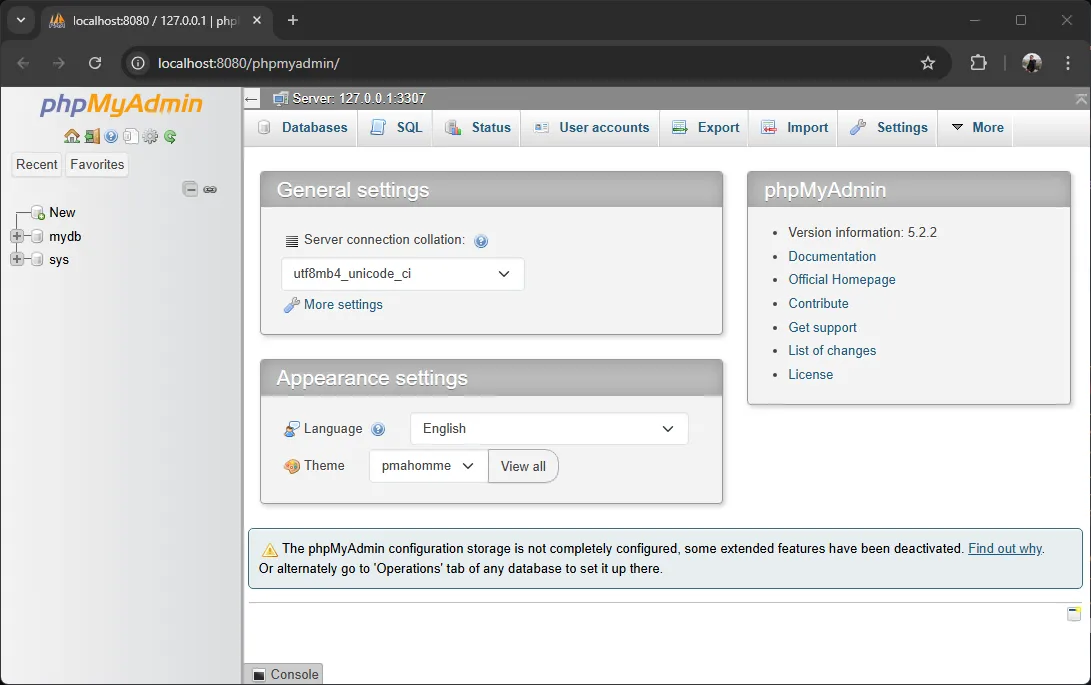
- Click New in phpMyAdmin
- Name the database: express_mysql_db
- Click Create
CAMPP Default MySQL Connection Settings:
Setting Value Host localhostPort 3307(not 3306 to avoid conflicts)Username rootPassword (empty)Note: CAMPP uses port 3307 for MySQL to avoid conflicts with other MySQL services that may be running on your machine
- When installation is complete, open CAMPP and click Start Caddy, PHP, and MySQL
-
Install Postman Download Postman at https://www.postman.com/downloads/ ↗ Install and open Postman. You will use Postman to test API endpoints (GET, POST, PUT, DELETE).
3. Setup Project and Install MySQL Driver#
-
Create Node.js Project Open Terminal or Command Prompt and run these commands:
bashmkdir api-mysql cd api-mysql npm init -y npm install express cors body-parser mysql2 code . # Open VS Code in the project folder (if installed) -
Create .env File Create a
.envfile in the project root to store database connection values:
bashDB_HOST=localhost DB_USER=root DB_PASSWORD=your-password DB_NAME=express_mysql_db DB_PORT=3307DB_HOST: MySQL Host (localhost)DB_USER: Database username (root for CAMPP)DB_PASSWORD: Password (leave empty for CAMPP if not set)DB_NAME: Database nameDB_PORT: MySQL Port (3307 for CAMPP)
4. Create Database Tables#
Open phpMyAdmin at http://localhost:8080/phpmyadmin ↗ and go to the express_mysql_db database, then click the SQL tab and paste the following SQL commands to create tables:
-- Create Users table
CREATE TABLE users (
  id INT AUTO_INCREMENT PRIMARY KEY,
  fname VARCHAR(100) NOT NULL,
  lname VARCHAR(100) NOT NULL,
  username VARCHAR(50) NOT NULL UNIQUE,
  email VARCHAR(100) NOT NULL UNIQUE,
  avatar VARCHAR(255) NULL
);

-- Create Products table
CREATE TABLE products (
  id INT AUTO_INCREMENT PRIMARY KEY,
  name VARCHAR(200) NOT NULL,
  price INT NOT NULL
);

-- Create Orders table
CREATE TABLE orders (
  id INT AUTO_INCREMENT PRIMARY KEY,
  user_id INT NOT NULL,
  created_at TIMESTAMP DEFAULT CURRENT_TIMESTAMP,
  FOREIGN KEY (user_id) REFERENCES users(id) ON DELETE CASCADE
);

-- Create Order_Product table (join table between Orders and Products)
CREATE TABLE order_product (
  id INT AUTO_INCREMENT PRIMARY KEY,
  order_id INT NOT NULL,
  product_id INT NOT NULL,
  FOREIGN KEY (order_id) REFERENCES orders(id) ON DELETE CASCADE,
  FOREIGN KEY (product_id) REFERENCES products(id) ON DELETE CASCADE
);Table Structure Summary#
| Table | Relationship | Type |
|---|---|---|
| users | has many orders | One-to-Many |
| orders | belongs to one user | Many-to-One |
| orders | has many products | Many-to-Many |
| products | appears in many orders | Many-to-Many |
| order_product | joins orders and products | Join table |
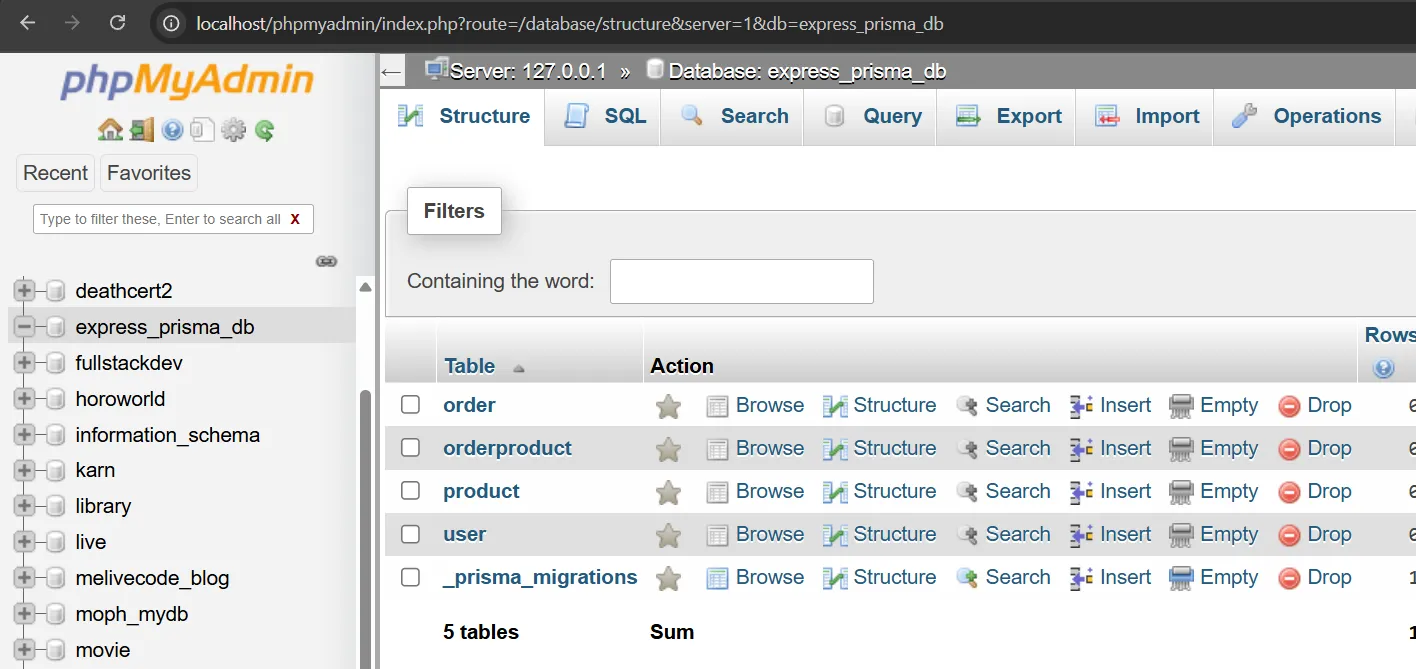
View the results in the express_mysql_db database
SQL Commands Explanation for Creating Tables#
CREATE TABLE - Command to create a new table:
CREATE TABLE table_name (
  column_name data_type constraints
);Commonly Used Data Types:
INT- Integer numbersVARCHAR(n)- Character text with maximum length of n charactersTIMESTAMP- Date and time dataTEXT- Unlimited length character text
Commonly Used Constraints:
PRIMARY KEY- Primary key, used to identify each row uniquelyAUTO_INCREMENT- Auto-incrementing number (1, 2, 3, …)NOT NULL- Data must not be emptyUNIQUE- Data must not be duplicatedDEFAULT- Default value when data is not specified
Table Relationships (Foreign Key):
FOREIGN KEY (column_name) REFERENCES other_table(id)
ON DELETE CASCADE -- Delete related data when main data is deletedExample:
-- users table stores user data
id INT AUTO_INCREMENT PRIMARY KEY  -- User ID (auto-increment)
username VARCHAR(50) NOT NULL UNIQUE  -- Username (unique)

-- orders table stores orders
user_id INT NOT NULL
FOREIGN KEY (user_id) REFERENCES users(id) ON DELETE CASCADE
-- user_id links to id in the users table
-- When a user is deleted, their orders will be deleted too5. Add Sample Data (Seed Data)#
After creating the tables, we need sample data to test the API immediately. Open phpMyAdmin at http://localhost:8080/phpmyadmin ↗ and go to the express_mysql_db database, then click the SQL tab and paste the following SQL commands:
-- Add Users data
INSERT INTO users (id, fname, lname, username, email, avatar) VALUES
(1, 'Karn', 'Yong', 'karn.yong', 'karn.yong@melivecode.com', 'https://www.melivecode.com/users/1.png'),
(2, 'Parkpoom', 'Chaisiriprasert', 'parkpoom', 'parkpoom@melivecode.com', 'https://www.melivecode.com/users/2.png');

-- Add Products data
INSERT INTO products (id, name, price) VALUES
(1, 'Laptop', 39999),
(2, 'Smartphone', 19999),
(3, 'Monitor', 7999);

-- Add Orders data
INSERT INTO orders (id, user_id) VALUES
(1, 1),
(2, 2),
(3, 1);

-- Add Order_Product data (links orders with products)
INSERT INTO order_product (order_id, product_id) VALUES
-- Order #1 (Karn) has Laptop and Smartphone
(1, 1),
(1, 2),
-- Order #2 (Parkpoom) has Smartphone
(2, 2),
-- Order #3 (Karn) has Smartphone and Monitor
(3, 2),
(3, 3);SQL Commands Explanation for Adding Data#
INSERT INTO - Command to add new data:
INSERT INTO table_name (column1, column2) VALUES (value1, value2);Add multiple rows at once:
INSERT INTO users (fname, lname, email) VALUES
('Karn', 'Yong', 'karn@example.com'),
('Parkpoom', 'Chaisiriprasert', 'parkpoom@example.com');Sample Data Added:
| Table | Data Added |
|---|---|
| Users | 2 users: Karn and Parkpoom |
| Products | 3 products: Laptop, Smartphone, Monitor |
| Orders | 3 orders |
| Order_Product | Links orders with products |
Sample Data Relationships:
- Karn (id: 1) placed 2 orders:
- Order #1: Laptop + Smartphone = 59,998 Baht
- Order #3: Smartphone + Monitor = 27,998 Baht
- Parkpoom (id: 2) placed 1 order:
- Order #2: Smartphone = 19,999 Baht
6. Create Database Connection File#
Create a src/db.js file to create a connection pool for connecting to the MySQL database:
// src/db.js
const mysql = require('mysql2/promise');

// Create connection pool
const pool = mysql.createPool({
  host: process.env.DB_HOST || 'localhost',
  user: process.env.DB_USER || 'root',
  password: process.env.DB_PASSWORD || '',
  database: process.env.DB_NAME || 'express_mysql_db',
  port: process.env.DB_PORT || 3307,
  waitForConnections: true,
  connectionLimit: 10,
  queueLimit: 0
});

module.exports = pool;Connection Pool Explanation#
Connection Pool is storing database connections for reuse, so you don’t need to open-close a new connection every time.
7. Basic SQL Commands Used in RESTful API#
SELECT - Retrieve Data#
Retrieve all data:
SELECT * FROM users;Retrieve data by condition:
SELECT * FROM users WHERE id = 1;Retrieve specific columns:
SELECT fname, lname, email FROM users;INSERT - Add Data#
Add new data:
INSERT INTO users (fname, lname, username, email) VALUES ('Anna', 'Dee', 'anna.dee', 'Anna@example.com');In JavaScript (using parameters):
const sql = 'INSERT INTO users (fname, lname, username, email) VALUES (?, ?, ?, ?)';
await pool.query(sql, ['Anna', 'Dee', 'anna.dee', 'Anna@example.com']);UPDATE - Update Data#
Update data:
UPDATE users SET fname = 'Jane', email = 'jane@example.com' WHERE id = 3;In JavaScript:
const sql = 'UPDATE users SET fname = ?, email = ? WHERE id = ?';
await pool.query(sql, ['Jane', 'jane@example.com', 1]);DELETE - Delete Data#
Delete data:
DELETE FROM users WHERE id = 3;In JavaScript:
await pool.query('DELETE FROM users WHERE id = ?', [3]);JOIN - Join Tables#
LEFT JOIN - Join tables and show all left-side data:
SELECT users.id, users.fname, orders.id AS order_id
FROM users
LEFT JOIN orders ON users.id = orders.user_id;This SQL query retrieves data from the users table and the orders table using a LEFT JOIN.
It selects each user’s id and fname, along with the corresponding order_id from the orders table. The LEFT JOIN ensures that all users are included, even if they do not have any orders. If a user has no matching order, the order_id will be NULL.
The condition ON users.id = orders.user_id links each order to the correct user based on their ID.
Use JOIN with multiple tables:
SELECT o.id, u.fname, p.name, p.price
FROM orders o
JOIN users u ON o.user_id = u.id
JOIN order_product op ON o.id = op.order_id
JOIN products p ON op.product_id = p.id;Parameterized Queries (?)#
Why use ??
- Secure - Prevents SQL Injection
- Clean - Code is more readable
- Correct - Automatically handles data types
Bad (SQL Injection risk):
const sql = `SELECT * FROM users WHERE id = ${userId}`;
// If userId = "1; DROP TABLE users;" it will be dangerousGood (Secure):
const sql = 'SELECT * FROM users WHERE id = ?';
await pool.query(sql, [userId]);
// The ? will be replaced with a safe value8. Create index.js with Express + MySQL Endpoints#
Create an index.js file in the project root and add the basic Express server code with the database connection we created:
const express = require('express');
const bodyParser = require('body-parser');
const cors = require('cors');
const pool = require('./src/db'); // Import database connection
const app = express();
const port = 5000; // Define port

// Middleware
app.use(cors());
app.use(bodyParser.json());

// Test route
app.get('/', (req, res) => {
  res.send('Hello! RESTful API is ready to use with MySQL');
});

// Add API endpoints below this line

// Start server
app.listen(port, () => {
  console.log(`Server running at http://localhost:${port}`);
});Start and Test API Server:
node --env-file=.env index.jsOpen a web browser and go to http://localhost:5000 ↗, you will see the message “Hello! RESTful API is ready to use with MySQL” as shown
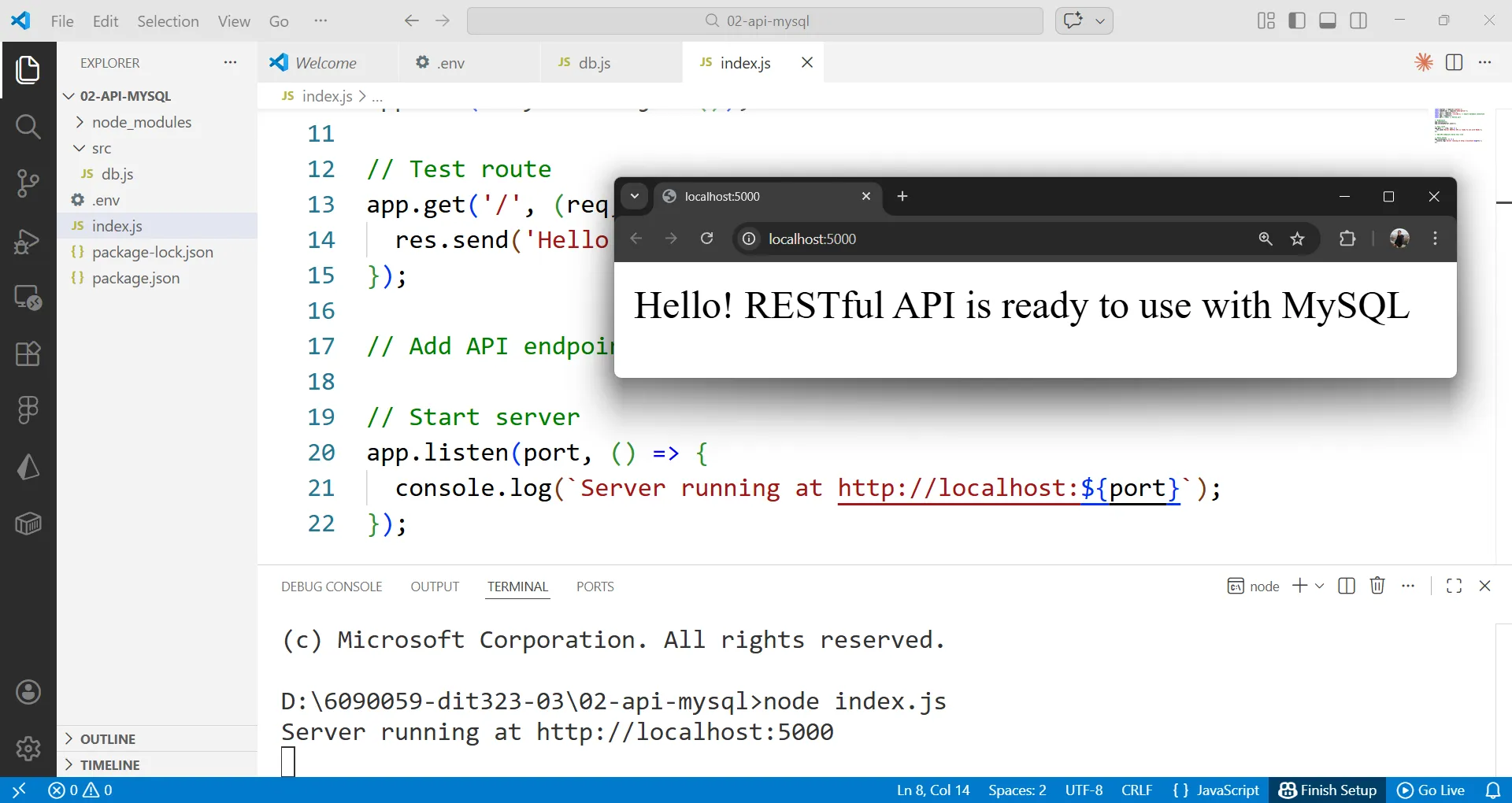
Next, we will add endpoints for User, Product, and Order using SQL queries to manage data.
8.1. User Endpoints#
Add the following code to the index.js file under app.get('/')
// User Endpoints
// Read All Users
app.get('/users', async (req, res) => {
  try {
    const [rows] = await pool.query('SELECT * FROM users');
    res.json(rows);
  } catch (error) {
    res.status(500).json({ message: 'Error fetching users', error: error.message });
  }
});

// Read One User
app.get('/users/:id', async (req, res) => {
  try {
    const id = parseInt(req.params.id);
    const [rows] = await pool.query('SELECT * FROM users WHERE id = ?', [id]);
    if (rows.length === 0) {
      return res.status(404).json({ message: 'User not found' });
    }
    res.json(rows[0]);
  } catch (error) {
    res.status(500).json({ message: 'Error fetching user', error: error.message });
  }
});

// Create User
app.post('/users', async (req, res) => {
  try {
    const { fname, lname, username, email, avatar } = req.body;
    const sql = 'INSERT INTO users (fname, lname, username, email, avatar) VALUES (?, ?, ?, ?, ?)';
    const [result] = await pool.query(sql, [fname, lname, username, email, avatar || null]);

    const [newUser] = await pool.query('SELECT * FROM users WHERE id = ?', [result.insertId]);
    res.status(201).json(newUser[0]);
  } catch (error) {
    if (error.code === 'ER_DUP_ENTRY') {
      return res.status(409).json({ message: 'Username or email already exists' });
    }
    res.status(500).json({ message: 'Error creating user', error: error.message });
  }
});

// Update User
app.put('/users/:id', async (req, res) => {
  try {
    const id = parseInt(req.params.id);
    const { fname, lname, username, email, avatar } = req.body;

    // Check if user exists
    const [existing] = await pool.query('SELECT * FROM users WHERE id = ?', [id]);
    if (existing.length === 0) {
      return res.status(404).json({ message: 'User not found' });
    }

    const sql = 'UPDATE users SET fname = ?, lname = ?, username = ?, email = ?, avatar = ? WHERE id = ?';
    await pool.query(sql, [fname, lname, username, email, avatar || null, id]);

    const [updated] = await pool.query('SELECT * FROM users WHERE id = ?', [id]);
    res.status(200).json(updated[0]);
  } catch (error) {
    if (error.code === 'ER_DUP_ENTRY') {
      return res.status(409).json({ message: 'Username or email already exists' });
    }
    res.status(500).json({ message: 'Error updating user', error: error.message });
  }
});

// Delete User
app.delete('/users/:id', async (req, res) => {
  try {
    const id = parseInt(req.params.id);

    // Check if user exists
    const [existing] = await pool.query('SELECT * FROM users WHERE id = ?', [id]);
    if (existing.length === 0) {
      return res.status(404).json({ message: 'User not found' });
    }

    await pool.query('DELETE FROM users WHERE id = ?', [id]);
    res.status(200).json({ message: `User with ID ${id} deleted successfully` });
  } catch (error) {
    res.status(500).json({ message: 'Error deleting user', error: error.message });
  }
});SQL Explanation in User Endpoints:
-
SELECT * FROM users
- Retrieves all columns from the users table
- Result: All users
-
SELECT * FROM users WHERE id = ?
- Retrieves user with id matching the specified value
?is a placeholder that will be replaced with a value from the array[id]- Result: One user or empty array if not found
-
INSERT INTO users (…) VALUES (?, ?, ?, ?, ?)
- Adds a new user
result.insertIdis the auto-generated id- After INSERT, SELECT again to retrieve the newly created data
-
UPDATE users SET … WHERE id = ?
- Updates user with id matching the specified value
- After UPDATE, SELECT to retrieve the updated data
-
DELETE FROM users WHERE id = ?
- Deletes user with id matching the specified value
- Data in the orders table will be deleted too (CASCADE)
Error Handling:
ER_DUP_ENTRY- Occurs when data is duplicated (username or email)rows.length === 0- Data not found
| HTTP Method | URI | Purpose | Logic | Response |
|---|---|---|---|---|
| GET | /users | Get all users | Use SELECT * FROM users to retrieve all data | List of all user objects |
| GET | /users/:id | Get user by ID | Use SELECT WHERE id = ? from URL parameter id, returns 404 if not found | User object or 404 (not found) |
| POST | /users | Create new user | req.body should have fname, lname, username, email, avatar. Use INSERT INTO users | Newly created user object or 409 (duplicate) or 500 (error) |
| PUT | /users/:id | Update user by ID | Update user data using ID from URL and data from Body. Handle errors (e.g., user not found or duplicate) | Updated user object or 404 (not found) or 409 (duplicate) or 500 (error) |
| DELETE | /users/:id | Delete user by ID | Use DELETE FROM users WHERE id = ? with specified ID | User deletion confirmation or 404 (not found) or 500 (error) |
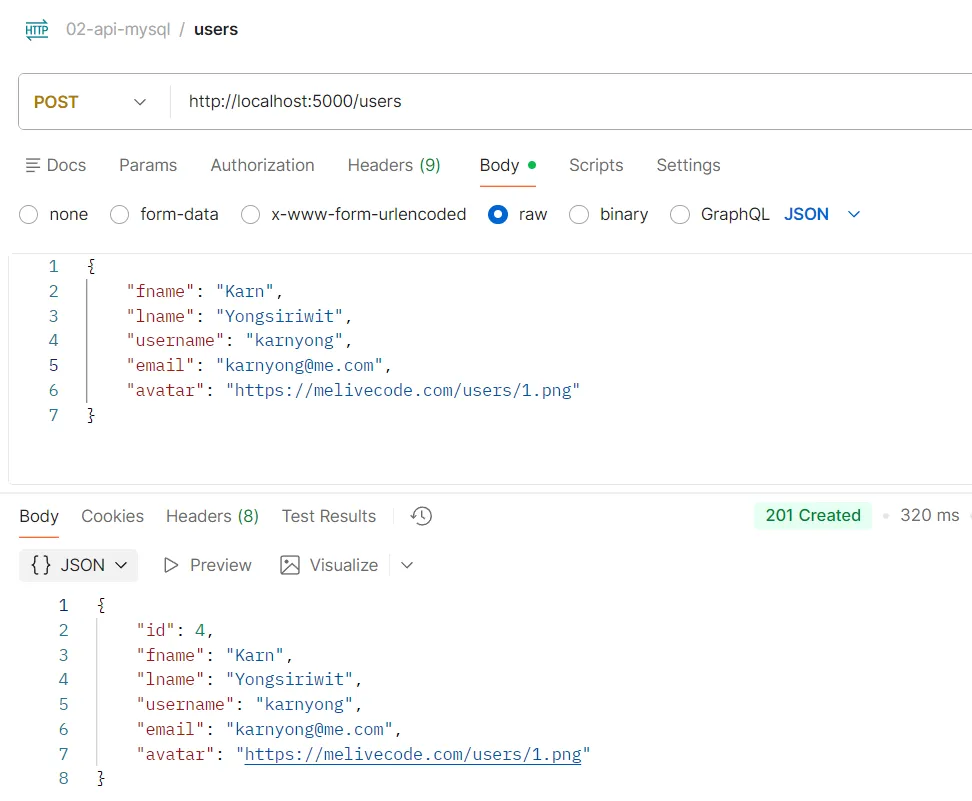
API Testing Example POST /users
Purpose Create a new user
Logic
- req.body must include: fname (first name), lname (last name), username (username), email (email), and avatar (profile picture)
- The system will use the INSERT INTO users command to save user data to the database
Response
Object of the newly created user data
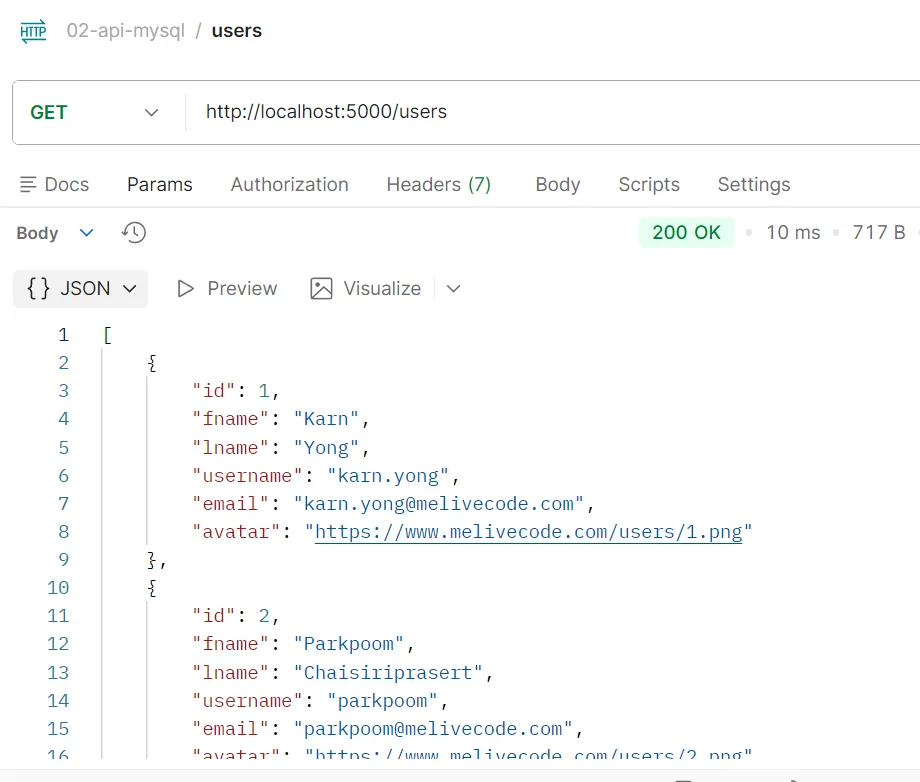
API Testing Example GET /users
Purpose Get all users
Logic
- The system will use the SELECT * FROM users command to retrieve all user data from the database
Response
List of objects of all user data
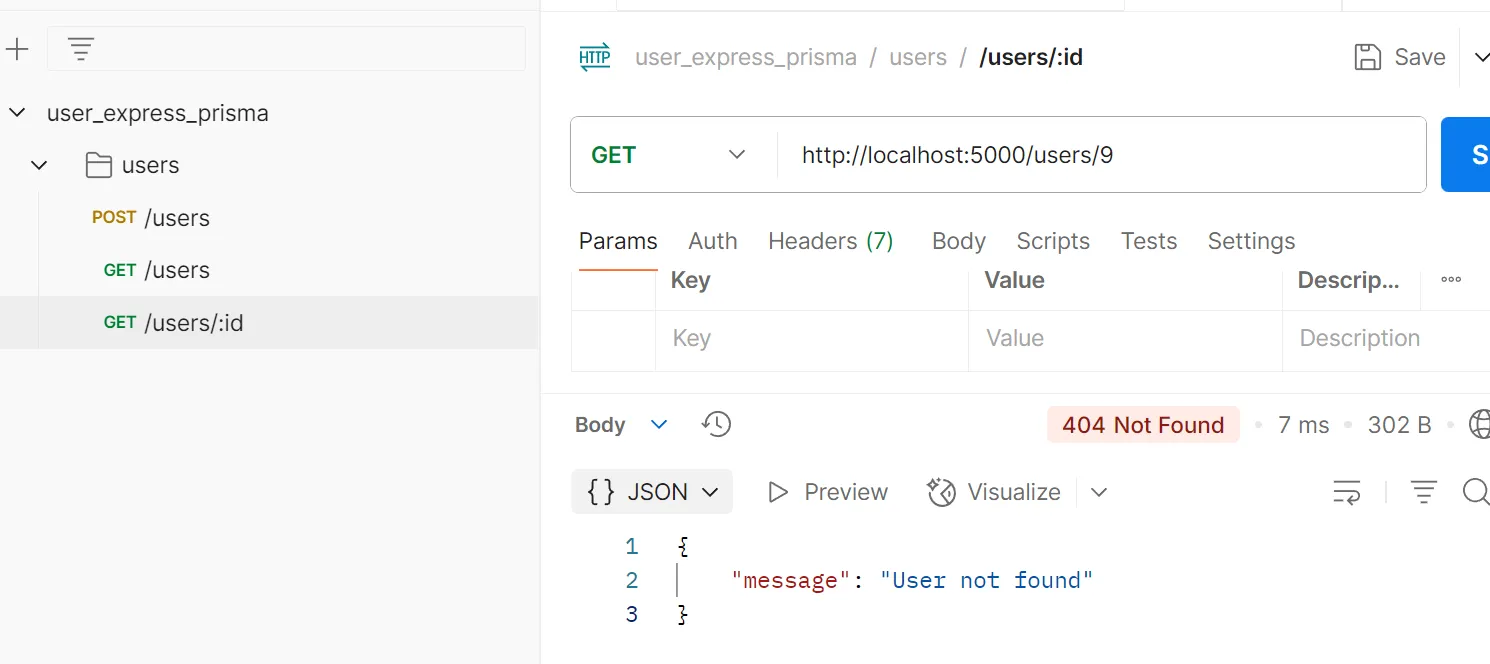
API Testing Example GET /users/:id
Purpose Get a single user by ID
Logic
- The system will use the SELECT WHERE id = ? command using the id value from the URL parameter
- If user is not found, the system will return status 404 (Not Found)
Response Object of a single user data
API testing example GET /users/:id
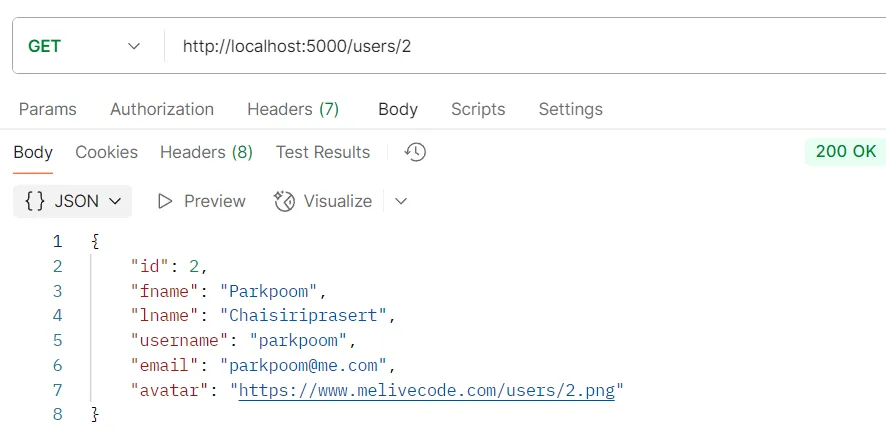
API testing example GET /users/:id when user not found
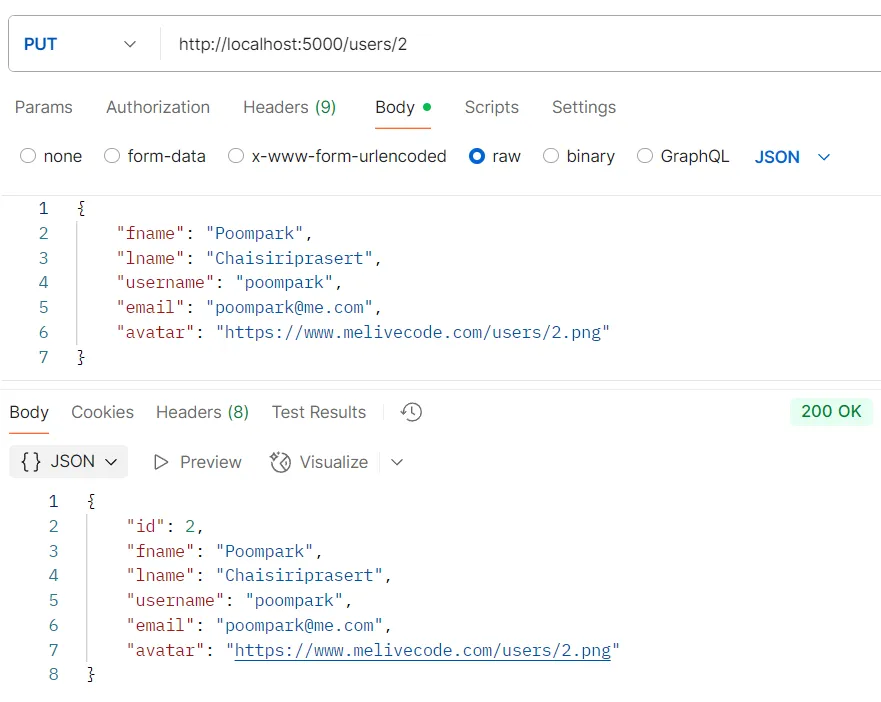
API Testing Example PUT /users/:id
Purpose Update user data by ID
Logic
- The system will parse the id value from the URL
- Use the UPDATE users SET … WHERE id = ? command with the new data to be updated
- Error handling is included (e.g., user not found case)
Response Object of updated user data
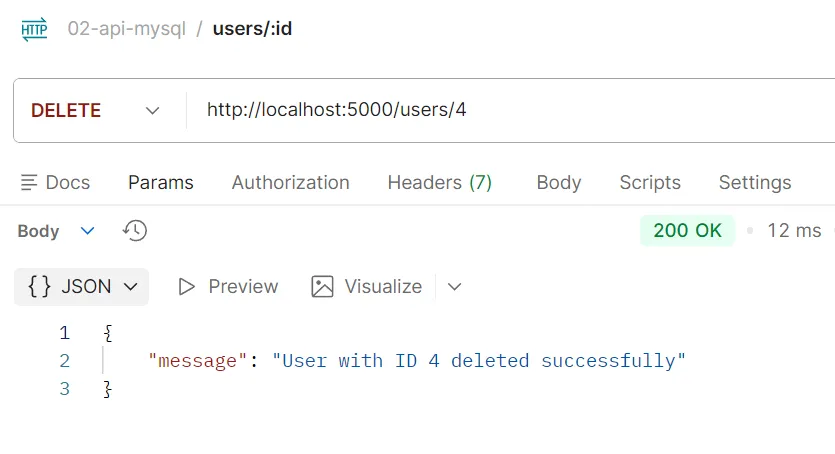
API Testing Example DELETE /users/:id
Purpose Delete user by ID
Logic
- The system will use the DELETE FROM users WHERE id = ? command with the specified ID value
Response User deletion confirmation
8.2. Product Endpoints#
Add the following code to the index.js file
// Product Endpoints
// Read All Products
app.get('/products', async (req, res) => {
  try {
    const [rows] = await pool.query('SELECT * FROM products');
    res.json(rows);
  } catch (error) {
    res.status(500).json({ message: 'Error fetching products', error: error.message });
  }
});

// Read One Product
app.get('/products/:id', async (req, res) => {
  try {
    const id = parseInt(req.params.id);
    const [rows] = await pool.query('SELECT * FROM products WHERE id = ?', [id]);
    if (rows.length === 0) {
      return res.status(404).json({ message: 'Product not found' });
    }
    res.json(rows[0]);
  } catch (error) {
    res.status(500).json({ message: 'Error fetching product', error: error.message });
  }
});

// Create Product
app.post('/products', async (req, res) => {
  try {
    const { name, price } = req.body;
    const sql = 'INSERT INTO products (name, price) VALUES (?, ?)';
    const [result] = await pool.query(sql, [name, price]);

    const [newProduct] = await pool.query('SELECT * FROM products WHERE id = ?', [result.insertId]);
    res.status(201).json(newProduct[0]);
  } catch (error) {
    res.status(500).json({ message: 'Error creating product', error: error.message });
  }
});

// Update Product
app.put('/products/:id', async (req, res) => {
  try {
    const id = parseInt(req.params.id);
    const { name, price } = req.body;

    // Check if product exists
    const [existing] = await pool.query('SELECT * FROM products WHERE id = ?', [id]);
    if (existing.length === 0) {
      return res.status(404).json({ message: 'Product not found' });
    }

    const sql = 'UPDATE products SET name = ?, price = ? WHERE id = ?';
    await pool.query(sql, [name, price, id]);

    const [updated] = await pool.query('SELECT * FROM products WHERE id = ?', [id]);
    res.status(200).json(updated[0]);
  } catch (error) {
    res.status(500).json({ message: 'Error updating product', error: error.message });
  }
});

// Delete Product
app.delete('/products/:id', async (req, res) => {
  try {
    const id = parseInt(req.params.id);

    // Check if product exists
    const [existing] = await pool.query('SELECT * FROM products WHERE id = ?', [id]);
    if (existing.length === 0) {
      return res.status(404).json({ message: 'Product not found' });
    }

    await pool.query('DELETE FROM products WHERE id = ?', [id]);
    res.status(200).json({ message: `Product with ID ${id} deleted successfully` });
  } catch (error) {
    res.status(500).json({ message: 'Error deleting product', error: error.message });
  }
});| HTTP Method | URI | Purpose | Logic | Response |
|---|---|---|---|---|
| GET | /products | Get all products | Use SELECT * FROM products to retrieve all data | List of all product objects |
| GET | /products/:id | Get product by ID | Use SELECT WHERE id = ? from URL parameter id, returns 404 if not found | Product object or 404 (not found) |
| POST | /products | Create new product | req.body should have product data. Use INSERT INTO products | Newly created product object or 500 (error) |
| PUT | /products/:id | Update product by ID | Update product data using ID from URL and data from Body. Handle errors (e.g., product not found) | Updated product object or 404 (not found) or 500 (error) |
| DELETE | /products/:id | Delete product by ID | Use DELETE FROM products WHERE id = ? with specified ID | Product deletion confirmation or 404 (not found) or 500 (error) |
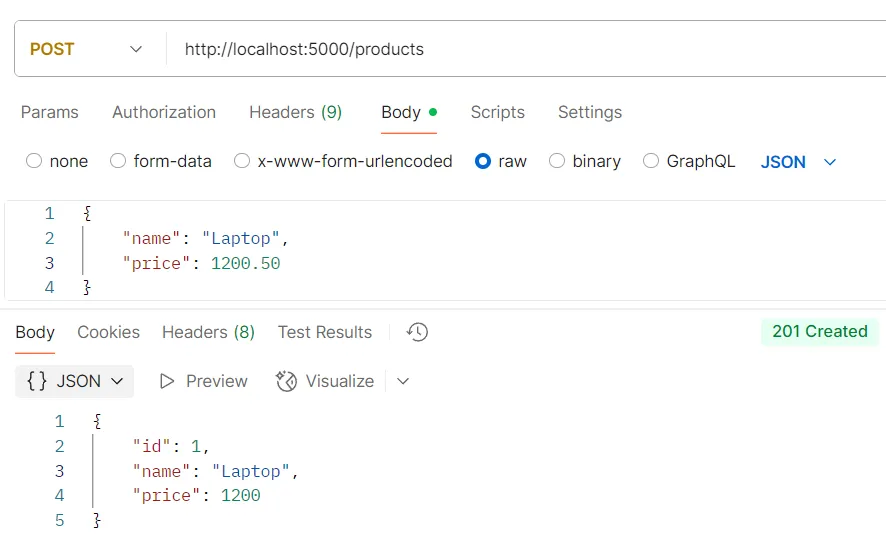
API Testing Example POST /products
Purpose Create a new product
Logic
- req.body should include product data
- The system will use the INSERT INTO products command to save product data to the database
Response Object of the newly created product data
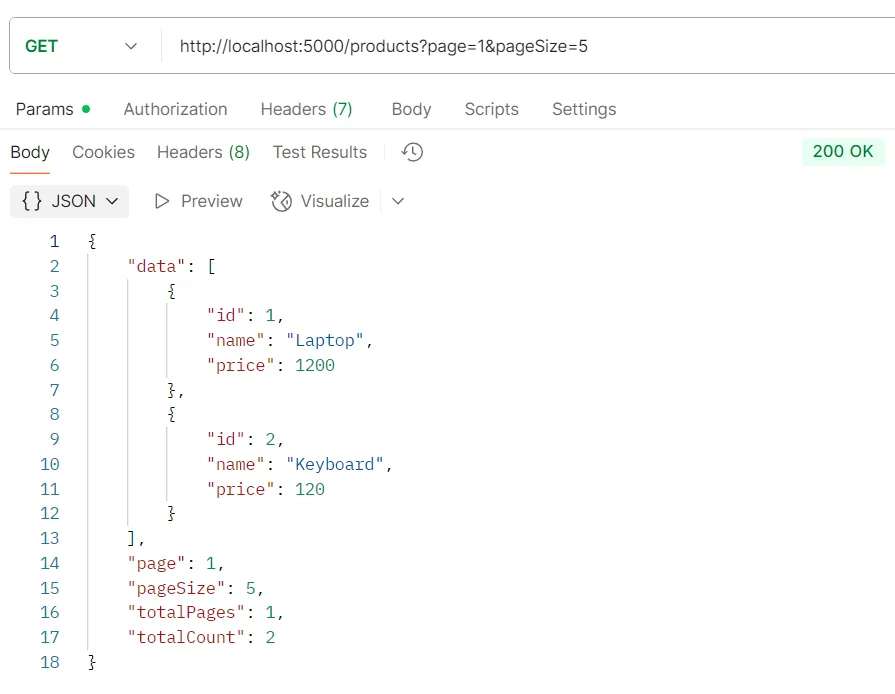
API Testing Example GET /products
Purpose Get all products
Logic
- The system will use the SELECT * FROM products command to retrieve all product data from the database
Response List of objects of all product data
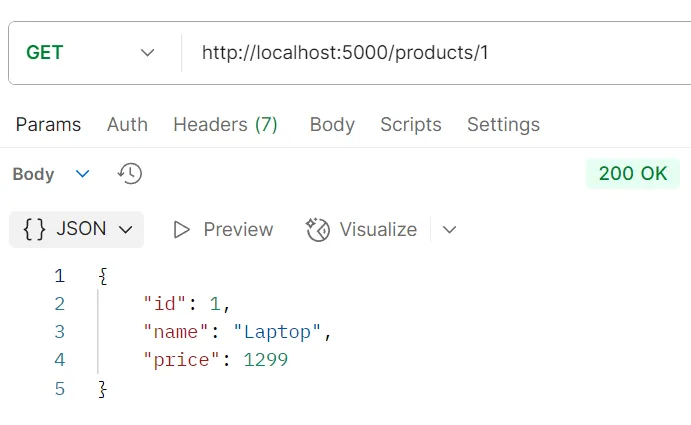
API Testing Example GET /products/:id
Purpose Get a single product by ID
Logic
- The system will use the SELECT WHERE id = ? command using the id value from the URL parameter
- If product is not found, the system will return status 404 (Not Found)
Response Object of a single product data
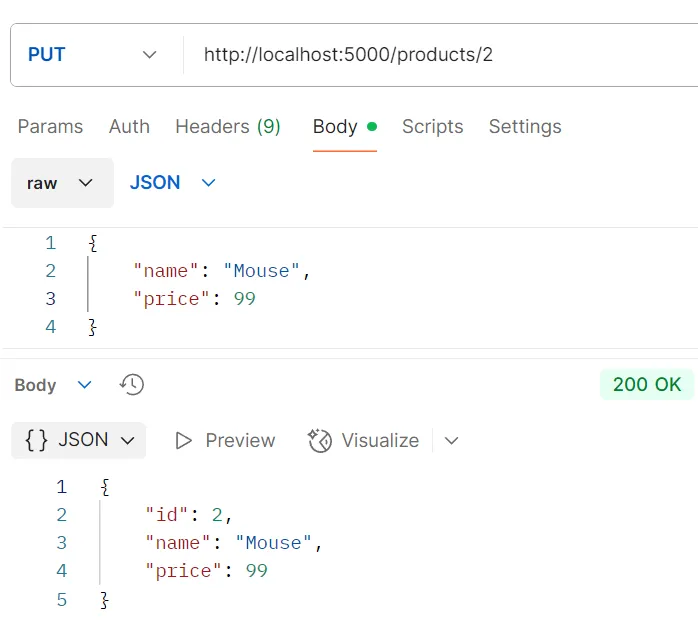
API Testing Example PUT /products/:id
Purpose Update product data by ID
Logic
- The system will parse the id value from the URL
- Use the UPDATE products SET … WHERE id = ? command with the new data to be updated
- Error handling is included (e.g., product not found case)
Response Object of updated product data
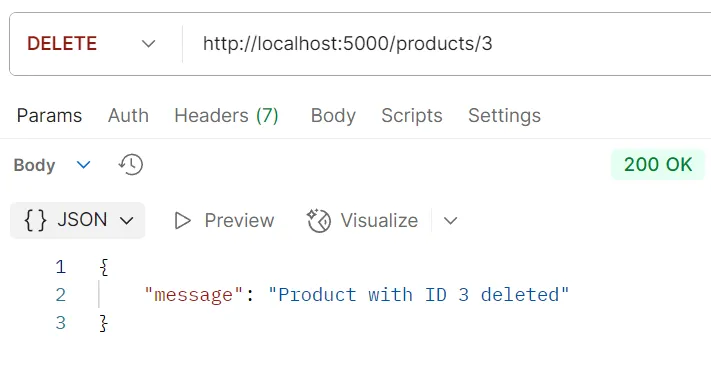
API Testing Example DELETE /products/:id
Purpose Delete product by ID
Logic
- The system will use the DELETE FROM products WHERE id = ? command with the specified ID value
Response Product deletion confirmation
8.3. Order Endpoints#
Add the following code to the index.js file
// Order Endpoints
// Read All Orders
app.get('/orders', async (req, res) => {
  try {
    const [orders] = await pool.query(`
      SELECT
        o.id,
        o.user_id,
        o.created_at,
        u.id as user_id,
        u.fname,
        u.lname,
        u.username,
        u.email,
        u.avatar
      FROM orders o
      JOIN users u ON o.user_id = u.id
    `);

    // Get products for each order
    for (const order of orders) {
      const [products] = await pool.query(`
        SELECT p.*
        FROM products p
        JOIN order_product op ON p.id = op.product_id
        WHERE op.order_id = ?
      `, [order.id]);
      order.products = products;
      order.user = {
        id: order.user_id,
        fname: order.fname,
        lname: order.lname,
        username: order.username,
        email: order.email,
        avatar: order.avatar
      };
      delete order.fname;
      delete order.lname;
      delete order.username;
      delete order.email;
      delete order.avatar;
    }

    res.json(orders);
  } catch (error) {
    res.status(500).json({ message: 'Error fetching orders', error: error.message });
  }
});

// Read One Order
app.get('/orders/:id', async (req, res) => {
  try {
    const id = parseInt(req.params.id);
    const [orders] = await pool.query(`
      SELECT
        o.id,
        o.user_id,
        o.created_at,
        u.fname,
        u.lname,
        u.username,
        u.email,
        u.avatar
      FROM orders o
      JOIN users u ON o.user_id = u.id
      WHERE o.id = ?
    `, [id]);

    if (orders.length === 0) {
      return res.status(404).json({ message: 'Order not found' });
    }

    const order = orders[0];

    // Get products for the order
    const [products] = await pool.query(`
      SELECT p.*
      FROM products p
      JOIN order_product op ON p.id = op.product_id
      WHERE op.order_id = ?
    `, [id]);

    order.products = products;
    order.user = {
      id: order.user_id,
      fname: order.fname,
      lname: order.lname,
      username: order.username,
      email: order.email,
      avatar: order.avatar
    };
    delete order.fname;
    delete order.lname;
    delete order.username;
    delete order.email;
    delete order.avatar;

    res.json(order);
  } catch (error) {
    res.status(500).json({ message: 'Error fetching order', error: error.message });
  }
});

// Create Order
app.post('/orders', async (req, res) => {
  const connection = await pool.getConnection();
  try {
    await connection.beginTransaction();
    const { userId, productIds } = req.body;

    // Check if user exists
    const [users] = await connection.query('SELECT * FROM users WHERE id = ?', [userId]);
    if (users.length === 0) {
      await connection.rollback();
      return res.status(400).json({ message: 'Invalid user ID' });
    }

    // Create order
    const [orderResult] = await connection.query('INSERT INTO orders (user_id) VALUES (?)', [userId]);
    const orderId = orderResult.insertId;

    // Add products to order
    for (const productId of productIds) {
      await connection.query('INSERT INTO order_product (order_id, product_id) VALUES (?, ?)', [orderId, productId]);
    }

    await connection.commit();

    // Get complete order data
    const [orders] = await pool.query(`
      SELECT
        o.id,
        o.user_id,
        o.created_at,
        u.fname,
        u.lname,
        u.username,
        u.email,
        u.avatar
      FROM orders o
      JOIN users u ON o.user_id = u.id
      WHERE o.id = ?
    `, [orderId]);

    const [products] = await pool.query(`
      SELECT p.*
      FROM products p
      JOIN order_product op ON p.id = op.product_id
      WHERE op.order_id = ?
    `, [orderId]);

    const order = orders[0];
    order.products = products;
    order.user = {
      id: order.user_id,
      fname: order.fname,
      lname: order.lname,
      username: order.username,
      email: order.email,
      avatar: order.avatar
    };
    delete order.fname;
    delete order.lname;
    delete order.username;
    delete order.email;
    delete order.avatar;

    res.status(201).json(order);
  } catch (error) {
    await connection.rollback();
    if (error.code === 'ER_NO_REFERENCED_ROW_2') {
      return res.status(400).json({ message: 'Invalid user ID or product ID' });
    }
    res.status(500).json({ message: 'Error creating order', error: error.message });
  } finally {
    connection.release();
  }
});

// Update Order
app.put('/orders/:id', async (req, res) => {
  const connection = await pool.getConnection();
  try {
    await connection.beginTransaction();
    const id = parseInt(req.params.id);
    const { userId, productIds } = req.body;

    // Check if order exists
    const [existing] = await connection.query('SELECT * FROM orders WHERE id = ?', [id]);
    if (existing.length === 0) {
      await connection.rollback();
      return res.status(404).json({ message: 'Order not found' });
    }

    // Update order user
    await connection.query('UPDATE orders SET user_id = ? WHERE id = ?', [userId, id]);

    // Delete old products and add new ones
    await connection.query('DELETE FROM order_product WHERE order_id = ?', [id]);
    for (const productId of productIds) {
      await connection.query('INSERT INTO order_product (order_id, product_id) VALUES (?, ?)', [id, productId]);
    }

    await connection.commit();

    // Get complete order data
    const [orders] = await pool.query(`
      SELECT
        o.id,
        o.user_id,
        o.created_at,
        u.fname,
        u.lname,
        u.username,
        u.email,
        u.avatar
      FROM orders o
      JOIN users u ON o.user_id = u.id
      WHERE o.id = ?
    `, [id]);

    const [products] = await pool.query(`
      SELECT p.*
      FROM products p
      JOIN order_product op ON p.id = op.product_id
      WHERE op.order_id = ?
    `, [id]);

    const order = orders[0];
    order.products = products;
    order.user = {
      id: order.user_id,
      fname: order.fname,
      lname: order.lname,
      username: order.username,
      email: order.email,
      avatar: order.avatar
    };
    delete order.fname;
    delete order.lname;
    delete order.username;
    delete order.email;
    delete order.avatar;

    res.status(200).json(order);
  } catch (error) {
    await connection.rollback();
    if (error.code === 'ER_NO_REFERENCED_ROW_2') {
      return res.status(400).json({ message: 'Invalid user ID or product ID' });
    }
    res.status(500).json({ message: 'Error updating order', error: error.message });
  } finally {
    connection.release();
  }
});

// Delete Order
app.delete('/orders/:id', async (req, res) => {
  try {
    const id = parseInt(req.params.id);

    // Check if order exists
    const [existing] = await pool.query('SELECT * FROM orders WHERE id = ?', [id]);
    if (existing.length === 0) {
      return res.status(404).json({ message: 'Order not found' });
    }

    // Delete related order_product records (will be auto-deleted by CASCADE)
    await pool.query('DELETE FROM orders WHERE id = ?', [id]);
    res.status(200).json({ message: `Order with ID ${id} deleted successfully` });
  } catch (error) {
    res.status(500).json({ message: 'Error deleting order', error: error.message });
  }
});SQL JOIN Explanation in Order Endpoints:
1. JOIN to retrieve order data with user:
SELECT
  o.id, o.user_id, o.created_at,
  u.fname, u.lname, u.username, u.email, u.avatar
FROM orders o
JOIN users u ON o.user_id = u.idoanduare aliases (abbreviations) of table namesJOIN users u ON o.user_id = u.idjoins orders table with users- Result: Orders with user data
2. JOIN to retrieve products in an order:
SELECT p.*
FROM products p
JOIN order_product op ON p.id = op.product_id
WHERE op.order_id = ?- Joins products table with order_product
- Filters only products in the specified order
3. Transaction for CREATE/UPDATE:
const connection = await pool.getConnection();
try {
  await connection.beginTransaction();
  // Multiple SQL commands
  await connection.commit();
} catch (error) {
  await connection.rollback();
}- Transaction is used when multiple commands must all succeed
- commit - Confirm changes
- rollback - Cancel changes if an error occurs
4. INSERT with relationships:
INSERT INTO orders (user_id) VALUES (?);           -- Create order
INSERT INTO order_product (order_id, product_id)   -- Link products
VALUES (?, ?);5. DELETE with CASCADE:
DELETE FROM orders WHERE id = ?
-- Data in order_product will be auto-deleted (CASCADE)| HTTP Method | URI | Purpose | Logic | Response |
|---|---|---|---|---|
| GET | /orders | Get all orders | Use JOIN to retrieve order data with users and products | List of all order objects with user and product data |
| GET | /orders/:id | Get order by ID | Use JOIN WHERE id = ? with product data, returns 404 if not found | Order object with user and product data or 404 (not found) |
| POST | /orders | Create new order | req.body must have userId and productIds. Use Transaction and INSERT with creating product relationships | Newly created order object with user and product data or 400 (invalid data) or 500 (error) |
| PUT | /orders/:id | Update order by ID | Update order data, delete old products and add new ones. Handle errors | Updated order object with user and product data or 404 (not found) or 400 (invalid data) or 500 (error) |
| DELETE | /orders/:id | Delete order by ID | Delete order (order_product data will be deleted by CASCADE) | Order deletion confirmation or 404 (not found) or 500 (error) |
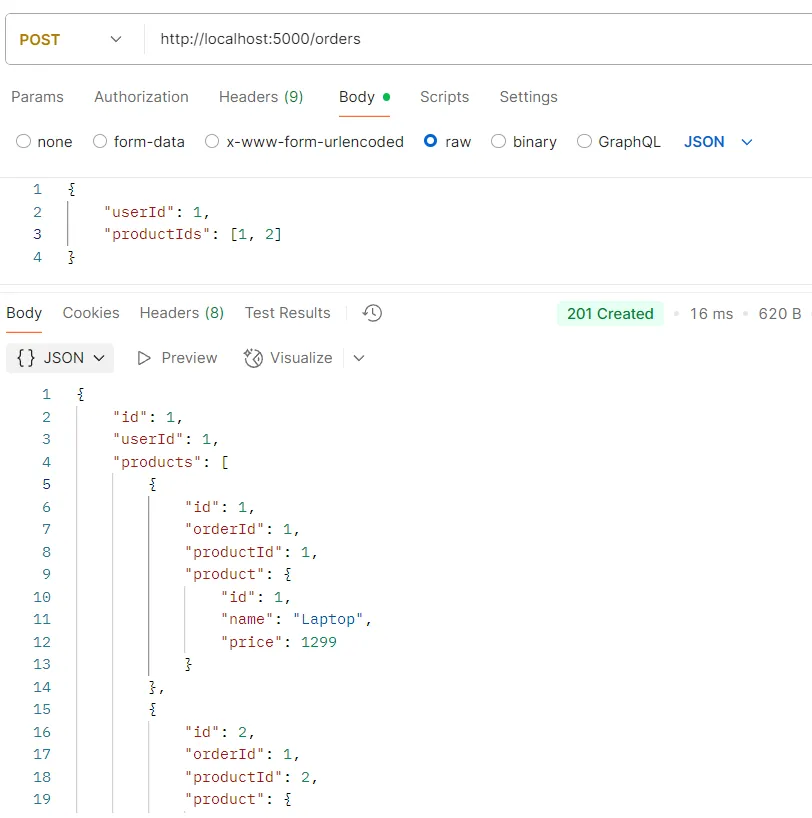
API Testing Example POST /orders
Purpose Create a new order
Logic
- req.body must include: userId (user ID) and productIds (list of product IDs)
- The system will use the INSERT INTO orders and INSERT INTO order_product commands with Transaction to create an order and link it with selected products
- Data will be returned with user and product details
Response Object of the newly created order data with user and product details
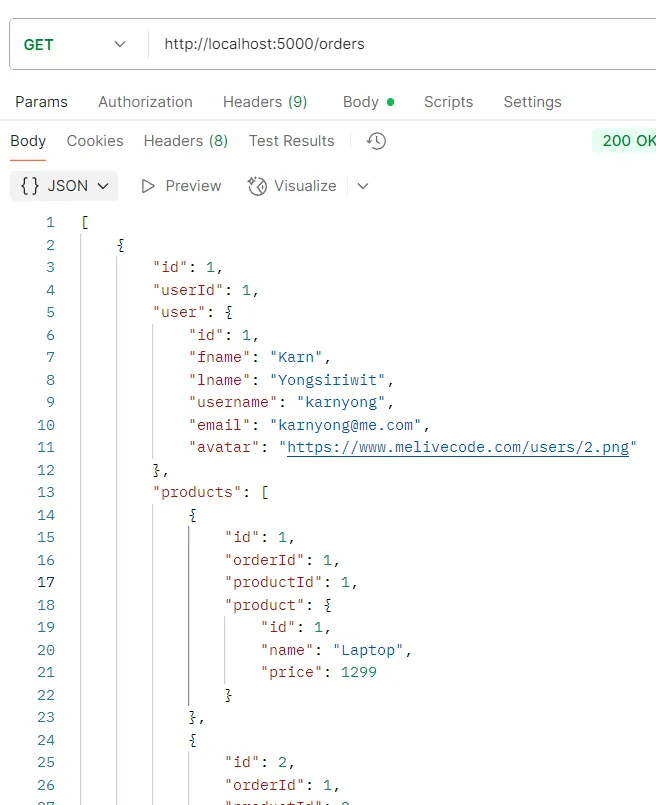
API Testing Example GET /orders
Purpose Get all orders
Logic
- The system will use the JOIN command to retrieve all order data with users and products
Response List of objects of all order data with users and products
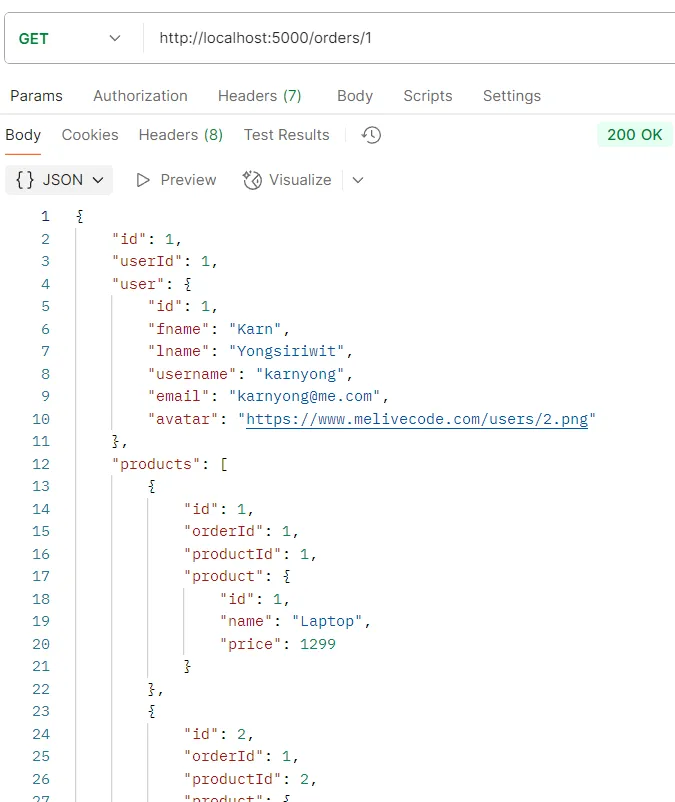
API Testing Example GET /orders/:id
Purpose Get a single order by ID
Logic
- The system will use the JOIN WHERE id = ? command using the id value from the URL parameter
- Use JOIN to retrieve related user and product data
- If order is not found, the system will return status 404 (Not Found)
Response Object of a single order data with user and product details
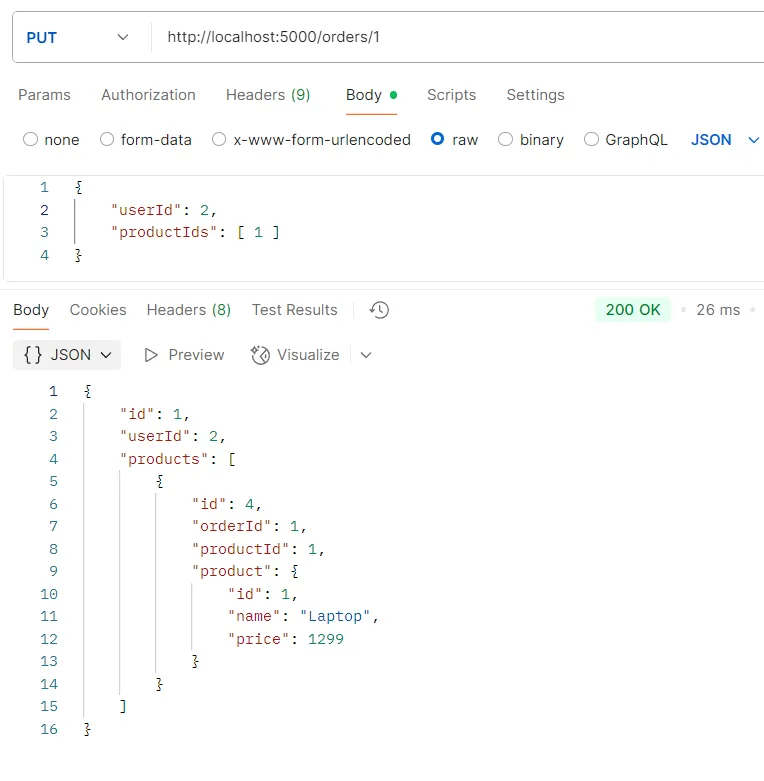
API Testing Example PUT /orders/:id
Purpose Update order data by ID
Logic
- The system will parse the id value from the URL
- Use the UPDATE orders and DELETE/INSERT order_product commands with new data in Transaction
- Delete all relationships with old products and create new relationships with selected products
- Error handling is included (e.g., order not found case)
Response Object of updated order data with user and product details
API Testing Example DELETE /orders/:id
Purpose Delete order by ID
Logic
- The system will use the DELETE FROM orders WHERE id = ? command
- Data in the order_product table will be auto-deleted by CASCADE
Response Order deletion confirmation
 |
|
8.4. Nested Endpoints#
Add the following code to the index.js file to create endpoints for nested resources:
// Relationship Endpoints
// Get Orders by User ID
app.get('/users/:id/orders', async (req, res) => {
  const id = parseInt(req.params.id);
  try {
    // Check if user exists
    const [users] = await pool.query('SELECT * FROM users WHERE id = ?', [id]);
    if (users.length === 0) {
      return res.status(404).json({ message: 'User not found' });
    }

    const [orders] = await pool.query(`
      SELECT
        o.id,
        o.user_id,
        o.created_at,
        u.fname,
        u.lname,
        u.username,
        u.email,
        u.avatar
      FROM orders o
      JOIN users u ON o.user_id = u.id
      WHERE o.user_id = ?
    `, [id]);

    // Get products for each order
    for (const order of orders) {
      const [products] = await pool.query(`
        SELECT p.*
        FROM products p
        JOIN order_product op ON p.id = op.product_id
        WHERE op.order_id = ?
      `, [order.id]);
      order.products = products;
      order.user = {
        id: order.user_id,
        fname: order.fname,
        lname: order.lname,
        username: order.username,
        email: order.email,
        avatar: order.avatar
      };
      delete order.fname;
      delete order.lname;
      delete order.username;
      delete order.email;
      delete order.avatar;
    }

    res.json(orders);
  } catch (error) {
    res.status(500).json({ message: 'Error fetching user orders', error: error.message });
  }
});

// Get Products by Order ID
app.get('/orders/:id/products', async (req, res) => {
  const id = parseInt(req.params.id);
  try {
    // Check if order exists
    const [orders] = await pool.query('SELECT * FROM orders WHERE id = ?', [id]);
    if (orders.length === 0) {
      return res.status(404).json({ message: 'Order not found' });
    }

    const [products] = await pool.query(`
      SELECT p.*
      FROM products p
      JOIN order_product op ON p.id = op.product_id
      WHERE op.order_id = ?
    `, [id]);

    res.json(products);
  } catch (error) {
    res.status(500).json({ message: 'Error fetching order products', error: error.message });
  }
});| HTTP Method | URI | Purpose | Logic | Response |
|---|---|---|---|---|
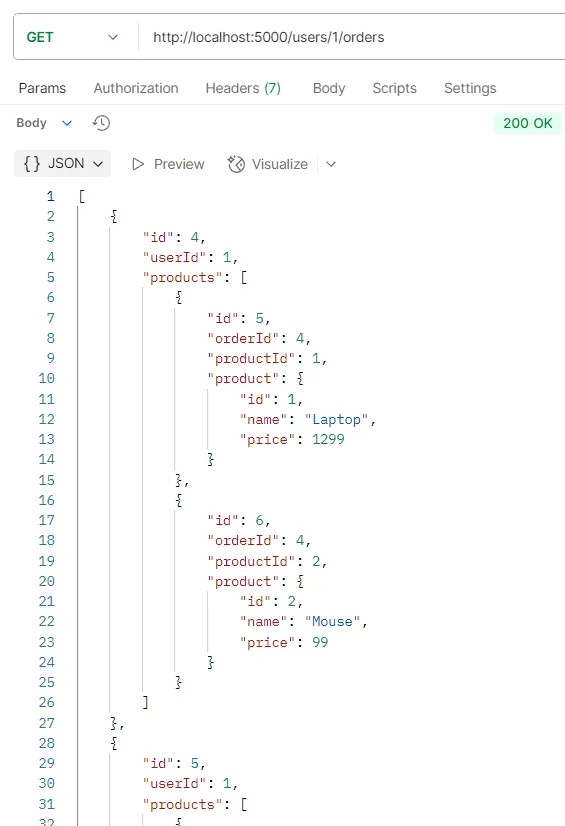
GET | /users/:id/orders | Get all orders of a user | Check if user exists, then use JOIN WHERE user_id = ? | List of order objects for that user with product data or 404 (user not found) or 500 (error) |
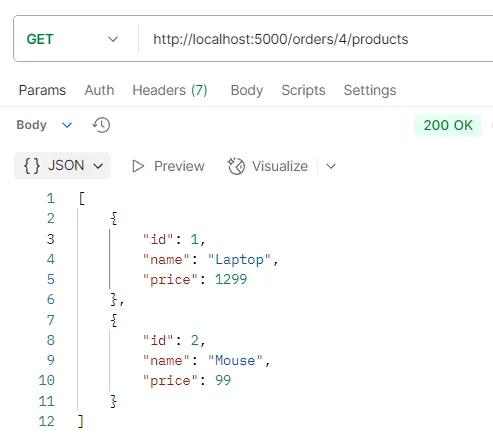
GET | /orders/:id/products | Get all products in an order | Use JOIN to find order with products, then return only product data | List of product objects in that order or 404 (order not found) or 500 (error) |
API Testing Example GET /users/:id/orders
Purpose Get all orders of a single user
Logic
- The system will check if the user with the specified id exists in the database
- If user is found, the system will use the JOIN WHERE user_id = ? command filtered by user_id
- Use JOIN to retrieve related product and user data
- If user is not found, the system will return status 404 (User not found)
Response List of objects of all orders for that user with product data
API Testing Example GET /orders/:id/products
Purpose Get all products in a single order
Logic
- The system will use the JOIN command using the id value of the order from the URL parameter
- Use JOIN to retrieve product data related to the order
- If order is not found, the system will return status 404 (Order not found)
Response List of objects of all products in that order
Additional Notes
These Relationship Endpoints make accessing related data more convenient:
- /users/:id/orders - Suitable for displaying order history of each customer
- /orders/:id/products - Suitable for displaying product list in a specific order
Both of these endpoints help reduce complexity in data retrieval from the frontend and make the API more flexible to use.
Understanding API structure and writing SQL queries directly will help you better understand Web Application development principles and database management.