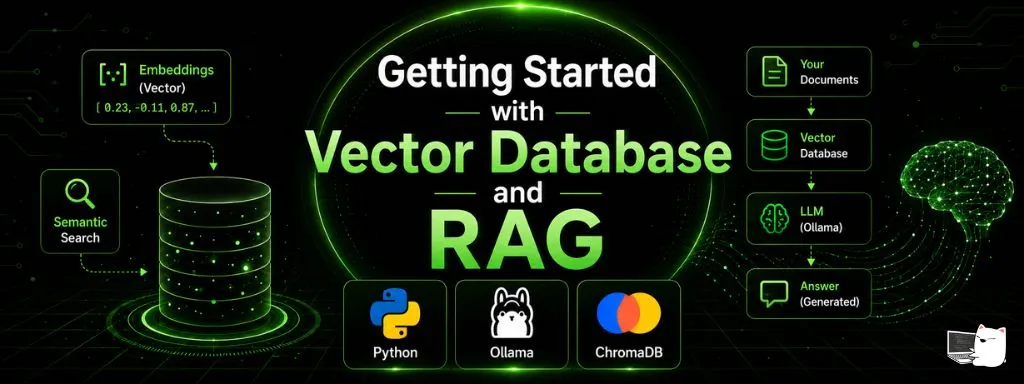
Getting Started with Vector Database and RAG
Start from VectorDB and RAG basics, then build a hands-on workshop with Ollama embeddings and Chroma — semantic retrieval, grounded answers
This article walks you through building RAG (Retrieval-Augmented Generation) from scratch using Ollama together with the Chroma vector database.
Before we start building, we’ll build a clear mental model of the fundamentals of a Vector Database, Embedding, and RAG. After that we’ll install the tools and build the workshop step by step.
What this workshop will demonstrate:
- Text documents
- Embeddings
- Vector Database
- Semantic Retrieval
- Retrieval-Augmented Generation (RAG)
1. Understanding Vector Databases#
Before diving into the workshop, let’s review the fundamentals, because these concepts are the core of any RAG system.
The classic approach: Keyword Search#
Traditional databases such as MySQL or PostgreSQL search using keywords that match character by character, for example:
SELECT * FROM products WHERE name LIKE '%cat%';This query only finds rows that contain the word “cat” in the name. In other words, the system matches on identical characters without considering the meaning of the words.
Keyword Search has the advantage of being fast, precise, and resource-efficient, so it’s well suited to data that requires an exact match, such as:
- Searching by product code
SKU-1024 - Searching by order number
INV-2026-001 - Searching by an email or username that must match exactly
However, the system cannot understand the meaning of language. If a user searches for “feline”, “kitten”, or “kitty”, the system cannot connect these to “cat”. Moreover, a single typo can cause the search to return no results at all.
Keyword Search only looks at matching characters — it doesn’t understand meaning.
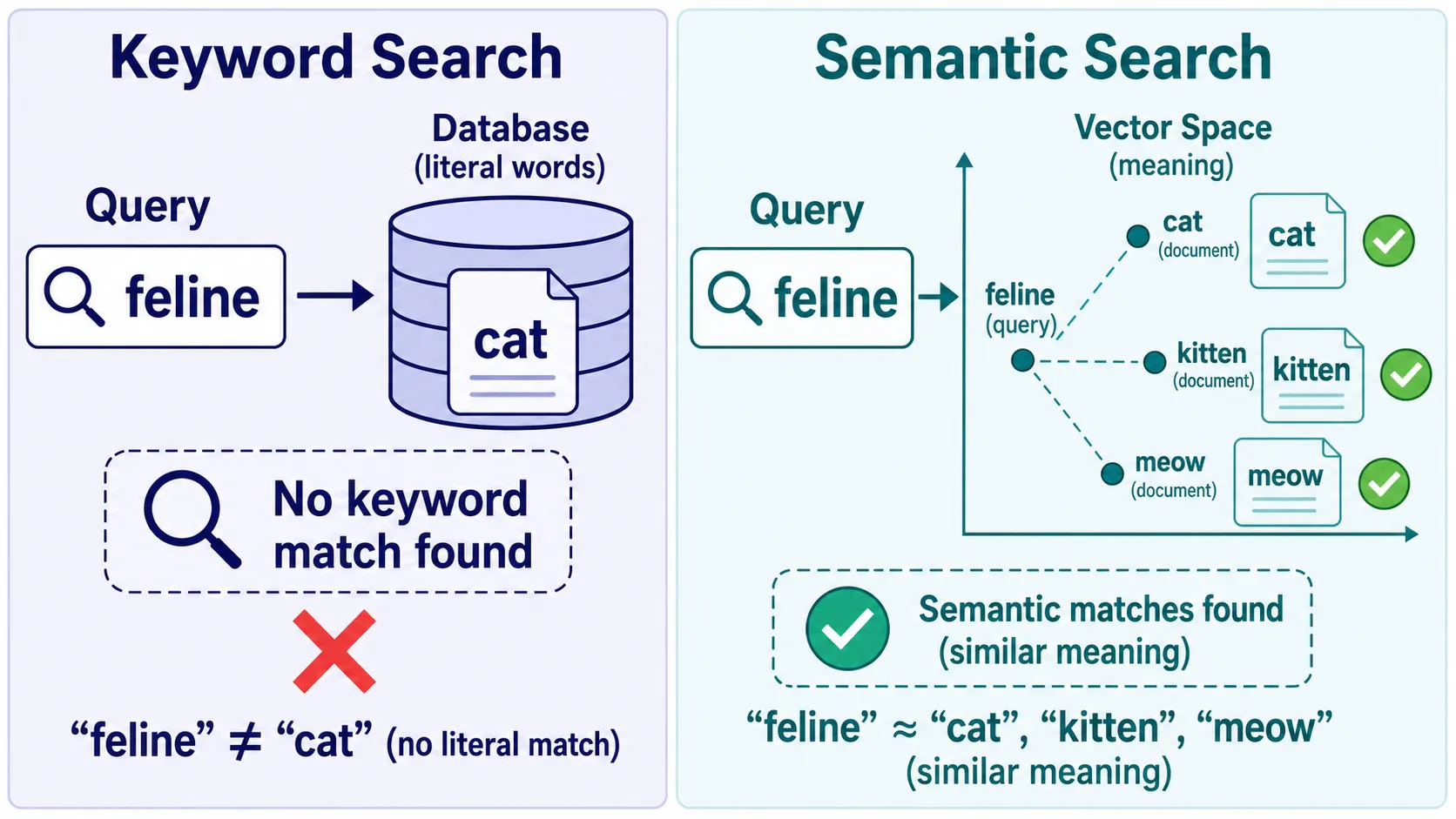
The image above compares the two search styles. On the left is Keyword Search — when searching for “feline”, the system finds nothing because the database only contains the word “cat”. On the right is Semantic Search, which can retrieve documents about “cat”, “kitten”, and “meow”, because it understands that these words have similar meanings.
Semantic Search: searching by meaning#
Semantic Search is designed to overcome the limitations of Keyword Search by comparing the meaning of the text rather than the characters (the underlying mechanism is explained in the Vector Database section below).
The advantages of Semantic Search include:
- It understands synonyms and rephrased sentences (paraphrases)
- It tolerates typos or different word choices
- With a Multilingual Model, it can compare meaning across languages
However, Semantic Search also has its limitations:
- It is slower and more resource-intensive, because an Embedding must be generated every time
- It is an approximate search, so it may return documents that are “close” but not the most exact
- It’s not ideal for data that requires 100% precision, such as product codes, document numbers, or reference IDs, where Keyword Search still performs better
So the two methods are complementary, not competing. In real systems they are often used together — called Hybrid Search — to combine the precision of Keyword Search with the meaning-understanding ability of Semantic Search.
Keyword Search = precise on characters · Semantic Search = understands meaning
What is an Embedding?#
An Embedding is the process of converting text (or an image) into a Vector of numbers.
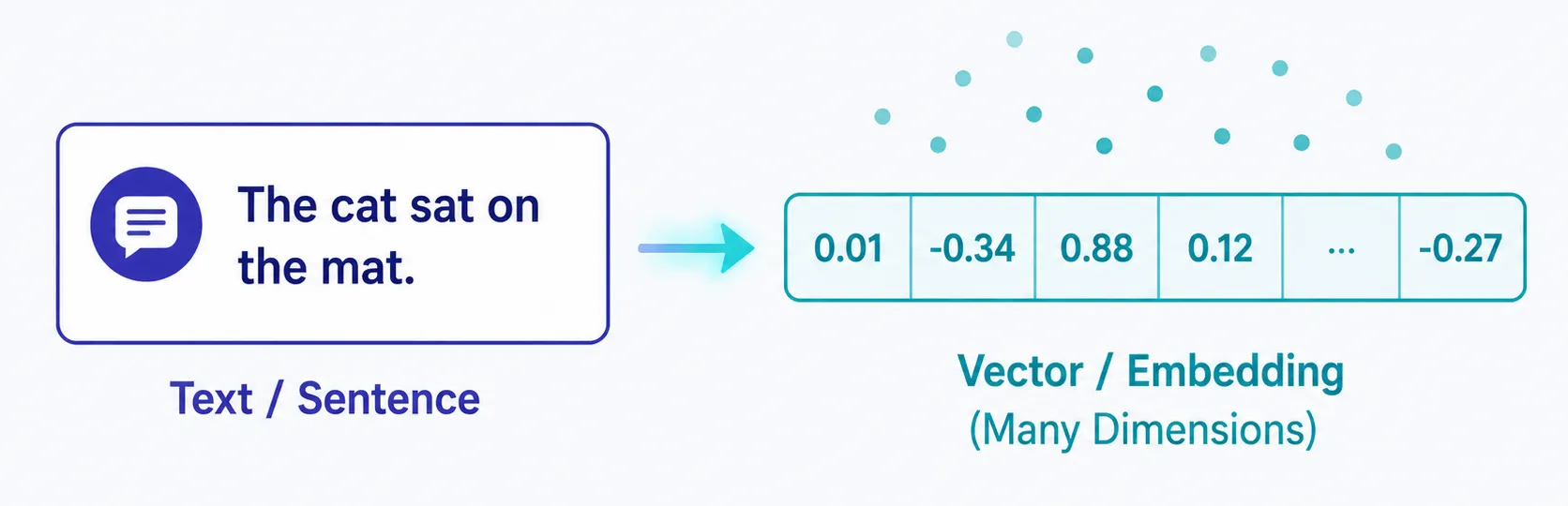
This vector represents the meaning of the text, not the characters directly.
Texts with similar meanings are converted into vectors that sit close together in a high-dimensional space.
Each position in the vector doesn’t have a standalone meaning, but taken together they can represent the meaning of the entire sentence.
A toy example: turning text into a vector
To build intuition before we look at the real (model-based) process, imagine the simplest possible conversion: count how many times each word appears against a shared vocabulary.
Say our vocabulary is just four words: [cat, dog, sat, ran]. Each text becomes a vector by counting those words:
Text          cat  dog  sat  ran   →  vector
"a cat sat"    1    0    1    0   →  [1, 0, 1, 0]
"a dog sat"    0    1    1    0   →  [0, 1, 1, 0]
"a car ran"    0    0    0    1   →  [0, 0, 0, 1]
Now we can compare two vectors by multiplying matching positions and adding them up — a dot product:
"a cat sat" · "a dog sat" = (1×0 + 0×1 + 1×1 + 0×0) = 1   ← they share "sat"
"a cat sat" · "a car ran" = (1×0 + 0×0 + 1×0 + 0×1) = 0   ← they share nothing
So the system judges “a cat sat” to be closer to “a dog sat” than to “a car ran” — exactly the kind of “closeness” a vector database relies on.
But notice the flaw: here “cat” and “dog” live in different word slots, so they never look similar, even though both are animals. This count-based vector only matches identical words, not meaning. Real embedding models fix exactly this — they replace these hand counts with learned numbers, so that “cat” and “dog” end up close even though they’re different words. That leap is what the next section explains.
So how is text turned into numbers?#
Converting text into a vector isn’t done by hand or with a fixed formula — it’s done by an Embedding Model, which is a neural network.
The process, in summary, has three steps:
-
Tokenize the text
The text is split into smaller units called Tokens, which may be words, syllables, or parts of words. Each Token is then represented by an identifier (Token ID).
"A cat sat"
     ↓
["A", "cat", "sat"]
     ↓
[32, 1245, 876]
This step only converts characters into numbers — it doesn’t yet reflect the meaning of the text.
-
The model produces a meaning vector
The Embedding Model takes all the Tokens in and produces a single vector that summarizes the meaning of the entire text. The number of dimensions depends on the model, for example 768 or 3072 dimensions.
-
How the model learns
The Embedding Model is trained on vast amounts of text until it learns that texts with similar context or meaning should have vectors that sit close together.
So the numbers in the vector don’t come from a human-defined formula — they emerge from the model’s learning.
Think of it like dropping pins on a map. The model assigns each text a position — for instance, “cat” and “dog” end up close together, while “cat” and “car” are far apart. Those positions are exactly the vectors.
In this project, we’ll use an Embedding Model called embeddinggemma, which runs through Ollama.
Vector Database#
A Vector Database is a database designed specifically to store and search Embeddings.
Unlike ordinary databases that search by keyword, a vector database searches by vectors that are close together — which corresponds to text with similar meaning.
What does each record store?
Typically a single record consists of:
- id — a unique identifier
- embedding — the vector representing the meaning of the text
- document — the original text (Chunk)
- metadata — supplementary data, such as the file name, Chunk number, or category
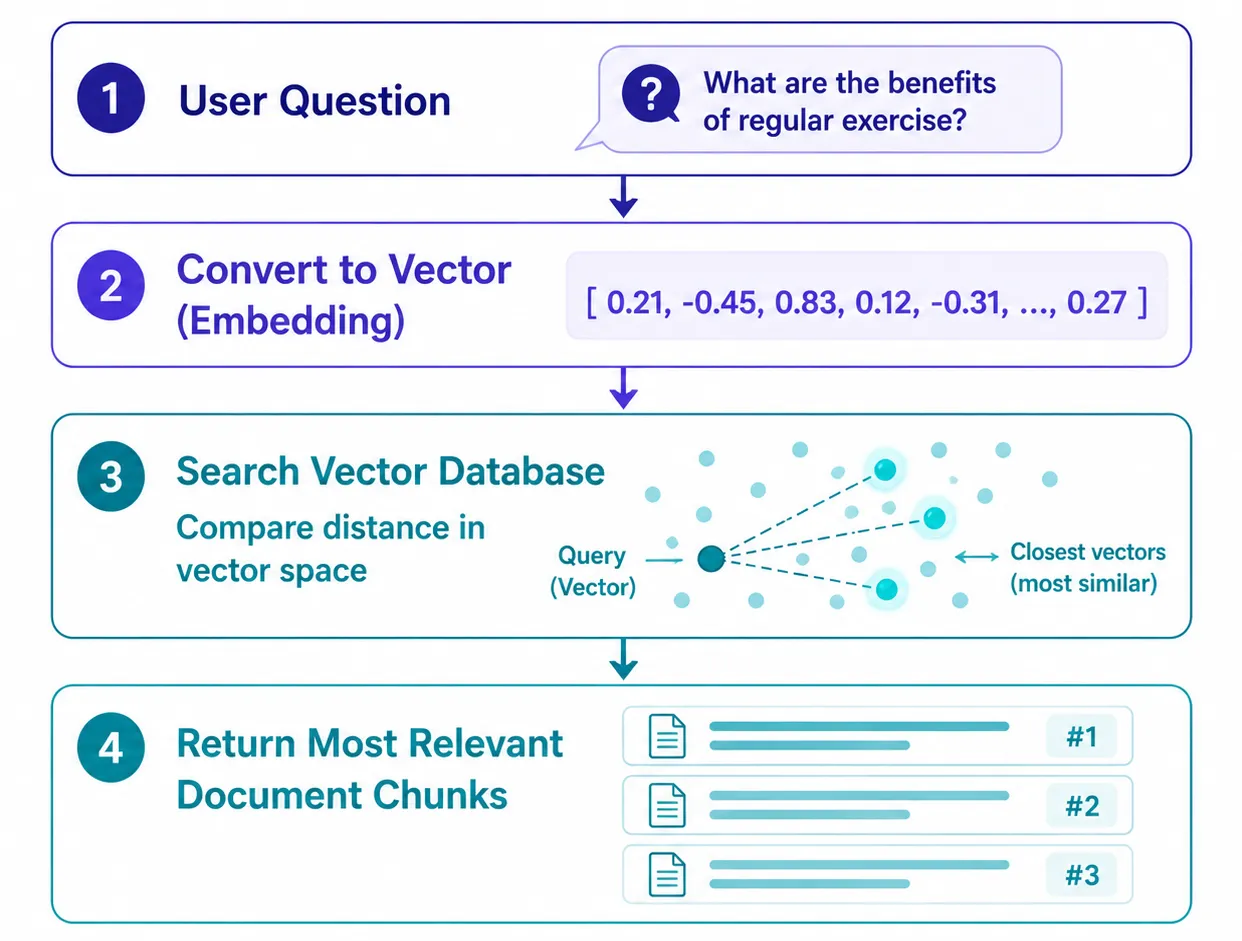
The workflow has two stages:
-
Index (store)
- Split the document into Chunks
- Generate an Embedding for each Chunk
- Save the Embedding along with the text and Metadata into the database
-
Query (search)
- Convert the question into an Embedding
- Compare it against all Embeddings in the database
- Return the Chunks with the closest meaning
The image below shows the steps of a Semantic Search.
How do we measure “close”?
Measuring the closeness of vectors is called a Similarity Metric or Distance Metric.
Popular methods include:
- Cosine Similarity — measures the angle between vectors; best suited to text data
- Euclidean Distance (L2) — measures straight-line distance
- Dot Product — uses the product of the vectors
In this workshop, we’ll use Cosine Similarity.
And how can search be so fast?
If we had to compare the query against every vector one by one (brute force), search would be extremely slow once the dataset reaches millions of records.
Vector databases therefore use special index structures such as HNSW (Hierarchical Navigable Small World) to find Approximate Nearest Neighbors (ANN) very quickly, at the cost of only a small amount of error.
Popular vector databases include Chroma, Pinecone, Milvus, Qdrant, Weaviate, and the pgvector extension for PostgreSQL.
Because of this, even if a query uses words different from the source document, the system can still retrieve relevant documents as long as the meaning is close.
In this workshop, we’ll use Chroma as the vector database.
What can you use it for?#
A vector database can be applied in many ways, for example:
- Semantic Search — search by the meaning of the text
- Recommendation System — recommend similar products or content
- RAG — retrieve relevant information to use as context for an LLM, so it can answer more accurately and ground its answers in real data
2. Understanding RAG (Retrieval-Augmented Generation)#
Why RAG?#
Even though large language models (LLMs) are impressive at answering questions and generating text, they still have several limitations:
- They don’t know the user’s private data — an LLM only knows the data it was trained on, so it can’t access your personal documents, course materials, or internal organizational data
- Data may be outdated — a model has a training Knowledge Cutoff, so it doesn’t know anything that happened after that point
- Hallucination — sometimes a model can produce an answer that looks plausible but is incorrect, because there’s no real data backing it
One approach is to take all the data and Fine-tune a new model, but this process is expensive, time-consuming, and whenever the data changes the model has to be trained again, making it unsuitable for data that is constantly updated.
What is RAG?#
RAG (Retrieval-Augmented Generation) is a technique that lets an LLM answer questions from the user’s own data without retraining the model.
The idea is to Retrieve relevant information from the user’s knowledge base first, and then feed that information as Context for the LLM to use when generating the answer.
In other words, instead of the model answering from memory alone, it answers by grounding itself in real, retrieved data.
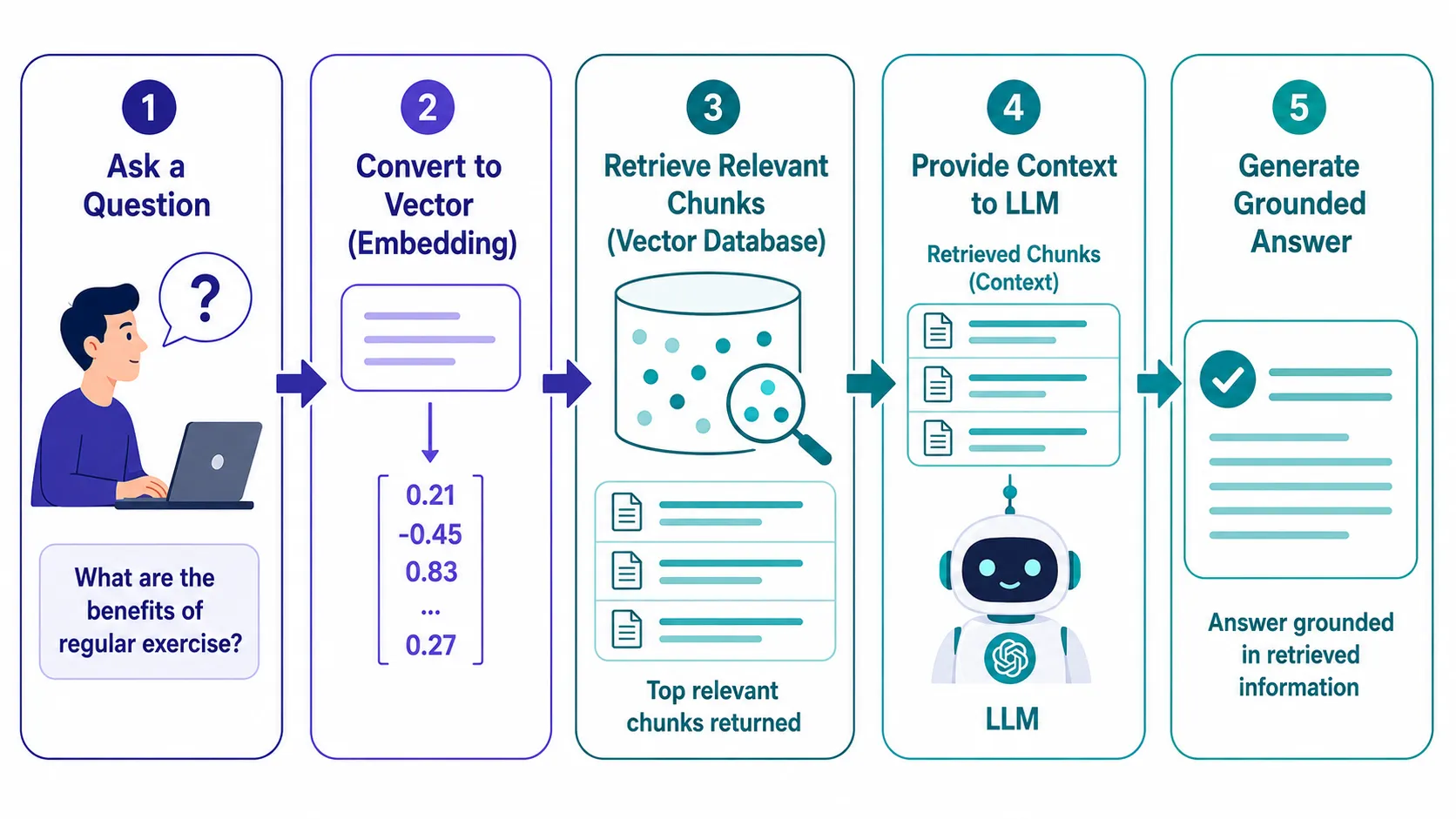
The image below shows the end-to-end RAG pipeline, read from left to right:
- The user’s question — starts from the question the user submits
- Convert the question into an Embedding — turn the question into a vector for semantic search
- Retrieve relevant Chunks — the vector database searches and returns the texts (Chunks) whose meaning is closest to the question
- Feed the Chunks as Context to the LLM — place the retrieved Chunks into the Prompt alongside the user’s question
- Generate a grounded answer — the LLM generates an answer based on the Context it received, instead of answering from memory alone
Advantages of RAG#
RAG has several advantages over letting an LLM answer only from its existing knowledge:
- Answer questions from the user’s own data without fine-tuning the model
- Easy to update the data — just add or edit documents and rebuild the index, and the answer immediately references the latest data
- Can cite the source of the data, making it easier for users to verify the answer
- Helps reduce Hallucination, because the model has real data to reference while generating the answer
RAG = Retrieval (finding relevant data) + Generation (producing the answer with an LLM)
That said, RAG is only a way to reduce Hallucination, not eliminate it entirely. If the retrieved data is irrelevant or the model misinterprets the Context, it can still answer incorrectly. So verifying the result remains important.
In this workshop, we’ll build a complete RAG system end to end so that every step is clearly visible, so that you truly understand how RAG works under the hood.
3. Installation#
Before starting the workshop, we’ll get all the necessary tools ready: VS Code, Python, Ollama, a language model, and the libraries the project uses.
Install VS Code#
Visual Studio Code (VS Code) is a popular editor for programming, with excellent Python support. It’s free and has a large selection of Extensions.
Download it from:
https://code.visualstudio.com/ ↗
Choose the version that matches your operating system, then follow the installation steps.
We recommend installing the Python Extension by Microsoft through VS Code. It helps with auto-complete, syntax highlighting, and running Python programs more conveniently.
Install Python 3.10 or newer#
Download and install Python from the official website:
https://www.python.org/downloads/ ↗
Once installed, check the version with:
python --versionIf it shows 3.10 or newer, you’re ready to go.
Install Ollama#
Ollama is a tool for running language models (LLMs) and Embedding Models on your own machine, without relying on cloud services.
Download it from:
Choose the version that matches your operating system (Windows, macOS, or Linux), then follow the installation steps.
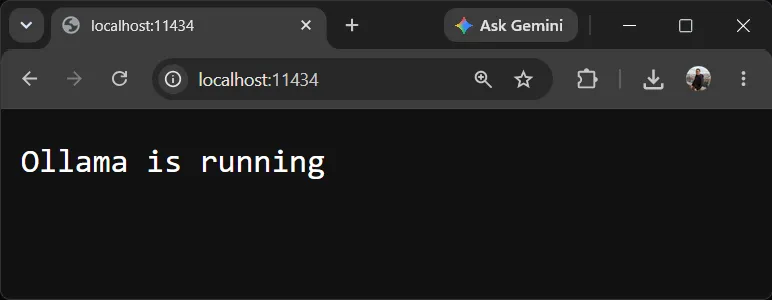
After installation, Ollama opens a local API at:
http://localhost:11434You can open this URL in a web browser to verify it’s running. If Ollama is active, you’ll see the message:
Ollama is running
This is the simplest way to confirm that Ollama is ready to use.
Download the models#
Open a Terminal or Command Prompt and download the models used in the workshop:
ollama pull embeddinggemma
ollama pull qwen3:1.7b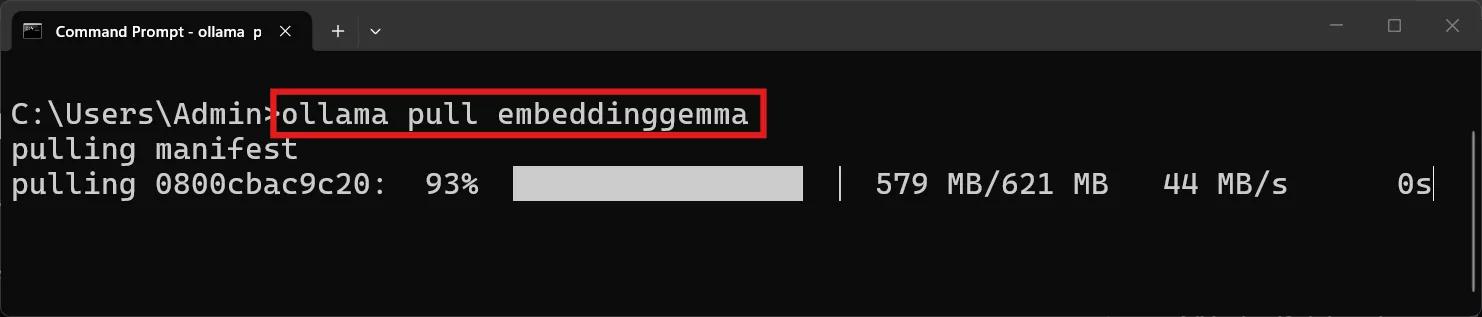
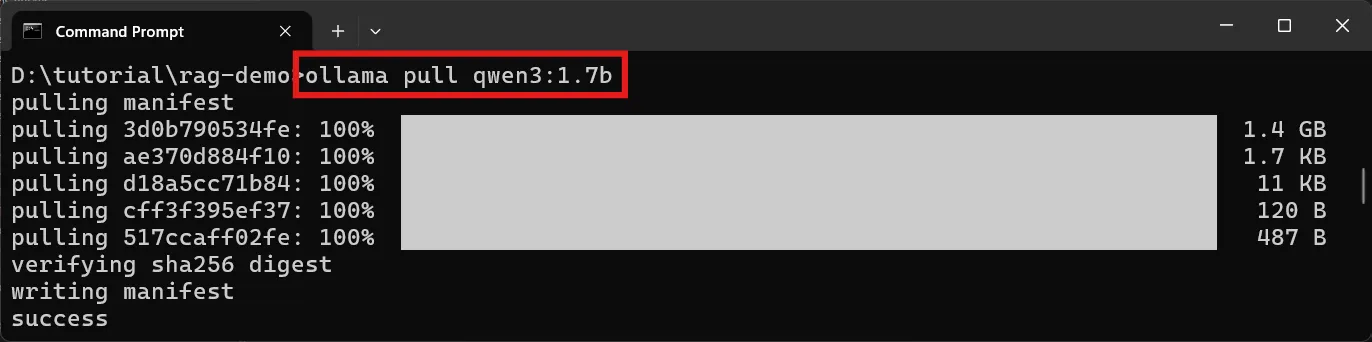
The two models have different roles:
embeddinggemma— used to generate Embeddings from text, which are then stored in the vector database (https://ollama.com/library/embeddinggemma ↗)qwen3:1.7b— used as the Chat Model that generates answers in the RAG system (https://ollama.com/library/qwen3 ↗)
If you already have another Chat Model, such as Llama, Gemma, or Mistral, you can use it in place of
qwen3:1.7b.
After the downloads finish, verify that the models are installed:
ollama list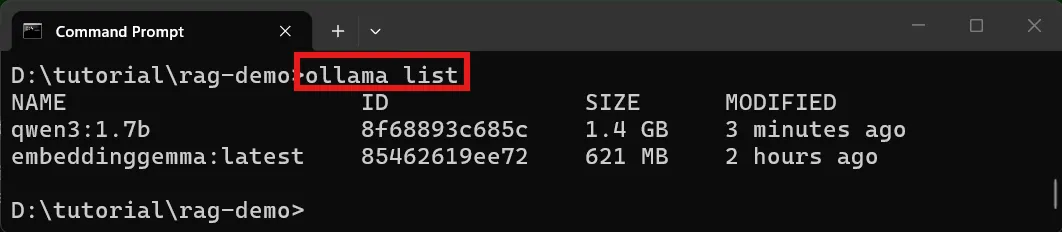
Then try running the model with a simple question:
ollama run qwen3:1.7b "What is the capital of France?"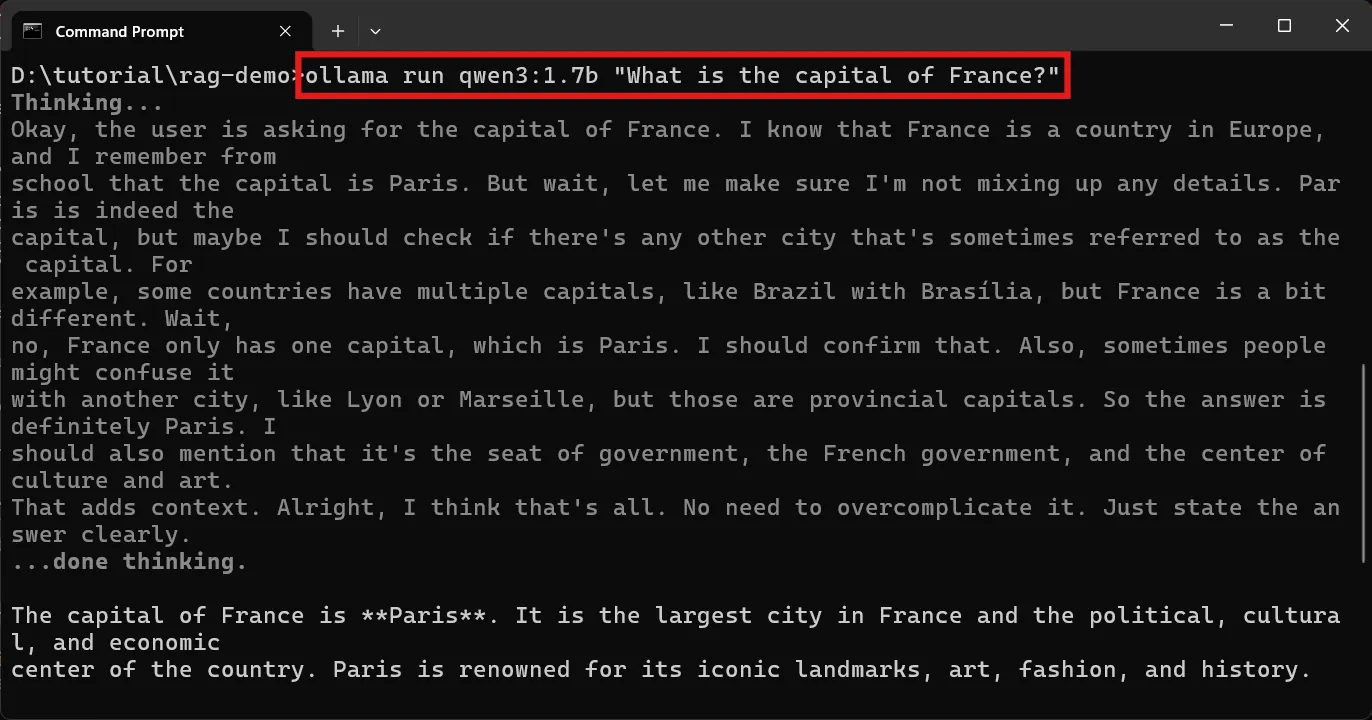
If the model can respond — for example Paris, or a sentence mentioning Paris — then Ollama and the model are ready to use.
Install the Python packages#
This workshop uses only two Python libraries:
- ollama — a library for calling Ollama from Python
- chromadb — the vector database used to store and search Embeddings (https://www.trychroma.com/ ↗)
Install them with:
python -m pip install ollama chromadbThe models and libraries together will use roughly 3–6 GB of disk space, depending on the models installed.
Once all the tools are ready, you can start building the RAG system right away.
4. Architecture#
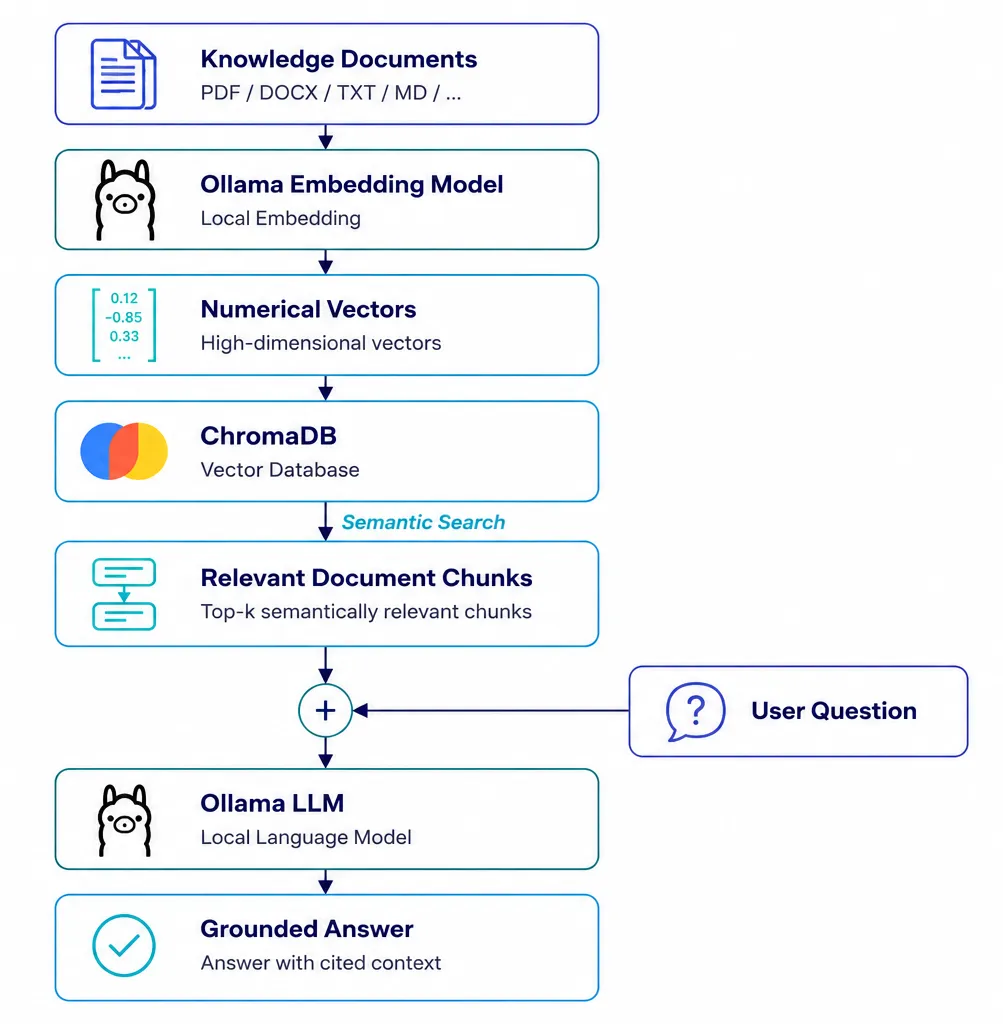
The image below shows an overview of the RAG system architecture we’ll build in this workshop. The work can be split into two main parts.
1) The indexing stage
It starts by feeding documents or a knowledge base into the system. The text is then sent to Ollama’s Embedding Model to be converted into numeric vectors (Embeddings), after which the text, vectors, and metadata are stored in the Chroma vector database.
2) The question-answering stage (Retrieval + Generation)
When a user submits a question, the system turns the question into an Embedding and runs a Semantic Search in Chroma to find the Chunks with the closest meaning. The retrieved Chunks are then combined with the user’s question as Context before being passed to the Ollama LLM to generate a grounded answer.
The point where Chunks from the database meet the user’s question is the heart of RAG: it’s what keeps the model from answering purely from memory and lets it ground itself in real data retrieved from the knowledge base.
5. Project structure#
Once all the tools are ready, the next step is to create the project structure for the RAG system.
Create the following folder structure:
rag-demo/
├── rag_demo.py
├── embeddings.py
├── vector_store.py
├── rag.py
├── knowledge/
│   ├── remote-work.txt
│   ├── leave.txt
│   ├── expenses.txt
│   ├── it-security.txt
│   ├── dress-code.txt
│   └── benefits.txt
└── chroma_db/
The knowledge/ folder holds text files (.txt) that act as the company knowledge base, while the chroma_db/ folder is created automatically the first time you run the program, to store Chroma’s vector database.
The program automatically reads every .txt file inside the knowledge/ folder, so to add, edit, or remove data you can just manage the text files directly — no need to touch the program code.
Sample data files: company policy#
To make the workshop’s RAG workflow concrete, we’ll use company policy as the sample knowledge base.
Create the following text files inside the knowledge/ folder:
knowledge/remote-work.txt
Employees may work from home up to two days per week with manager approval.
Remote employees must be online during core hours of 10:00 to 16:00.
A stable internet connection is required. Equipment such as laptops is
provided by the company.
knowledge/leave.txt
Full-time employees receive 15 days of paid vacation per year. Sick leave
is granted for up to 30 days per year with a medical certificate. Unused
vacation days can be carried over up to 5 days into the next year. All
leave requests must be submitted through the HR portal.
knowledge/expenses.txt
Employees can claim reimbursement for business expenses within 30 days.
Travel and meal expenses require original receipts. The daily meal
allowance is capped at 500 baht. Approved reimbursements are paid with
the next salary cycle.
knowledge/it-security.txt
Passwords must be at least 12 characters and changed every 90 days.
Two-factor authentication is required for all company accounts. Employees
must lock their screens when away from their desk. Report any suspicious
emails to the security team immediately.
knowledge/dress-code.txt
The dress code is business casual from Monday to Thursday. Friday is
casual day. Closed shoes are required in the office at all times.
Client-facing meetings require formal business attire.
knowledge/benefits.txt
Full-time employees receive health insurance covering the employee and
their family. The company contributes 5% to the provident fund. Employees
are entitled to an annual health check-up. Parental leave of 90 days is
available for new parents.
6. Source code#
To keep the code readable and easy to maintain, this project splits the work across multiple files, each responsible for its own role.
| File | Role |
|---|---|
embeddings.py | Generates Embeddings with Ollama |
vector_store.py | Splits, stores, and retrieves data from Chroma |
rag.py | Generates answers with the LLM (RAG Generation) |
rag_demo.py | The entry point (Main Program) that wires everything together |
embeddings.py#
This file is responsible for a single task: generating Embeddings.
When text comes in, the embed_texts() function calls ollama.embed() to convert the text into vectors, then returns those vectors for other parts of the program to use.
The EMBEDDING_MODEL variable sets the name of the model used to generate Embeddings.
from __future__ import annotations

import ollama

# Ollama embedding model
EMBEDDING_MODEL = "embeddinggemma"


def embed_texts(texts: list[str]) -> list[list[float]]:
    """Create embeddings for one or more texts using Ollama."""
    if not texts:
        return []

    response = ollama.embed(
        model=EMBEDDING_MODEL,
        input=texts,
    )

return response["embeddings"]vector_store.py#
This file acts as the Vector Database Layer.
Its work is split into several parts:
split_text()splits the text into small Chunks, with a configurable overlapload_chunks()reads all the.txtfiles in theknowledge/folder and builds a list of Chunks with IDs and Metadataget_collection()creates or opens the Chroma databaseindex_documents()generates Embeddings and stores all the data in Chromaretrieve()finds the Chunks whose meaning is closest to the question using Semantic Search
from __future__ import annotations

from pathlib import Path
from typing import Any

import chromadb

from embeddings import embed_texts

# Configuration
KNOWLEDGE_DIR = Path("knowledge")
CHROMA_DIR = Path("chroma_db")
COLLECTION_NAME = "company_policies"

TOP_K = 3


# ---------------------------------------------------------
# Document loading and chunking
# ---------------------------------------------------------

def split_text(text: str, chunk_size: int = 500, overlap: int = 80) -> list[str]:
    """
    Split text into small overlapping character-based chunks.

    This intentionally simple function is suitable for teaching. Production
    systems often use token-aware, paragraph-aware, or structure-aware chunking.
    """
    clean_text = " ".join(text.split())

    if not clean_text:
        return []

    chunks: list[str] = []
    start = 0

    while start < len(clean_text):
        end = min(start + chunk_size, len(clean_text))
        chunks.append(clean_text[start:end])

        if end == len(clean_text):
            break

        start = end - overlap

    return chunks


def load_chunks() -> tuple[list[str], list[str], list[dict[str, Any]]]:
    """Read all .txt files in knowledge/ and return IDs, chunks, and metadata."""
    ids: list[str] = []
    documents: list[str] = []
    metadatas: list[dict[str, Any]] = []

    for path in sorted(KNOWLEDGE_DIR.glob("*.txt")):
        text = path.read_text(encoding="utf-8")

        for index, chunk in enumerate(split_text(text)):
            ids.append(f"{path.stem}-{index}")
            documents.append(chunk)
            metadatas.append(
                {
                    "source": path.name,
                    "chunk": index,
                }
            )

    return ids, documents, metadatas


# ---------------------------------------------------------
# Chroma vector database
# ---------------------------------------------------------

def get_collection():
    """Create or open a persistent local Chroma collection."""
    client = chromadb.PersistentClient(path=str(CHROMA_DIR))

    return client.get_or_create_collection(
        name=COLLECTION_NAME,
        metadata={"hnsw:space": "cosine"},
    )


def index_documents(collection) -> None:
    """Embed and store all document chunks in Chroma."""
    ids, documents, metadatas = load_chunks()

    if not documents:
        raise RuntimeError("No text documents were found in the knowledge folder.")

    print(f"Creating embeddings for {len(documents)} document chunks...")

    embeddings = embed_texts(documents)

    # upsert allows the script to be run repeatedly without duplicate-ID errors.
    collection.upsert(
        ids=ids,
        documents=documents,
        metadatas=metadatas,
        embeddings=embeddings,
    )

    print(f"Indexed {len(documents)} chunks in Chroma.\n")


def retrieve(collection, question: str, top_k: int = TOP_K) -> list[dict[str, Any]]:
    """Find the chunks whose vectors are most similar to the question."""
    query_embedding = embed_texts([question])[0]

    result = collection.query(
        query_embeddings=[query_embedding],
        n_results=min(top_k, collection.count()),
        include=["documents", "metadatas", "distances"],
    )

    documents = result.get("documents", [[]])[0]
    metadatas = result.get("metadatas", [[]])[0]
    distances = result.get("distances", [[]])[0]

    matches: list[dict[str, Any]] = []

    for document, metadata, distance in zip(
        documents,
        metadatas,
        distances,
        strict=False,
    ):
        matches.append(
            {
                "document": document,
                "source": metadata.get("source", "unknown"),
                "chunk": metadata.get("chunk", 0),
                "distance": distance,
            }
        )

return matchesrag.py#
This file is responsible for the Generation step of RAG.
Given the retrieved Chunks, the program combines all the text into a Context and sends Context + Question to Ollama’s Chat Model.
Inside the System Prompt it sets rules telling the model to:
- Answer only from the provided Context
- If the Context doesn’t contain the information, say honestly that it can’t answer
- Keep the answer short and concise, and cite the source of the information
from __future__ import annotations

from typing import Any

import ollama

# Ollama chat model
CHAT_MODEL = "qwen3:1.7b"


def answer_with_rag(question: str, matches: list[dict[str, Any]]) -> str:
    """Send the retrieved context and question to the chat model."""
    context_parts = []

    for number, match in enumerate(matches, start=1):
        context_parts.append(
            f"[Source {number}: {match['source']}]\n"
            f"{match['document']}"
        )

    context = "\n\n".join(context_parts)

    system_prompt = """
You are an assistant answering questions from a small company knowledge base.

Rules:
1. Answer using only the supplied context.
2. If the context does not contain the answer, say:
   "I cannot answer from the provided knowledge base."
3. Keep the answer concise and clear.
4. Mention the source filenames used in the answer.
""".strip()

    user_prompt = f"""
CONTEXT
-------
{context}

QUESTION
--------
{question}
""".strip()

    response = ollama.chat(
        model=CHAT_MODEL,
        messages=[
            {"role": "system", "content": system_prompt},
            {"role": "user", "content": user_prompt},
        ],
        options={
            "temperature": 0.2,
        },
    )

return response["message"]["content"]rag_demo.py#
from __future__ import annotations

import sys
from typing import Any

from ollama import ResponseError

from embeddings import EMBEDDING_MODEL
from rag import CHAT_MODEL, answer_with_rag
from vector_store import get_collection, index_documents, retrieve


def print_retrieval_results(matches: list[dict[str, Any]]) -> None:
    """Show what the vector database retrieved."""
    print("\nRetrieved chunks:")

    for number, match in enumerate(matches, start=1):
        similarity = 1 - float(match["distance"])

        print(
            f"\n{number}. {match['source']} "
            f"(approx. similarity: {similarity:.3f})"
        )
        print(f"   {match['document']}")


def main() -> None:
    print("=" * 60)
    print("Vector Database and RAG Demo")
    print("=" * 60)
    print(f"Embedding model: {EMBEDDING_MODEL}")
    print(f"Chat model:      {CHAT_MODEL}\n")

    collection = get_collection()
    index_documents(collection)

    print("Example questions:")
    print("- How many vacation days do I get?")
    print("- Can I work from home?")
    print("- How do I claim a travel expense?")
    print("- What is the password policy?")
    print("- What is the company profit this year?  # not in the knowledge base")
    print("\nType 'exit' to stop.")

    while True:
        question = input("\nQuestion: ").strip()

        if question.lower() in {"exit", "quit"}:
            print("Goodbye.")
            break

        if not question:
            continue

        matches = retrieve(collection, question)
        print_retrieval_results(matches)

        answer = answer_with_rag(question, matches)

        print("\nRAG answer:")
        print(answer)
        print("\n" + "-" * 60)


if __name__ == "__main__":
    try:
        main()
    except ResponseError as error:
        print(f"\nOllama error: {error.error}", file=sys.stderr)
        print(
            "\nCheck that Ollama is running and that both models are installed:",
            file=sys.stderr,
        )
        print(f"  ollama pull {EMBEDDING_MODEL}", file=sys.stderr)
        print(f"  ollama pull {CHAT_MODEL}", file=sys.stderr)
        sys.exit(1)
    except Exception as error:
        print(f"\nError: {error}", file=sys.stderr)
sys.exit(1)This file is the entry point of the program, run with:
python rag_demo.pyIts job is to wire every component of the system together:
- Open the Chroma database
- Read the documents and generate Embeddings
- Store the data in the vector database
- Receive a question from the user
- Retrieve the relevant Chunks
- Send the Context to the LLM
- Display the retrieval results and the RAG answer
7. Run the application#
Once all the files are created, open a Terminal inside the project folder and run the program with:
python rag_demo.py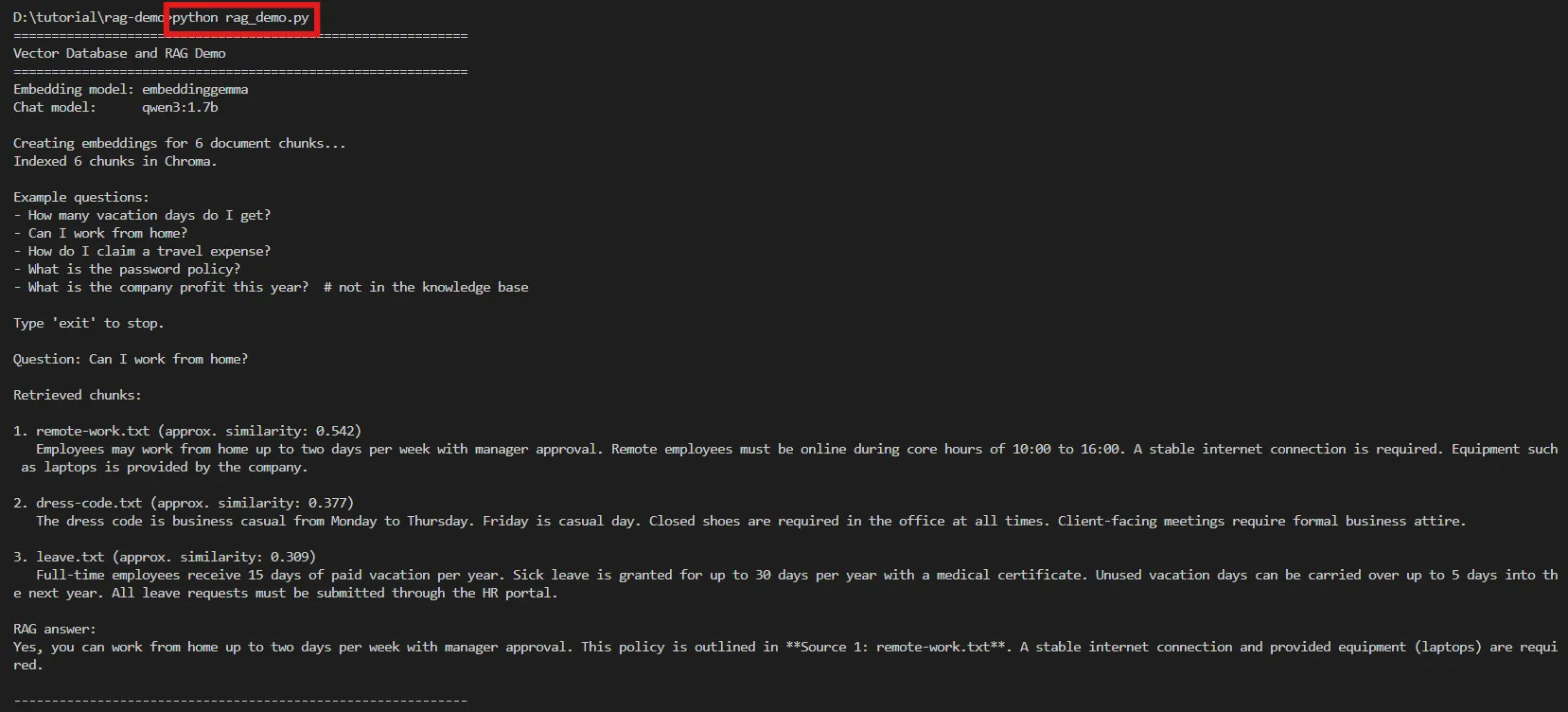
When the program starts, it generates Embeddings for all the documents, stores them in Chroma, and enters a mode that accepts questions from the user.
Example usage:
Question: Can I work from home?

Retrieved chunks:

1. remote-work.txt (approx. similarity: 0.542)
   Employees may work from home up to two days per week with manager approval. Remote employees must be online during core hours of 10:00 to 16:00. A stable internet connection is required. Equipment such as laptops is provided by the company.

2. dress-code.txt (approx. similarity: 0.377)
   The dress code is business casual from Monday to Thursday. Friday is casual day. Closed shoes are required in the office at all times. Client-facing meetings require formal business attire.

3. leave.txt (approx. similarity: 0.309)
   Full-time employees receive 15 days of paid vacation per year. Sick leave is granted for up to 30 days per year with a medical certificate. Unused vacation days can be carried over up to 5 days into the next year. All leave requests must be submitted through the HR portal.

RAG answer:
Yes, you can work from home up to two days per week with manager approval. This policy is outlined in **Source 1: remote-work.txt**. A stable internet connection and provided equipment (laptops) are required.
Before the LLM generates an answer, the program displays the Retrieved Chunks found in the vector database, so you can see which data the system chose as Context. After that it shows the RAG Answer, which is generated by grounding itself in those Chunks.
The similarity score and the answer text may differ slightly, depending on the model version used and the environment of each computer.
8. What readers should observe#
After trying out the RAG system, take note of the following key points to get a clearer understanding of how each component works.
A. Keyword search vs semantic search#
Try asking:
How many days off am I entitled to?Even though the literal phrase “days off” doesn’t appear in any file, the system can still retrieve information from leave.txt, because the vector database doesn’t compare characters — it compares the meaning of the text. So it understands that “days off” is close in meaning to “vacation”.
This is the key difference between Semantic Search and Keyword Search.
B. Retrieval happens before answer generation#
Before the LLM generates an answer, the program always first displays the Retrieved Chunks found in the vector database.
Showing this part of the output lets readers verify what information the LLM received as Context and analyze why the model answered the way it did.
C. RAG doesn’t permanently retrain the model#
RAG is not fine-tuning the model.
Every time there’s a question, the system retrieves relevant documents from the vector database in real time and feeds that data as Context to the LLM.
In other words, the language model’s weights never change. The new data is used only for that particular question.
D. The knowledge base defines the scope of the answer#
Try asking a question that isn’t in the knowledge base, such as:
What is the company's profit this year?Since this information isn’t in the knowledge files, the expected answer is:
I cannot answer from the provided knowledge base.This example shows that the System Prompt guides the model to answer only from the retrieved data, which helps reduce the chance of Hallucination.
That said, no prompt can guarantee the complete elimination of Hallucination, so verifying the result remains important.
9. Activities#
The following activities will help you understand how Embedding, the Vector Database, and RAG work more deeply.
Activity 1: Inspect an Embedding#
Create a new file in the project, such as inspect_embedding.py, and import the embed_texts() function from embeddings.py.
from embeddings import embed_texts

vector = embed_texts(["Employees can work from home two days a week."])[0]

print("Vector dimensions:", len(vector))
print("First 10 values:", vector[:10])Run the program with:
python inspect_embedding.pyThen observe the output.
A single vector may have hundreds or thousands of values. Even though you can’t directly interpret each dimension, the meaning of the text is distributed across the entire vector.
That is, no single dimension stands for a specific meaning — there’s no “dimension 5 is cuteness.” Meaning emerges from all the positions working together.
Think of it like the pixels of an image: a single pixel can’t tell you what the picture is, but combine many pixels and they form a complete image. Vectors work the same way.
Activity 2: Compare queries#
Try asking these questions:
How many vacation days do I get?Can I work remotely?Tell me about the expense reimbursement policy.Compare which file each question retrieves data from, and observe that even though different words are used, the system can still find the relevant document by meaning.
Activity 3: Edit the knowledge base#
Try editing or adding .txt files inside the knowledge/ folder.
Then rerun the program and ask a question about the data you just added, to see that the system can answer from the new data immediately — without fine-tuning the model.
Activity 4: Demonstrate missing knowledge#
Try asking a question that is clearly outside the knowledge base, and observe whether the model can follow the System Prompt and say it doesn’t have the information.
This activity makes the role of Grounding and the limitations of the LLM clear.
Activity 5: Change the TOP_K value#
Try editing the TOP_K variable inside vector_store.py:
TOP_K = 1Compare it with:
TOP_K = 5Then ask the same questions again and observe the difference in the results.
Consider the following points:
- If you retrieve too few Chunks, you may miss relevant key information
- If you retrieve too many Chunks, irrelevant data can creep in and become noise
- Adding more Context doesn’t always mean a better answer — the quality of the data matters more than the quantity
10. Optional: a retrieval-only version#
To make the role of the vector database crystal clear, try building a program that does only Semantic Search, without using an LLM to generate answers.
Create a new file called search_only.py:
from vector_store import get_collection, index_documents, retrieve

collection = get_collection()
index_documents(collection)

question = input("Search: ")
matches = retrieve(collection, question)

for match in matches:
    print(match["source"])
    print(match["document"])
print()Run the program with:
python search_only.pyThis program only shows retrieval results from the vector database — there’s no Generation step.
This experiment makes the difference between the two concepts clear:
Vector Search = Retrieving relevant information

RAG = Retrieval + LLM Generation
In other words, Vector Search is responsible for finding relevant information, while RAG takes the retrieved data and hands it to the LLM to generate an answer as an extra step.
11. Conclusion#
In this article, we built a Retrieval-Augmented Generation (RAG) system from fundamentals to a working implementation, so that the mechanism of each step is clearly visible.
The key takeaways are:
- Embedding — converts text into vectors that capture its meaning, using the
embeddinggemmamodel through Ollama - Vector Database — stores Embeddings and searches with Semantic Search; in this workshop we used Chroma
- RAG (Retrieval-Augmented Generation) — retrieves relevant information from the knowledge base and feeds it as Context to an LLM (
qwen3:1.7b) to generate a grounded answer - Code design — separates responsibilities into
embeddings.py,vector_store.py,rag.py, andrag_demo.py, and keeps the knowledge base as.txtfiles in theknowledge/folder, so data can be updated without touching the code
The main advantage of RAG is that it can answer questions from the user’s own data without fine-tuning the model, supports easy data updates, can cite the sources of its answers, and helps reduce the chance of Hallucination.
Even though the system built in this article is a small example, the same ideas can scale up to building a document chatbot for an organization, an internal knowledge search system, or an AI assistant that answers questions from a specialized database — all running on your own machine through Ollama and Chroma, with no cloud services required.