Serving Machine Learning Models in Production
Take Machine Learning to production — model serving, the serving lifecycle, model decay, monitoring, and metrics for real-world use
If you have ever studied Machine Learning, this process probably feels familiar: prepare the data → train a model → check the accuracy → and once the results look good, close the notebook and call it done.
But in the real world, training a model is only the starting point.
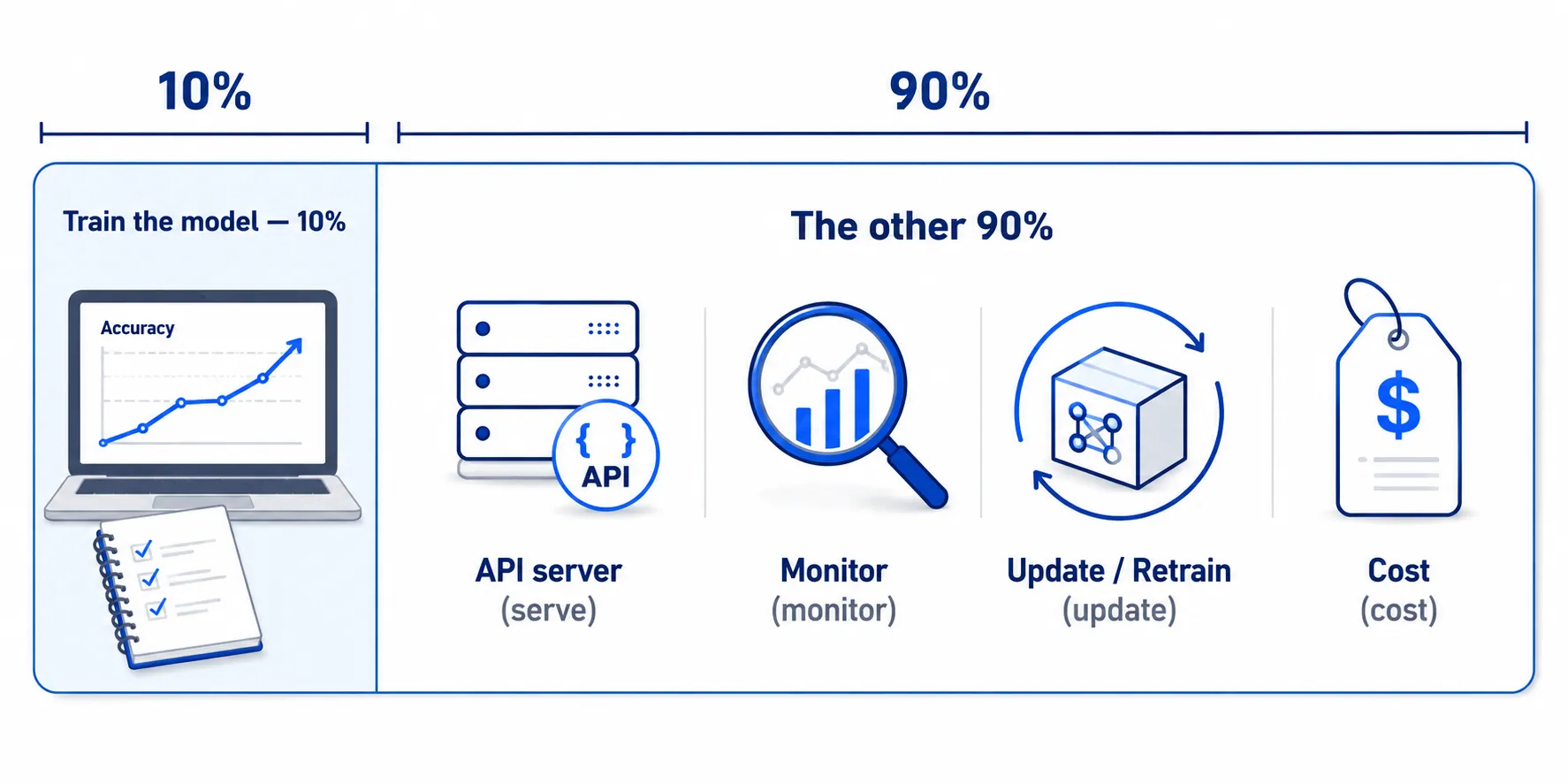
In reality, building the model may be only about 10% of the total work. The other 90% is making that model usable in a real application — and keeping it working well as time passes.
The remaining work includes everything from:
- Turning the model into a service that other systems and apps can call
- Checking whether the model is still predicting correctly
- Updating or retraining the model as data and user behavior change
- And of course… understanding the costs that come with it
That remaining 90% is what this series is about.
But before diving into the details, let’s get familiar — in simple terms — with three key terms we will see over and over:
-
Model — a program that learns patterns from historical data, then uses what it learned to make predictions about new data. For example, we feed in the text of an email, and the model answers whether that email is spam or not spam.
-
Serving — making a trained model ready for other systems to actually call. An app or website sends data in, the model sends a prediction back, and the system can call it whenever it needs to.
-
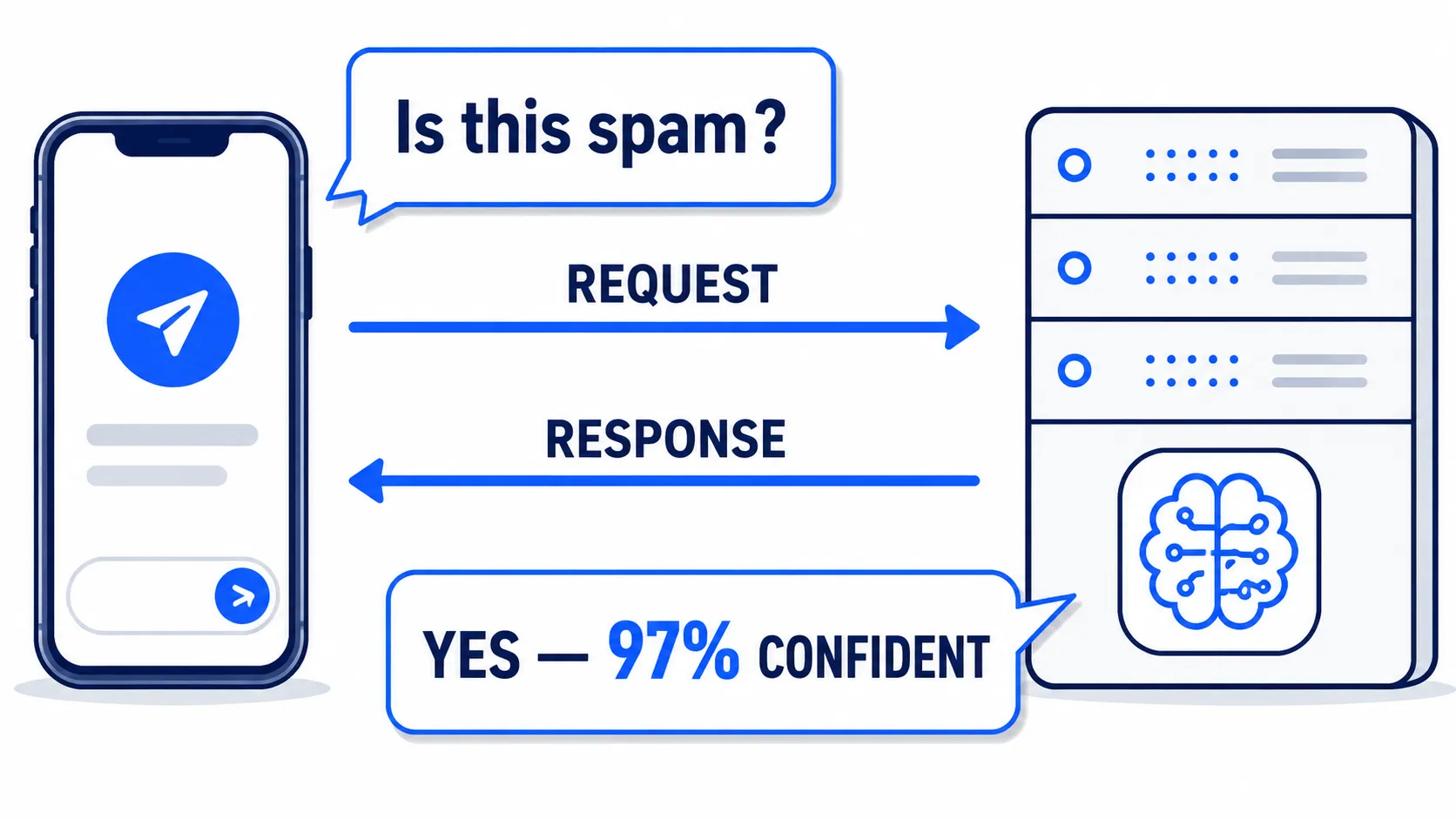
API — think of it as the channel software uses to talk to each other. An app sends a request asking “Is this email spam?” The server holding the model processes it and replies “Yes, 97% confident.”
From here on, we will gradually shift our perspective from “building an accurate model” to “how to turn a model into a system other people can actually use” — which is the heart of doing Machine Learning in the real world.
Part 1: Who Serves What? The Responsibility Ladder#
Imagine tonight you want dinner. You have roughly four options:
- Grow the vegetables, raise the animals, and cook everything yourself — everything is your responsibility
- Buy ingredients from a supermarket and cook at home — someone prepares the ingredients for you, but cooking is still your job
- Order food delivery — someone else cooks everything; you just wait, receive, and eat
- Go to a restaurant — almost nothing to manage yourself; you eat and leave, without even washing dishes
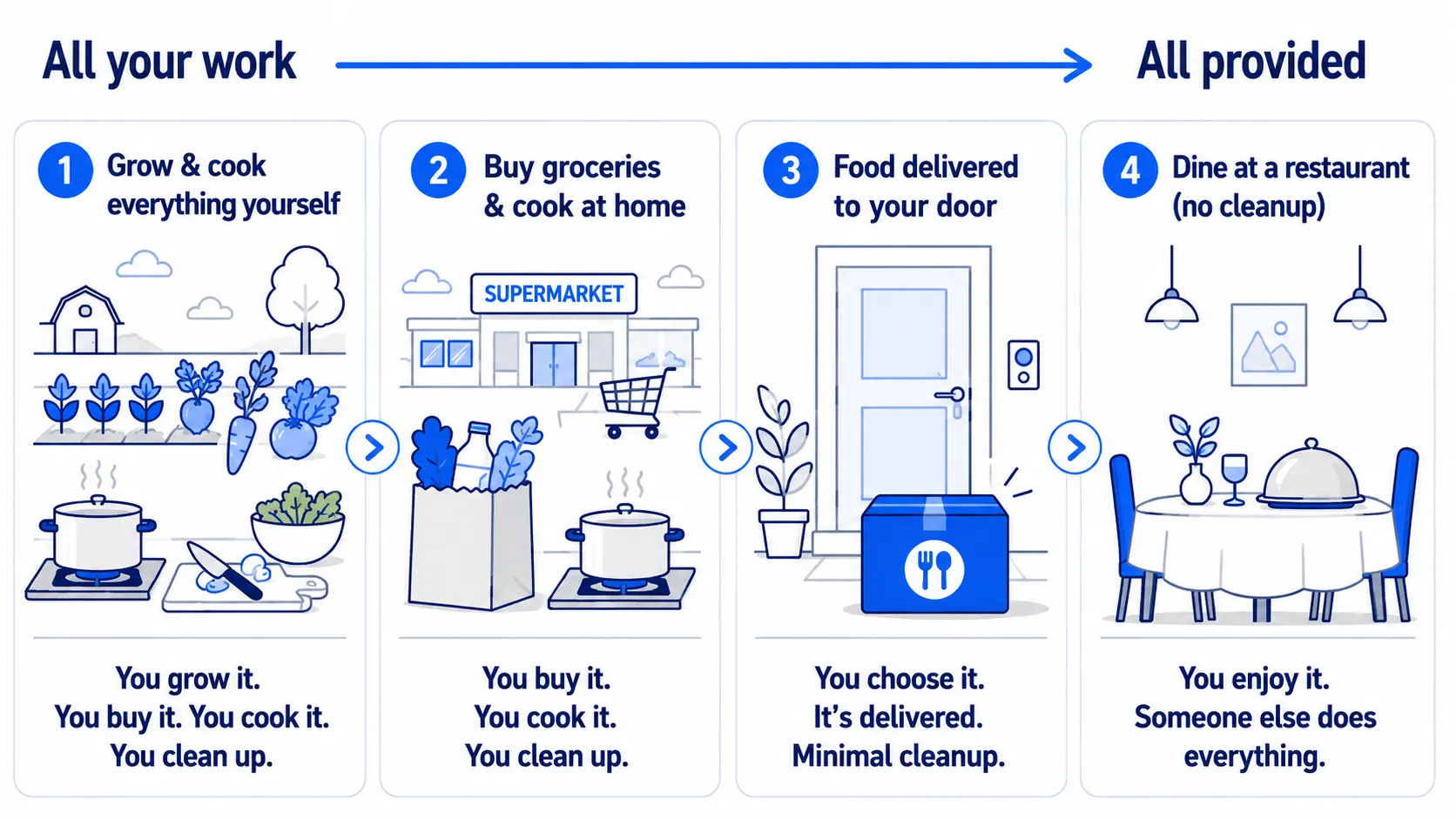
Cloud Computing works on a similar idea.
We don’t have to build and maintain everything ourselves — from servers, networking, and operating systems up to the application. We can choose which parts we manage ourselves and which parts we let the Cloud Provider handle for us.
So the key question of Cloud Computing is not just “should we use the cloud?”
It is:
“How much do we want to manage ourselves, and what do we want the provider to handle for us?”
The answer to that question leads us to key concepts like IaaS, PaaS, SaaS, and onward to AI as a Service (AIaaS).
This is the Cloud responsibility ladder — each step up hands more of the work we used to do over to the provider.
Put simply: the higher you climb, the less work you have — but the less control you have too.
| Model | You manage | Provider manages | Examples |
|---|---|---|---|
| On-Premise | Everything: hardware, OS, runtime, application, and data | Nothing — you manage it all | Your own servers in a rack |
| IaaS (Infrastructure as a Service) | OS, runtime, application, and data | Hardware, networking, and virtualization | A Linux VM rented from the cloud |
| PaaS (Platform as a Service) | Application and data | OS, runtime, infrastructure, and system patching | Heroku, Azure App Service |
| SaaS (Software as a Service) | Your data and settings | Everything from infrastructure up to the application itself | Gmail, Salesforce |
| AIaaS / MLaaS (AI / Machine Learning as a Service) | Preparing input and sending requests | Model, hosting, infrastructure, and scaling | Google Cloud Vision API |
The interesting one is AIaaS / MLaaS, which goes one step further — because even the Machine Learning model itself no longer needs to be built or maintained by us.
We simply send data in — an image, text, or audio — and wait for the result:
Input → API Request → AI Model → Output
Instead of the old question “which server should run my model?”, what’s left may be just “what do I send into the API, and what do I want back?”
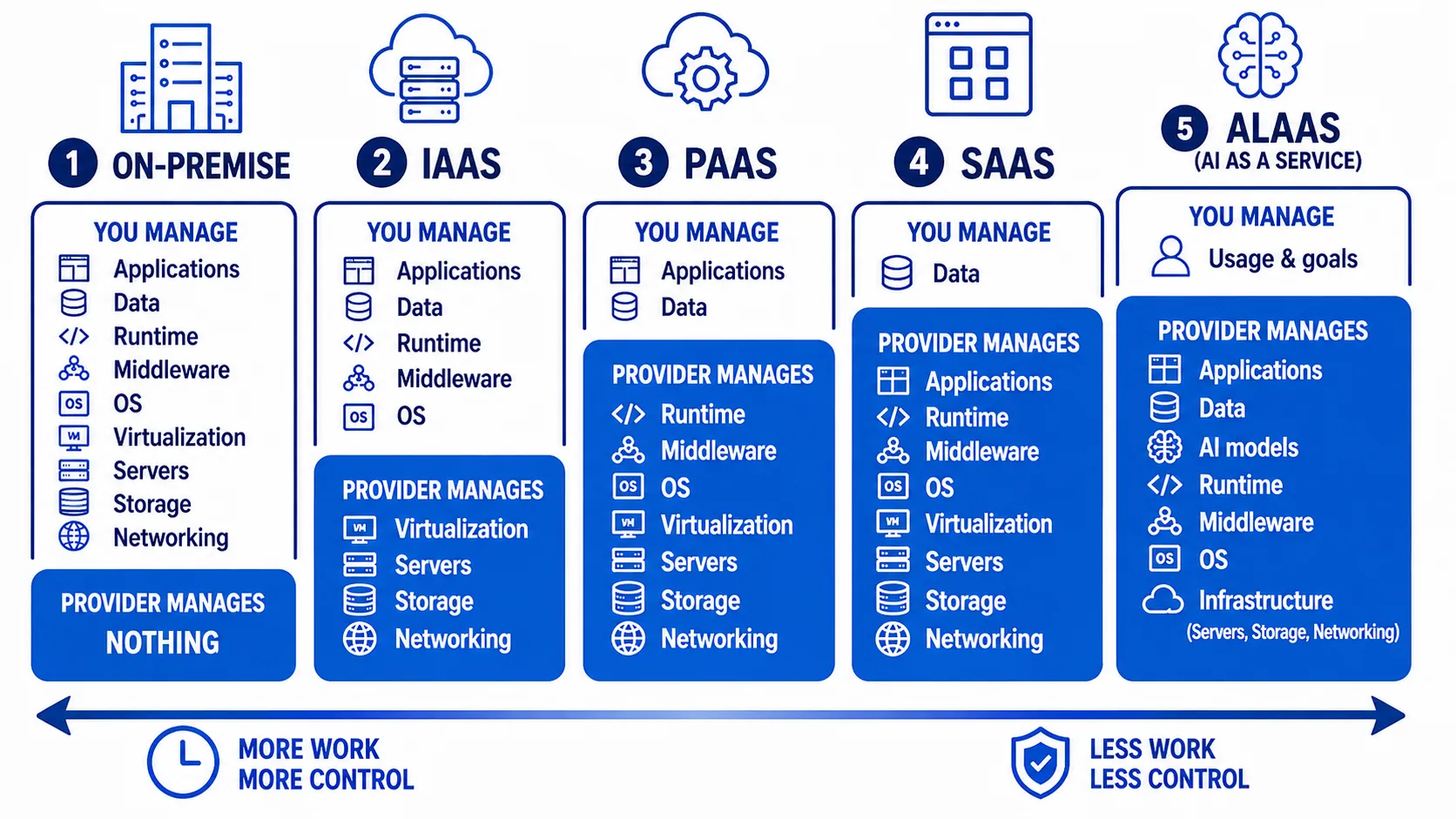
Let’s walk through each one in plain language:
-
On-Premise — the server is physically with us, maybe sitting in the company’s server room. If it breaks at 8pm, the person who deals with it is us — hardware, network, OS, all the way up to the application.
-
IaaS (Infrastructure as a Service) — instead of buying servers, we rent Virtual Machines (VMs) from a cloud provider. They look after the hardware and network; everything from the OS up is our job. If a physical disk fails, the provider handles it — but if our Linux needs a security patch, that’s on us.
-
PaaS (Platform as a Service) — we no longer manage even the OS or runtime. Our main job is to write the application and deploy it. Servers, OS updates, runtimes, and system patching are handled by the provider — examples include Heroku or Azure App Service.
-
SaaS (Software as a Service) — now we build almost nothing, because the software comes ready-made. With Gmail, we just log in and use it. We don’t even know how many servers run behind the scenes or how it is deployed.
-
AIaaS (AI as a Service) — the same idea as SaaS, but what we call is AI capability. Send in a photo, and the API replies “this image is a cat, 98% confident.” We don’t need to know how the model was trained, what dataset it used, or how many GPUs it runs on.
So why does this ladder matter?
Because every time we climb one step, we are always trading two things:
- Less work for us — fewer servers to look after, fewer patches, easier deploys, and less infrastructure to watch
- Less control — less customization, provider constraints to follow, and we must accept that platform’s pricing and rules
Less Work ↔ Less Control
This is one of the most important trade-offs in Cloud Computing.
There is no answer that is always best — it depends on how much control we need over the system, and how much operational burden we are willing to accept.
Another important point: these services are not strictly separate — they usually stack in layers.
For example, a university’s online learning system might be a SaaS that students open in a browser and use right away, while internally it calls another AIaaS to help filter spam, analyze text, or generate recommendations for learners.
Put another way:
A SaaS can call an AIaaS, and the AIaaS itself runs on cloud infrastructure.
Once we start seeing systems as layers like this, we begin to notice that the applications we use every day are actually assembled from many cloud services working together behind the scenes.
Part 2: Three Paths to a Prediction#
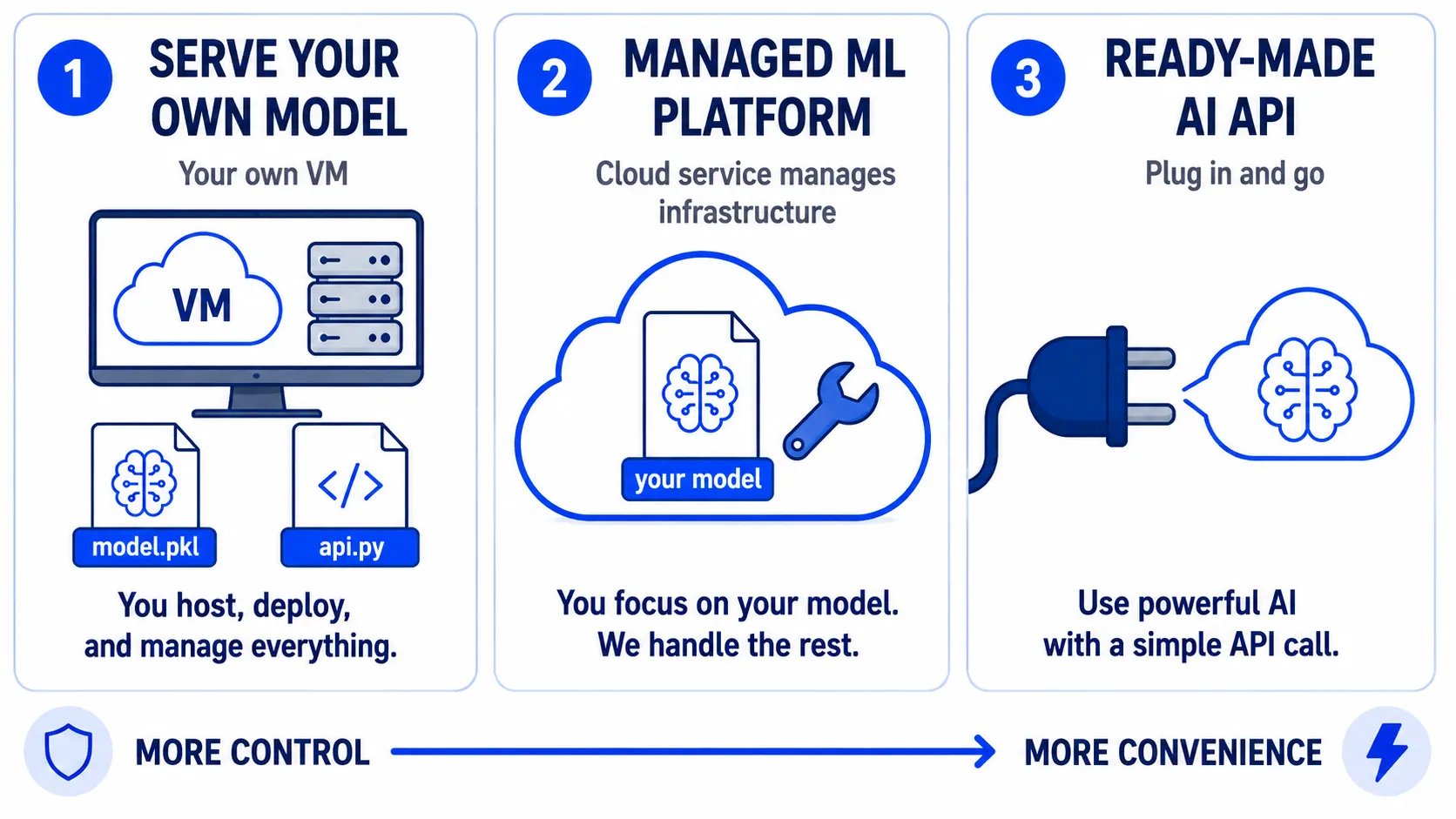
Now suppose our application needs Machine Learning to predict something.
Maybe it’s a travel app that must read text from a passport photo, a store that wants to predict which products are about to run out, or a hospital system that needs to assess patient risk.
The question is: how do we get AI or Machine Learning capability into our application?
Broadly, there are three paths.
Path 1: Serve Your Own Model#
On this path, we do almost everything ourselves.
We prepare data → train a model → save the model → put it on a server → build an API → and open it up for applications to call.
In this series, we will try running a model on our own Virtual Machine (VM).
The upside is that we control almost everything — the model itself, library versions, and how we deploy and scale the system.
But what follows is: when we control everything, we are responsible for everything too.
Server goes down — we handle it. Model won’t load — we handle it. Library has a vulnerability — we patch it. Traffic grows beyond what the server can take — we scale it ourselves.
In short:
Maximum control → maximum work
Path 2: Use a Managed ML Platform#
The second path sits in the middle.
We can still train our own model, or bring a model we already have, but instead of building and maintaining all the serving infrastructure ourselves, we let a cloud platform handle much of it.
Examples include Amazon SageMaker, Azure Machine Learning, or Google Vertex AI.
We focus mainly on the model and the application, while the platform takes care of much of the server provisioning, deployment, and scaling.
Simply put:
The model is still ours, but we don’t have to look after every server ourselves
So it is the middle ground between control and convenience.
Path 3: Call a Ready-Made AI API#
The last path is the easiest.
We don’t train a model ourselves, and we don’t deploy one — the provider has already built and trained the model for us.
All we do is send an HTTP request to the API and wait for the result.
For example, send a passport photo to an OCR API and get text back, or send an audio file to a Speech-to-Text API and get the transcribed text back.
Request → AI API → Response
The upside is that we can start using it very fast. What we trade away is control.
We may not even know which model runs behind it, what kind of data it was trained on, or how the infrastructure works — and of course, we cannot directly modify the model.
In short:
Most convenient → least control
So Which Path Should You Choose?#
Use this simple rule of thumb:
-
If you have unique data nobody else has → start with Path 1 e.g. internal organizational data, customer purchase history, or data from your company’s production process. This data may be our competitive advantage, and generic ready-made models may not fit the problem.
-
If it is a standard problem already solved well → start with Path 3 e.g. OCR, translation, or speech-to-text. These tasks already have ready-made services developed on massive datasets. Rebuilding everything from scratch may not be worth the time or money.
-
If you want your own model but don’t want to manage infrastructure → Path 2 We get the flexibility of a custom model while a managed platform shoulders the infrastructure and serving burden.
Now map the rule onto real examples:
| Case | Choice | Why |
|---|---|---|
| A hospital wants to predict which patients are likely to be readmitted, using its own data | Path 1 — serve your own model | The data is highly specific and privacy-sensitive, so maximum control is needed |
| A travel app needs to read text from passport photos | Path 3 — ready-made AI API | OCR is a standard problem with services already available; no need to build a model from scratch |
| A store wants demand forecasting from its own data, but has no infrastructure team | Path 2 — managed ML platform | Needs a custom model without carrying the whole serving burden alone |
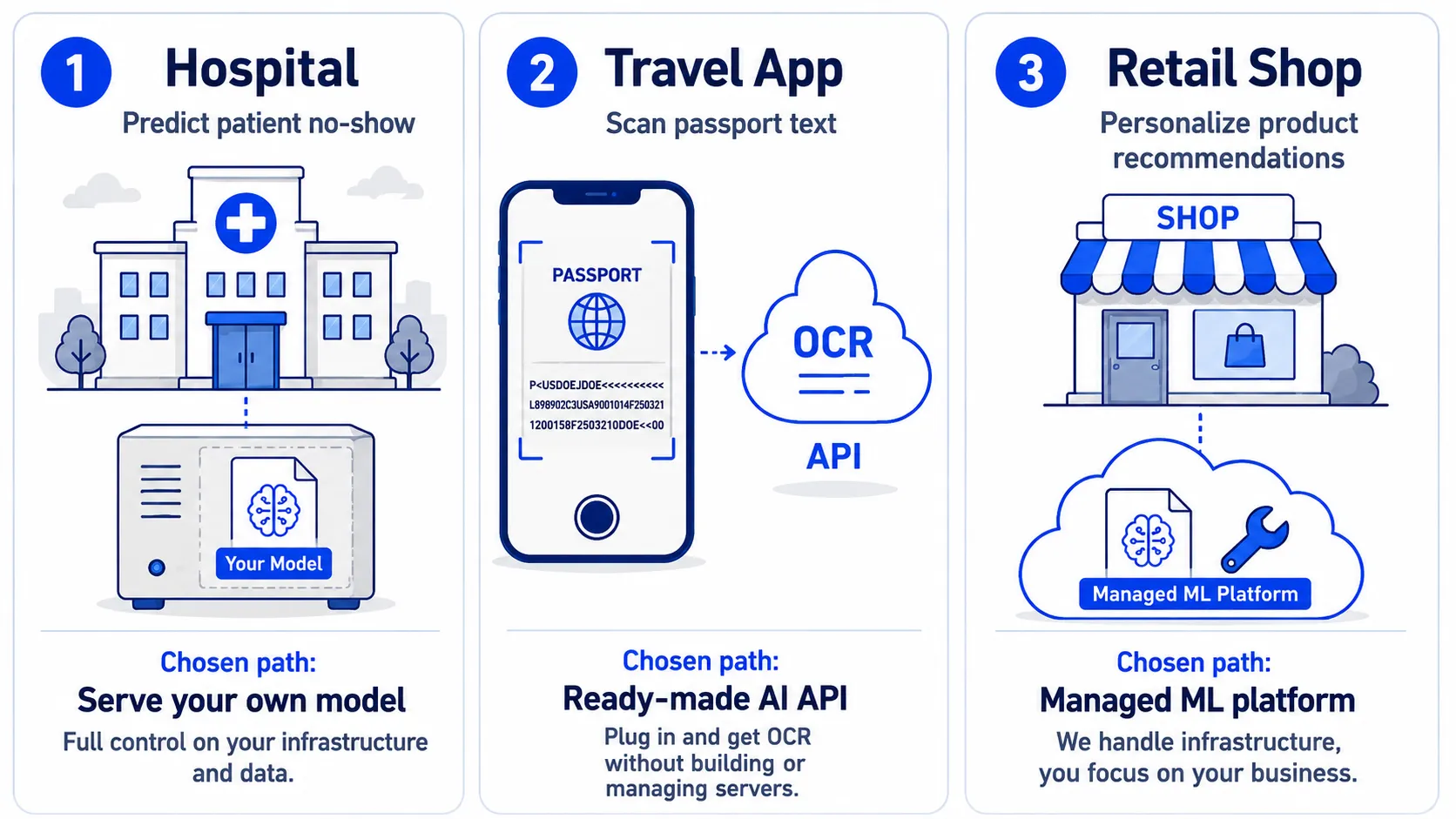
The key point: no single path is best for every problem.
Path 1 gives high control but demands a lot of effort. Path 3 is convenient and fast to start but gives little control. Path 2 sits in between the two.
And that is why this series will walk through all three paths.
We will start by serving a model ourselves, so we can see what it actually takes to put a Machine Learning model into production.
Because if we have never seen what hidden costs building it ourselves carries, it is hard to decide when to build and when to buy.
A good build-vs-buy decision starts with understanding the costs on both sides
Part 3: The Serving Lifecycle — Why It’s a Loop#
A model living in a notebook is still just an experiment. We try training, tweak parameters, check accuracy, and see how good the results look.
But the moment we put that model behind an API and open it to real applications and users, its status changes.
It is no longer just an experiment — it has become a product.
And real products are not built once and forgotten. They must be maintained, improved, and updated continuously.
Machine Learning models are the same — hence what we call the Serving Lifecycle.
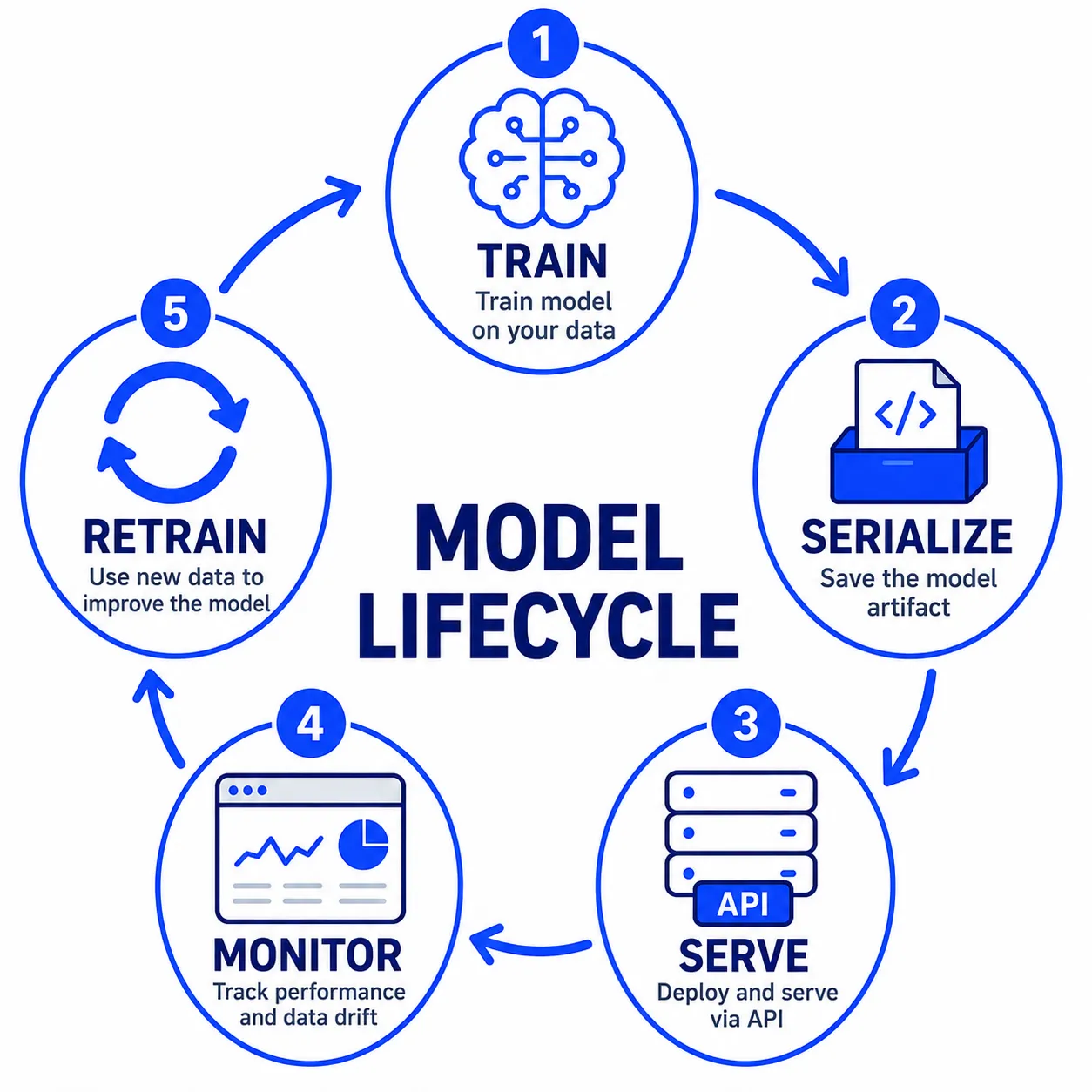
This lifecycle has five main stages.
1. Train — Build a Model from Data#
Start by feeding historical data to an algorithm so it can find patterns in the data, producing a trained model.
This stage usually happens offline — meaning it does not happen while users are actively calling the system.
Training may take a few minutes, several hours, or even longer, depending on the size of the data and the complexity of the model.
The important part: we do not retrain the model on every incoming request.
Training happens occasionally, but prediction may happen all day long.
2. Serialize — Turn the Model into a File#
Once training finishes, we save the model out to a file, such as
model.joblib
This file is called a Model Artifact.
The artifact is what we actually deploy to a real server.
This point matters a lot, because in production we do not open a notebook and hit Run every time we need a prediction.
We train once → save the model → and then use that file thereafter.
Simply put, after training is done:
The artifact is the model’s deployable stand-in.
3. Serve — Open the Model for Others to Call#
With an artifact in hand, the next step is to serve it.
A program on the server starts up, loads model.joblib into memory, and opens an API endpoint such as
POST /predict
When an application sends data in, the server passes it to the model for prediction and sends the answer back.
This stage is called Online Serving.
Unlike training, which may take minutes or hours, serving must be ready to work at all times, and each request usually needs an answer as fast as possible.
So the simple picture is:
Training: occasional, possibly slow Serving: always on, and fast
4. Monitor — Check Whether the Model Still Works Well#
A successful deploy does not mean the job is finished.
We have to keep watching whether the model and the system are still performing well — for example:
- How fast the API responds
- Whether errors are increasing
- Whether predictions are still accurate
- Whether today’s incoming data still looks like the data used for training
The problem is: a model cannot tell us itself “I’m starting to predict badly.”
The API may still work normally, the server is not down, no errors — yet the quality of the predictions may be declining.
That is why we need Monitoring to make these things visible.
5. Retrain — When the World Changes, the Model Must Change Too#
Real-world data does not sit still.
Customer behavior changes, products change, language changes, fraud patterns change — even economic conditions can change.
A model that learned from last year’s data may no longer fit today’s.
When monitoring tells us the model’s quality is starting to drop, we need to bring in fresher data and retrain.
Then we produce a new version of the artifact, such as
model_v2.joblib
and deploy it in place of the old model.
After that, the process starts all over again.
Train → Serialize → Serve → Monitor → Retrain → and back around
That is why we call it a lifecycle.
Compare It to a Restaurant#
If this lifecycle still feels technical, go back to our restaurant analogy.
| ML stage | Restaurant equivalent |
|---|---|
| Train | Experimenting and writing the recipe |
| Serialize | Recording the recipe in a cookbook |
| Serve | The kitchen uses that recipe to cook for customers every day |
| Monitor | Tasting the food and watching customer feedback |
| Retrain | Adjusting the recipe when ingredients or customer tastes change |
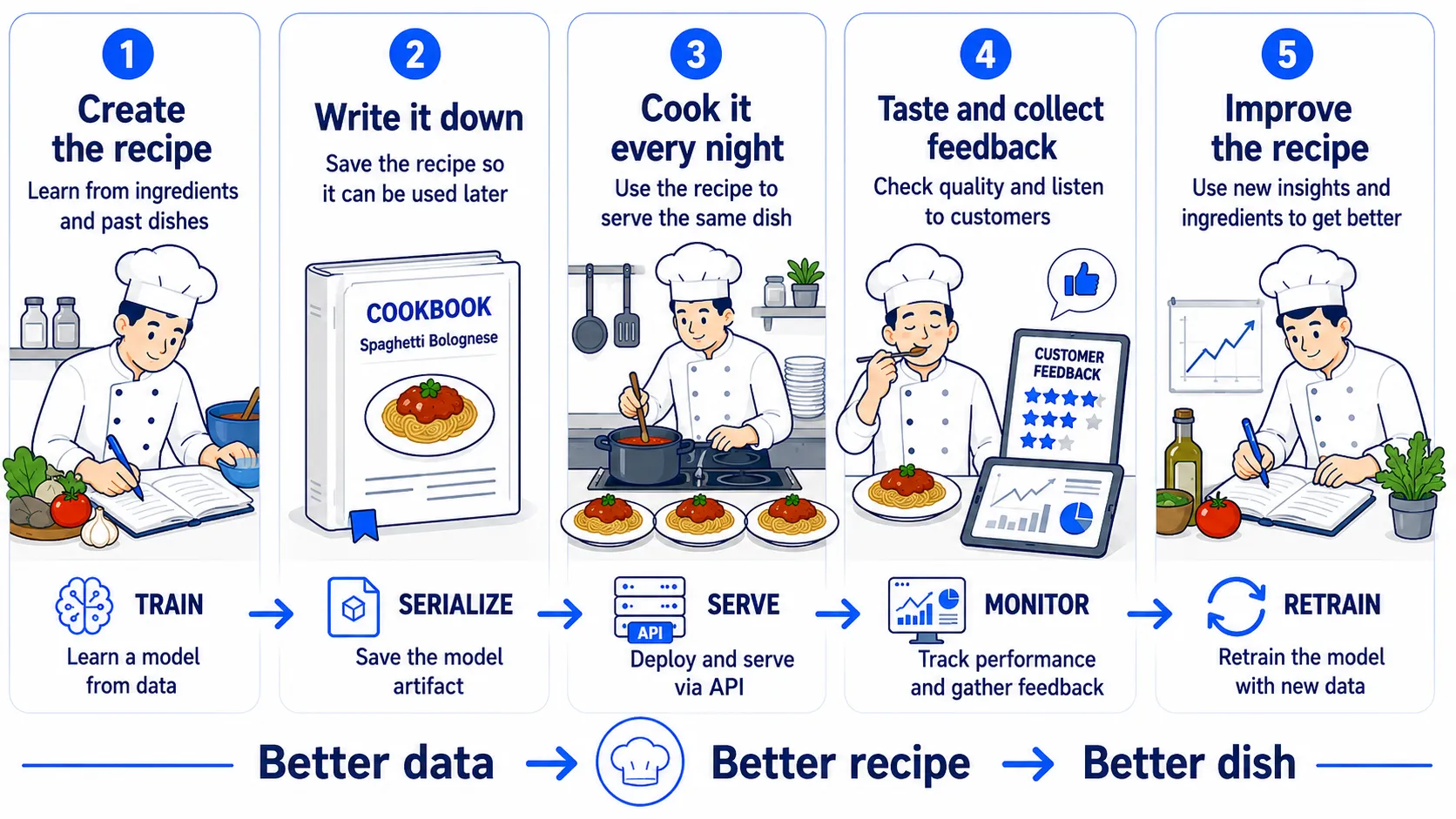
The key insight is that the chef does not have to invent a new recipe every time a customer orders.
The chef devises the recipe and records it first; then the kitchen uses that recipe to cook it over and over.
Machine Learning is the same. We do not train a model every time someone calls the API — we train and produce the artifact up front, and the server loads that artifact to answer predictions repeatedly.
An Important Truth: Models Can “Decay” Silently#
This is the most important reason this lifecycle cannot be avoided.
A deployed model can gradually get worse without the system breaking.
Regular software usually breaks in ways that are easy to notice.
Application crashes.
Server goes down.
Database connection error.
API returns 500 Internal Server Error.
When these happen, the monitoring system alerts, and the team steps in to fix it.
But Machine Learning has another kind of problem:
The system still works, but the answers are starting to get worse.
Suppose the model had 94% accuracy on the day it was deployed.
A year later, user behavior and data have changed. Accuracy may be down to 70%.
Yet the API still replies:
200 OK
The server is not down. No exceptions. No errors. Every dashboard may still be green.
But the predictions are getting more and more wrong.
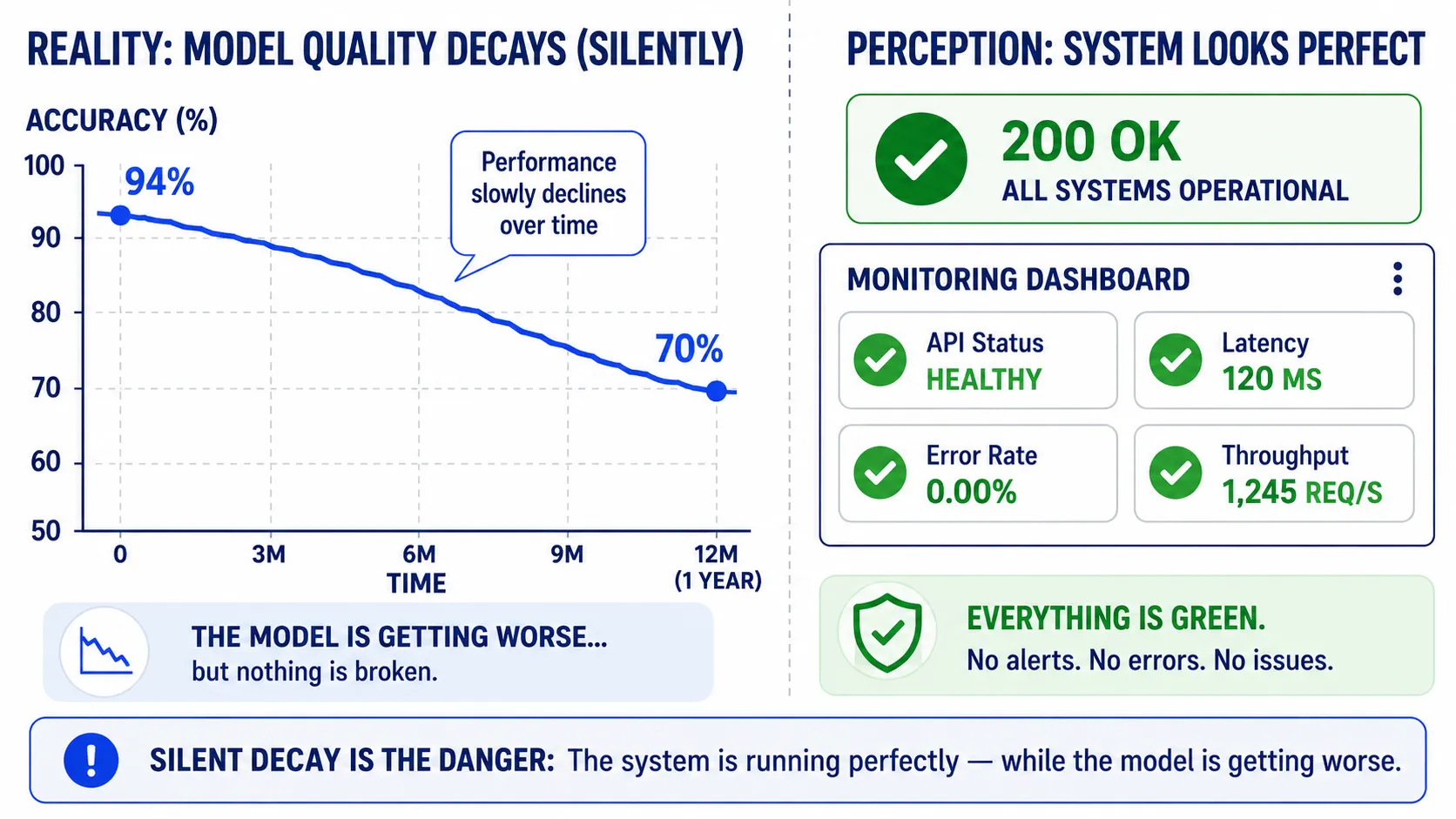
This is what makes Machine Learning in production dangerous.
The system does not break loudly — it can decay silently.
And if we don’t monitor model quality, we may never know there is a problem until users start feeling the system cannot be trusted.
So monitoring is not an add-on to deal with later.
It is part of the Machine Learning system from day one.
A demo cares whether the model can predict. Production must also know whether it still predicts well.
And this is the crucial line between a Machine Learning demo and Machine Learning in production.
Part 4: Two Programs, One Model#
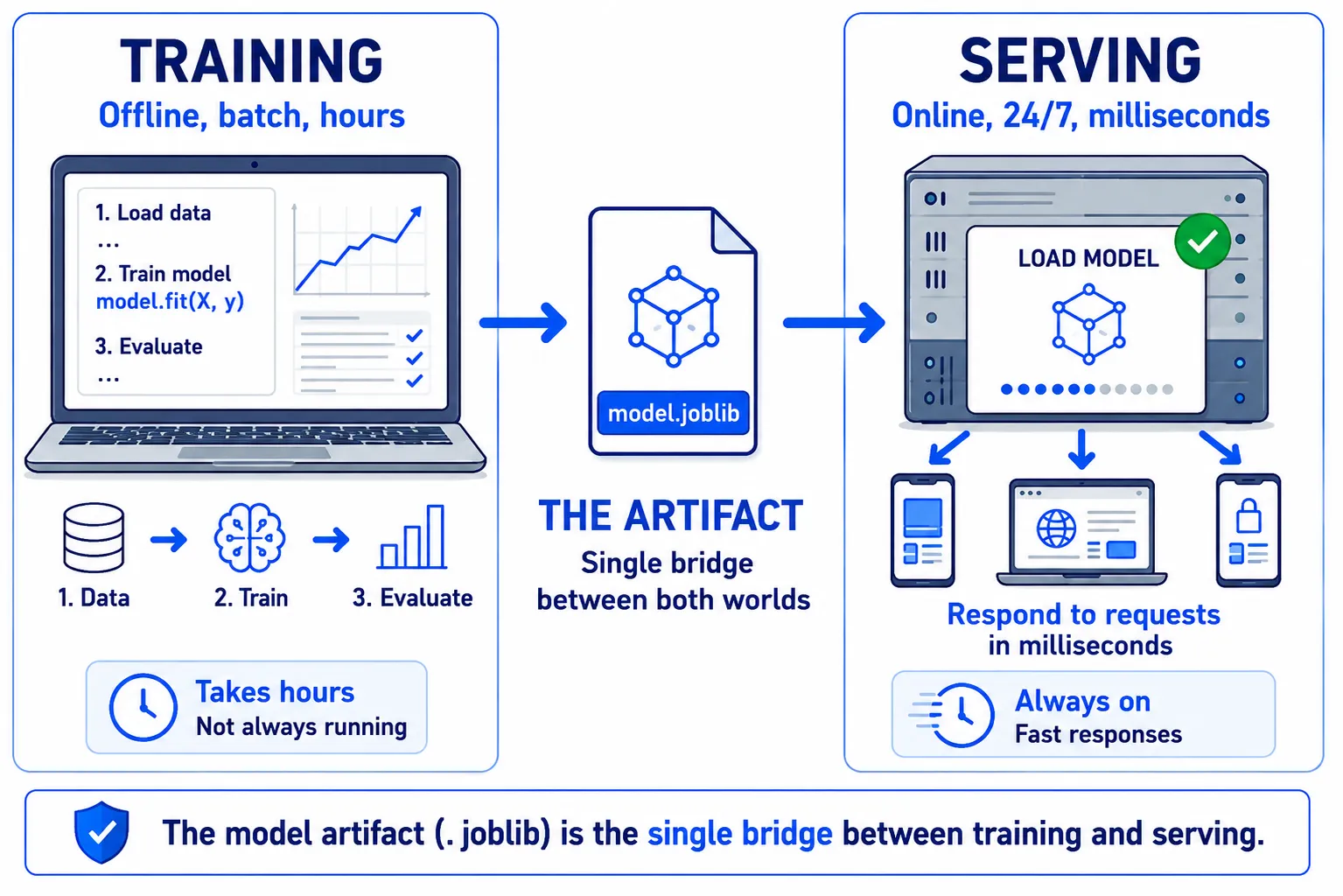
From the lifecycle in the previous part, there is one concept that matters a lot and is worth separating clearly from the start:
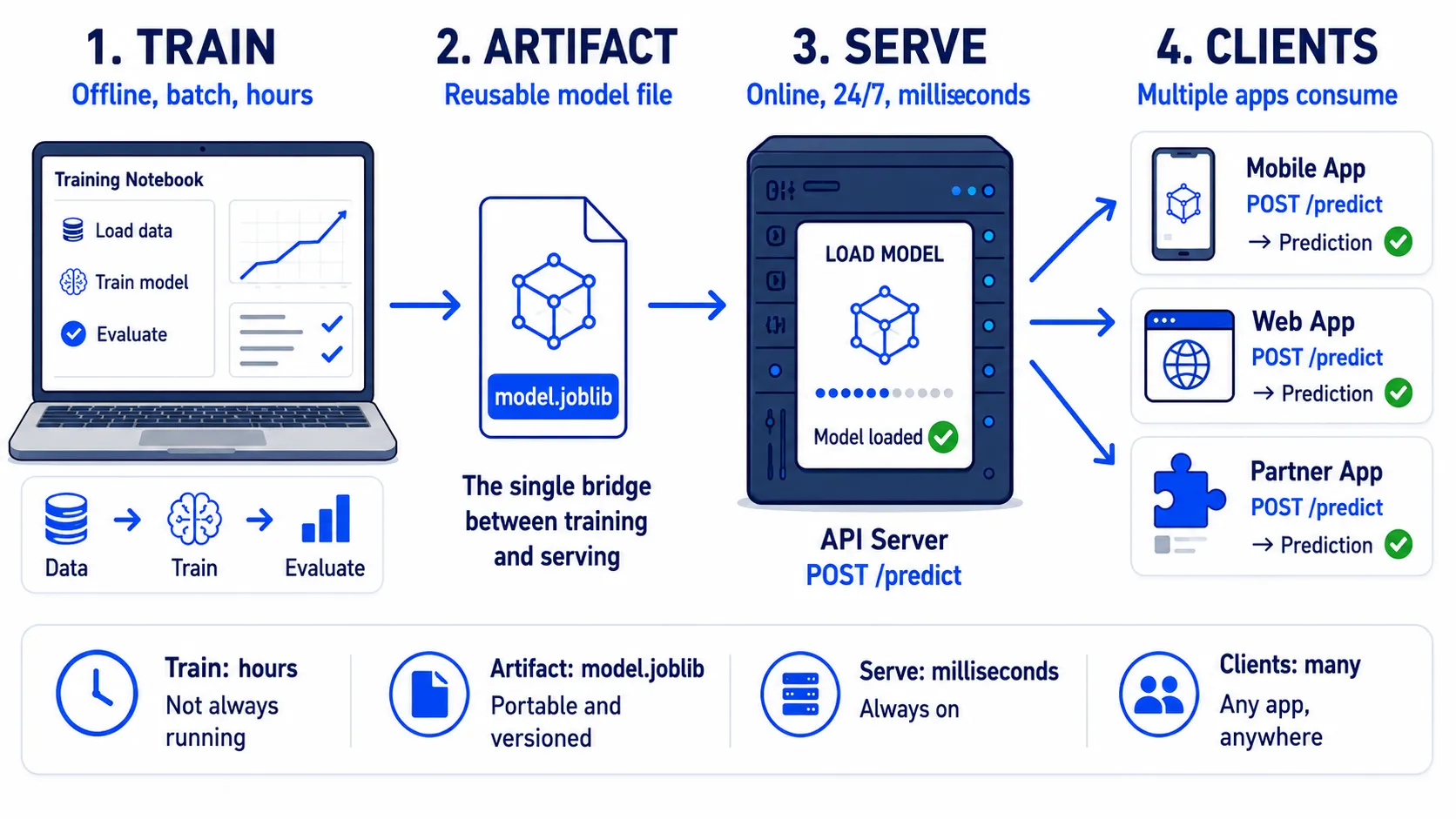
Training and Serving are two different programs.
These two programs may run at different times, live on different machines, or even be developed by different teams. What connects the two sides is a single file — the Model Artifact.
Before looking at code, let’s meet the two variables we will encounter:
X_trainis the data used for training. Each row is one example case — say, one email — possibly with information such as message length, number of links, or counts of certain kinds of words.y_trainis the correct answer for each row, or the label — e.g.spamandnot spam.
Simply put:
X_train= the questionsy_train= the answer key
With both the questions and the answers, a Machine Learning algorithm can learn the relationship between the two.
Program 1: Training#
# ---- Program 1: TRAINING ----
# Runs offline, occasionally
# Can take anywhere from minutes to hours

from sklearn.ensemble import RandomForestClassifier
import joblib

model = RandomForestClassifier().fit(X_train, y_train)
joblib.dump(model, "model.joblib")This program has two main jobs: train a model and save the model out to a file.
Program 2: Serving#
# ---- Program 2: SERVING ----
# Runs on a server, always on, answering requests

import joblib

model = joblib.load("model.joblib")
prediction = model.predict(features)Notice how short this program is — and importantly, there is no .fit().
The server does not retrain the model on every incoming request. It loads what was already learned from model.joblib and uses it for prediction.
Let’s walk through each line:
-
fit(X_train, y_train)roughly means “Here is historical data together with the answer key — please learn the patterns from this data.” -
joblib.dump(model, "model.joblib")means “Save what the model has learned out to a file.” This file,model.joblib, is the Model Artifact. -
joblib.load("model.joblib")the server reads this artifact when the program starts. It does not need to go back and retrain, and it does not need the training dataset to live on the server. -
model.predict(features)means “Here is brand-new data it has never seen before — please predict the answer.”
So the whole flow looks like this:
Training Data → Train →
model.joblib→ Server → Prediction
These Two Programs Live Very Different Lives#
Even though training and serving share the same model, their working patterns are nearly opposite.
| Training program | Serving program | |
|---|---|---|
| How often it runs | Occasionally — say weekly or monthly | Always on, 24/7 |
| How slow it may be | Minutes or hours are fine | Should answer in milliseconds or seconds |
| What data it sees | A large training dataset | New data, one request or batch at a time |
| Cost profile | Compute at training time | Continuous compute from serving |
| Who owns it | Usually Data Science / ML | Usually shared across Software / ML / Platform Engineering |
Training may happen on a laptop or a large GPU machine, then finish and exit.
Serving may live on a server in another country, running 24 hours a day, handling thousands of requests per day from applications.
These two programs never need to know each other.
The serving side doesn’t need X_train.
Doesn’t need y_train.
Doesn’t even need to know how many hours the model took to train.
The only thing it needs is:
The correct Model Artifact
That is why model.joblib may look like a small file but is hugely important in a real system — it is the bridge between the world of training and the world of production.
And it is right at this seam that many production Machine Learning problems tend to arise.
For example: the model was trained with a library version different from the server’s, the data preparation during training differs from serving, or the wrong version of the artifact was deployed.
The server itself may still work normally and the API may still answer 200 OK — yet the predictions that come out are wrong.
Training and Serving may never meet, but they must understand the data the same way.
This sentence matters a lot, because in the next part we will meet a classic ML production problem that springs directly from this seam.
Part 5: Why Serve a Model at All?#
At this point, a simple but very important question may come up:
“Why go to all the trouble of building an API? Can’t I just train a model in a notebook, export the predictions to Excel, and hand it to people to use?”
The answer is yes — and for some work, that may be the most appropriate approach.
If you need a sales forecast once a month, running a batch prediction and sending the file to the team may be enough.
But when a prediction has to become part of an application and be called all the time, we need to turn the model into a service.
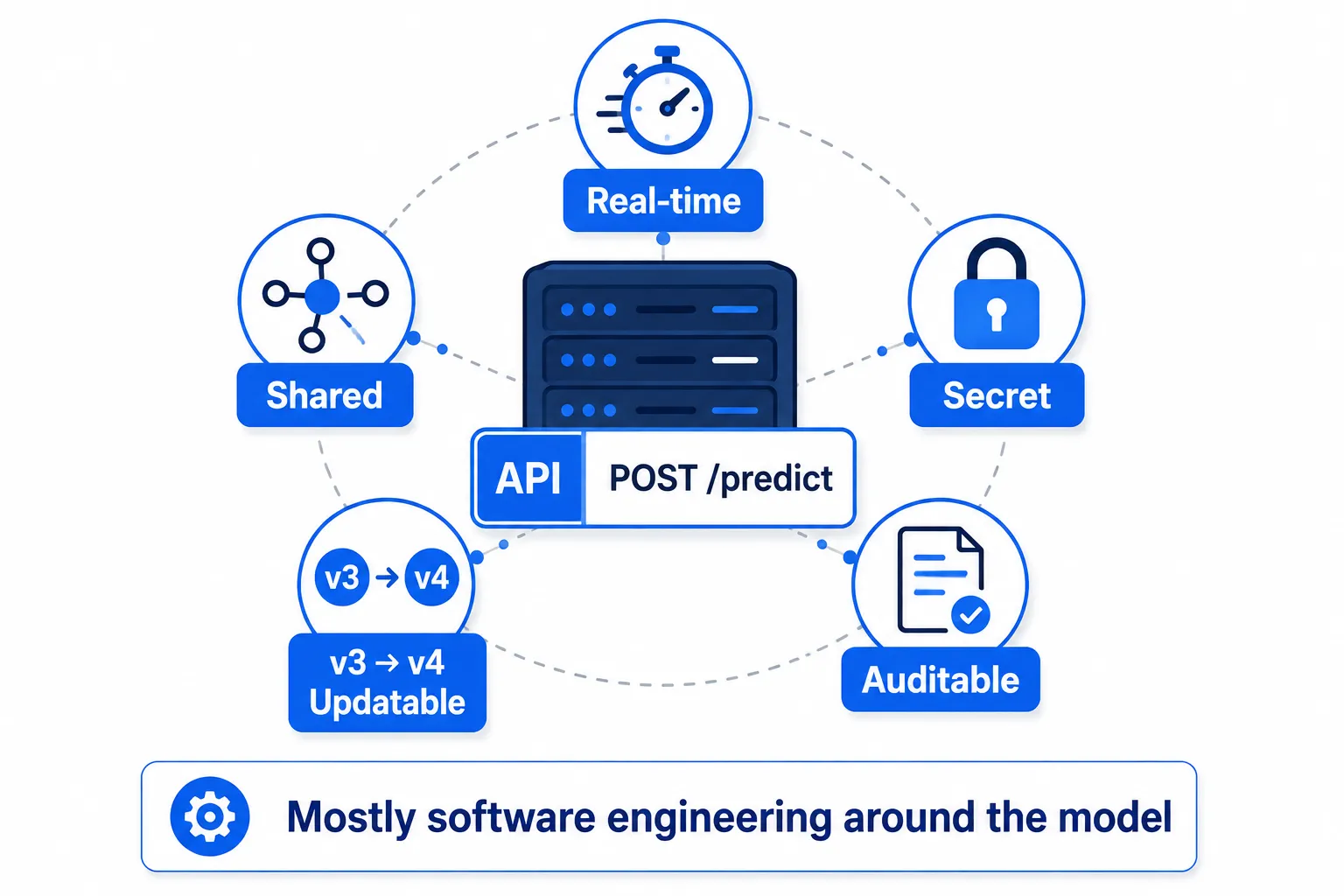
There are five main reasons.
1. Real-time — Some Answers Can’t Wait#
Some systems need a prediction immediately.
For example, fraud detection during a payment cannot wait for a data scientist to open a notebook and run a prediction.
The flow has to go roughly like this:
Transaction → Model → Decision → Approve / Reject
All of it fast enough that users barely notice Machine Learning working behind the scenes.
When the prediction is an API, other systems can call it instantly.
2. Shared — One Model, Usable by Many Systems#
Suppose a company has one fraud model.
If it is served as an API, we can let many systems call that same model — for example:
- Website
- Mobile application
- Partner systems
- Back-office systems
Every system calls the same endpoint, such as:
POST /predict
The benefit is that the Machine Learning logic lives in one place.
If we fix a bug or deploy a new model version, every application benefits immediately — without having to embed the model separately into every system.
3. Secret — No Need to Hand the Model Out to Others#
A Model Artifact may count as important intellectual property (IP) of the organization.
If we ship model.joblib to every application, we are handing the model itself out into the world.
But if the model lives behind an API, users see only:
Input → Prediction
They never need to see the Model Artifact, the parameters, or the model’s internals.
The same idea is at play when we use another company’s AI API.
We get to use the model’s capability without owning the model.
And this brings us back to the Build vs. Buy trade-off.
If we use someone else’s API, we start fast — but we live under the provider’s pricing, limits, and terms.
4. Updatable — Change the Model Without Changing Every Application#
Suppose production is currently running:
model_v3.joblib
We retrain and get:
model_v4.joblib
If the model is served through an API, we can deploy the new version on the server side, and the applications calling it may not need any changes at all.
They still call:
POST /predict
same as before.
But behind the scenes, v3 has become v4.
And if v4 misbehaves, we can roll back to v3.
This is why model versioning matters so much.
A versioned artifact is the undo button of a Machine Learning system.
5. Auditable — Being Able to Look Back and Answer What Happened#
In real systems, sometimes we need more than just predictions.
We must also be able to look back and answer:
“Which model version was the system running at that moment?”
“What was the input that came in?”
“What did the model answer?”
Especially in high-impact systems — finance, insurance, or decision-support systems.
Good request logging might record:
timestamp
request_id
model_version
input_features
prediction
confidence
latency
When something goes wrong, we can trace back what produced a prediction and which model version was used.
A notebook alone struggles to do this once there are millions of requests from real users.
Notice Something?#
Look back at the five reasons once more:
Real-time Shared Secret Updatable Auditable
None of them is a property of a Machine Learning algorithm.
Random Forest does not make a system auditable.
A neural network does not make a system shared.
Logistic Regression does not give us rollback.
These things come from the Software Engineering and Infrastructure we build around the model.
And that is the core idea of this entire series:
AI as a Service is not just AI — most of it is the Software Engineering that turns AI into a service that actually works.
Training the model is only the beginning.
The work that makes the model ready to use, reliable, updatable, auditable, and able to survive in production is what turns Machine Learning into a real product.
Summary#
If you keep just one sentence from this article, keep this one:
The fitted model is just the artifact — responsible serving, with validation, monitoring, and versioning, is the real work.
And here is the map, for reference:
- The ladder: on-premise → IaaS → PaaS → SaaS → AIaaS — each rung rents you more of the stack and strips away more control
- The three paths: your own VM / a managed platform / someone’s ready-made API — choose by how unusual your data is
- The loop: train → serialize → serve → monitor → retrain — forever, because models rot quietly
- The vocabulary: artifacts, feature schemas, train/serve skew, drift, and cost-aligned metrics
Homework#
Find one real, publicly documented ML/prediction API. Good picks: Google Cloud Vision, Azure Translator, a Hugging Face inference endpoint, or a weather/fraud-score forecasting API (not a chatbot API yet — that comes later in the series).
Answer five questions about it:
- What does it predict or classify — what goes in, what comes out?
- How is it priced — per call, per record, is there a free tier?
- What are the rate limits, and how do you authenticate?
- Who uses it, and for what? Find one real product or case study.
- What surprised you?
The point is not the write-up. The point is that from now on, you will see every AI feature you use as an API with a price tag attached.